AdjustingthePictureControls(cont'd)25
BRIGHTNESS
PICTURE
COLOR
TINT
SHARPNESS
Decrease
decreased brightness
decreased contrast
paler
more purple
softer
Increase
increased brightness
increased contrast
more brilliant
more green
clearer
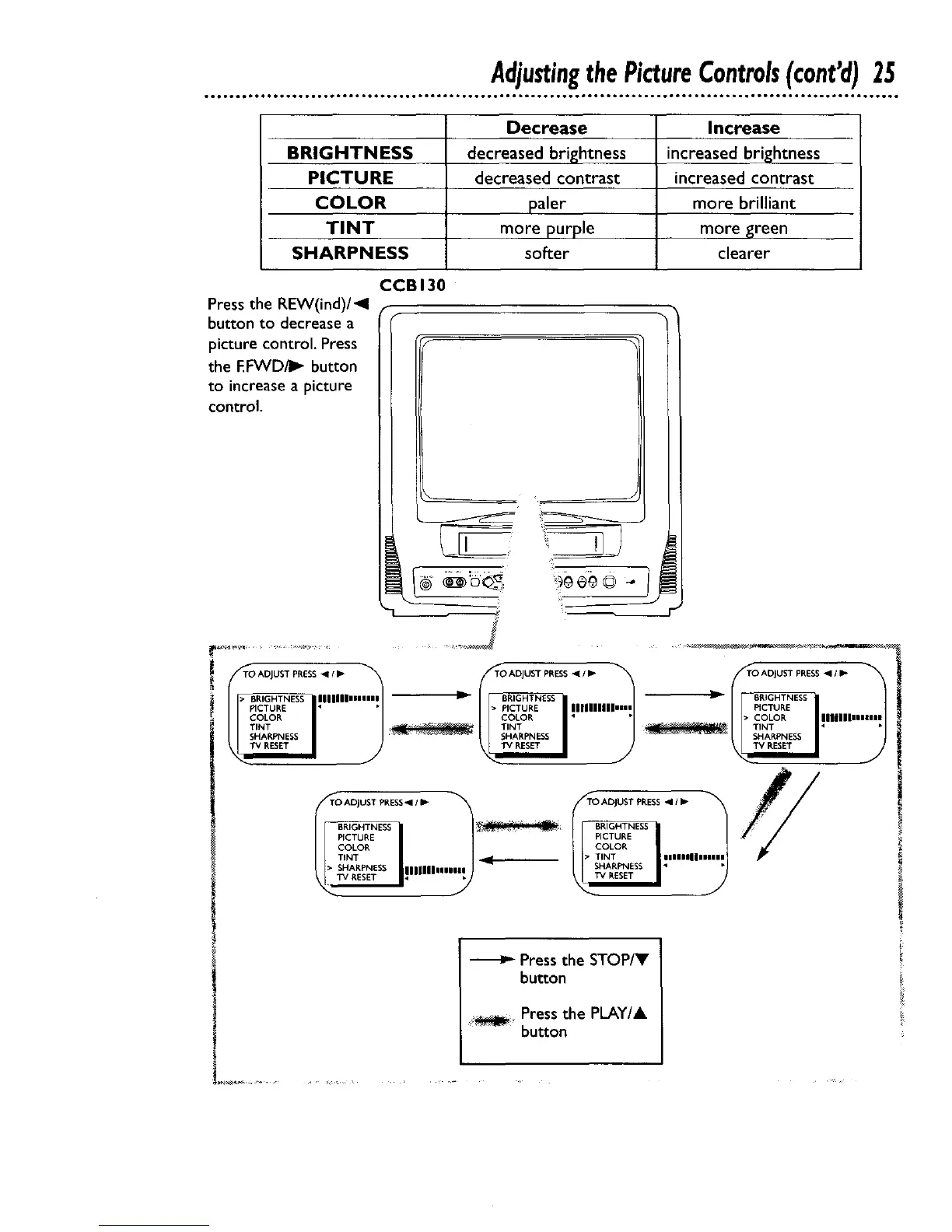
Press the REW(ind)/_l
buttonto decrease a
picture control. Press
the F.FVVD41_button
to increase a picture
control.
CCBI30
i TO ADJUST PRESS _11 IP" TO ADJUST PP,ESS II I I_
TO ADJUST PRESS-,11/ II-
i • BRIGHTNESS IIIIIIImmmmm _ BRIGHTNESS I1_ BRIGHTNESS
PICTURE • • • PICTURE InlllllUmHm PICTURE
COLOR COLOR " " • COLOR InllllmmmHmm
I_ tTINT _ IITINT ' _ tTINT • •
SHARPNESS SHARPNESS SHARPNESS
BRIGHTNESS _ BRIGHTNESS
PICTURE PICTURE
COLOR COLOR
TINT ._. • TINT iiIInllllllll
• SHARPNESS IlliUllllnll SHARPNESS • •
Press the STOP/Y
button
Pressthe PLAY/A
button










 To Next Page