Recording29
• °..°°..°.°..°.°.°° ....°°°o°. °°°..°°...°°° °...° ° • °°...°°. • °.° .°• i, • ••l ,,ill * io._o•.o•t..JJo • _o•••••_olll o_oll
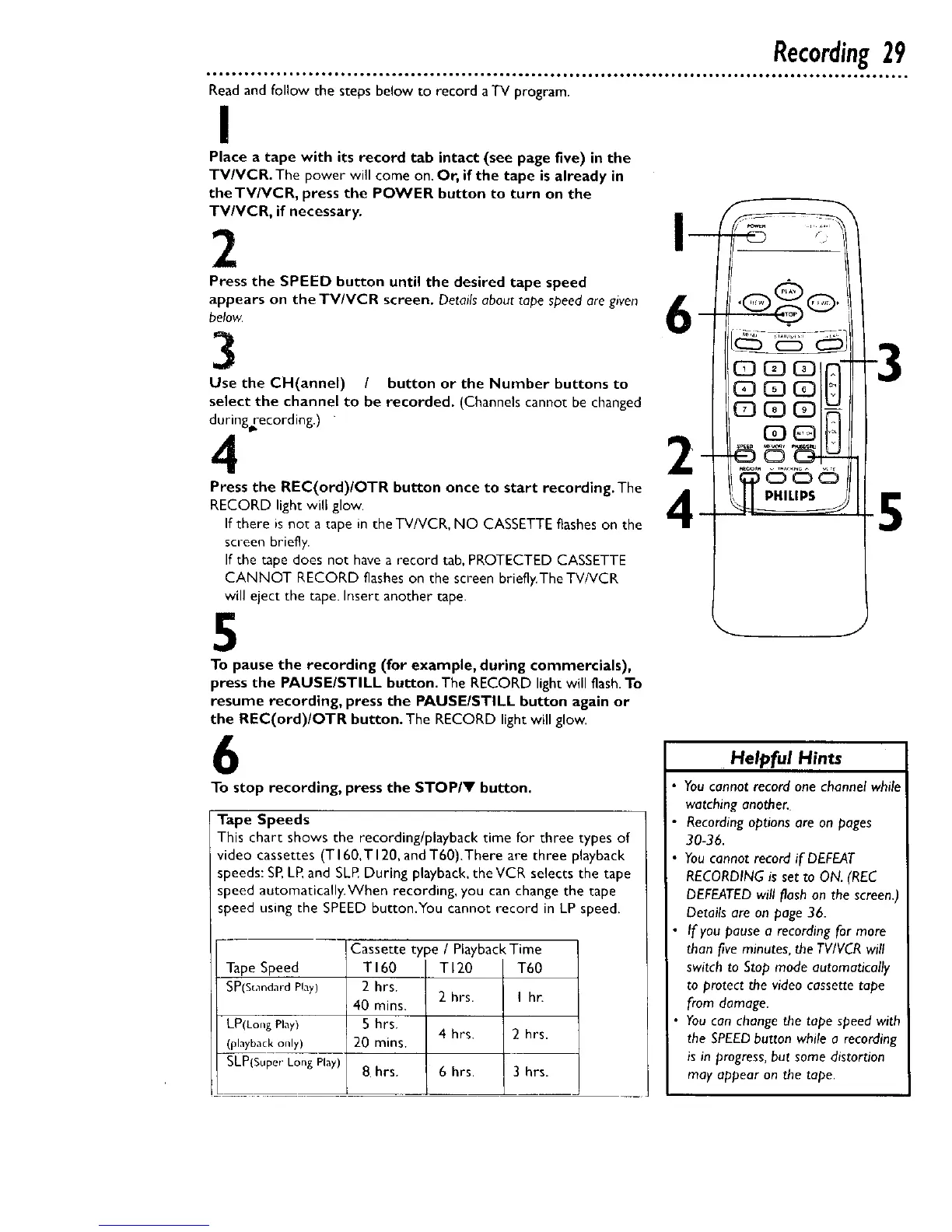
Read and follow the steps below to record aTV program.
I
Place a tape with its record tab intact (see page five) in the
TV/VCR. The power will come on. Or, if the tape is already in
theTV/VCR, press the POWER button to turn on the
TV/VCR, if necessary.
2
Press the SPEED button until the desired tape speed
appears on the TV/VCR screen. Details about tape speed are given
below
CoH!!!i: I)t / butt°n °r the Number butt°ns t° 2
o be recorded. (Channels cannot be changed
Press the REC(ord)/OTR button once to start recording.The
RECORD light will glow.
If there is not a tape in the TV/VCR, NO CASSETTE flashes on the
screen briefly.
If the tape does not have a record tab, PROTECTED CASSETTE
CANNOT RECORD flashes on the screen briefly.The TV/VCR
will eject the tape. Insert another rape.
5
To pause the recording (for example, during commercials),
press the PAUSE/STILL button. The RECORD light will flash.To
resume recording, press the PAUSEISTILL button again or
the REC(ord)/OTR button. The RECORD light will glow.
6
To stop recording, press the STOPIY button.
Tape Speeds
This chart shows the recording/playback time for three types of
video cassettes (TI60.TI20, and T60).There are three playback
speeds: SP,LR and SLR During playback, theVCR selects the tape
speed automatically.When recording, you can change the tape
speed using the SPEED button.You cannot record in LP speed.
Tape Speed
SP(Stnndard Play)
(playback only)
SLP(SuperLongPlay)
Cassette type / Playback Time
TI60 TI20 T60
2 hrs.
2 hrs. I hr.
40 mins.
5 hrs.
4 hrs. 2 hrs.
20 rains.
8 hrs. 6 hrs. 3 hrs.
_ J
Helpful Hints
You cannot record one channel while
watching another.
Recording options are on pages
30-36.
You cannot record if DEFEAT
RECORDING is set to ON. (REC
DEFEATED will flash on the screen.)
Details are on page 36.
• If you pause a recording for more
than five minutes, the TV/VCR will
switch to Stop mode automatically
to protect the video cassette tape
from damage.
You can change the tape speed with
the SPEEDbutton while a recording
is in progress, but some distortion
may appear on the tape.










 To Next Page