24 AdjustingthePictureControls
• O,,60eOt,IOQtltQt. BOOt. OeOtlgOt•OOtJfeOOtlOO•OOI,,OQtt. OQtmBO,tl,OtJ • _eOI • g_t6tOel_ttt_,OI6,,Q,Oleltm,,,OOe , • •
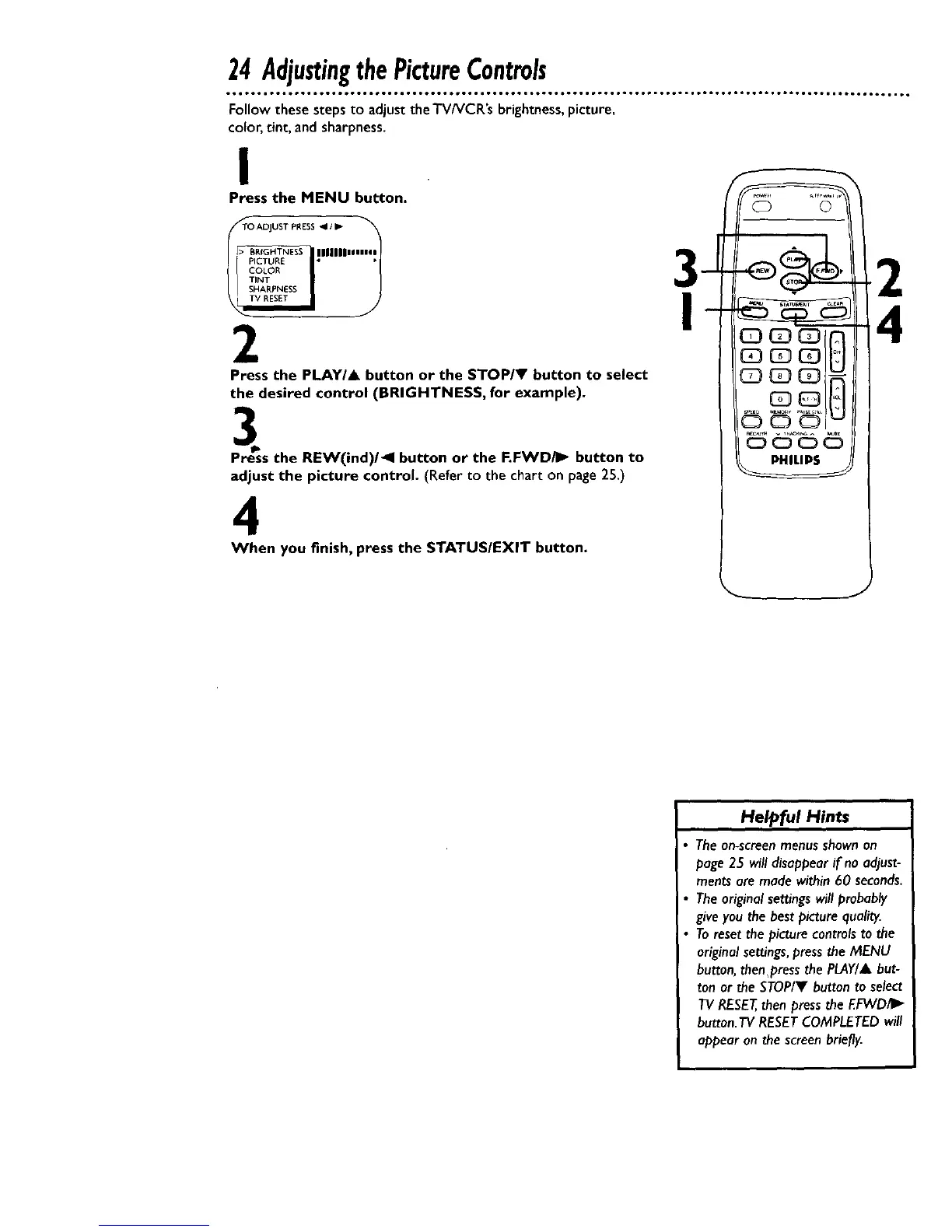
Follow these steps to adjust the TV/VCR's brightness,picture,
color, tint, and sharpness.
I
Press the MENU button.
TO ADJUST PRESS _11 II_
__ITN*_:_°_'"'"'"'" 3--
2
Press the PLAY/A button or the STOP/V button to select
the desired control (BRIGHTNESS, for example).
_s the REW(ind)/41 button or the F.FWD/I_ button to
adjust the picture control. (Refer to the chart on page25.)
4
When you finish, press the STATUS/EXIT button.
©
Helpful Hints
The on-screenmenus shownon
page 25 will disappear if no adjust-
ments are made within 60 seconds.
The original settings will probably
give you the best picture quality.
To reset the picture controls to the
original settings, press the MENU
button, thenpress the PLAY/& but-
ton or the STOP/Y button to select
TV RESET,then press the EFWD/I_
button. TV RESET COMPLETED will
appear on the screen briefly.










 To Next Page