DO
Hooking UpYour
TV/VCR to Another
Video Source
(VCR or Camcorder)
Youmay need this connection
ifyou want to copytapes.
Detailsore on page 31.
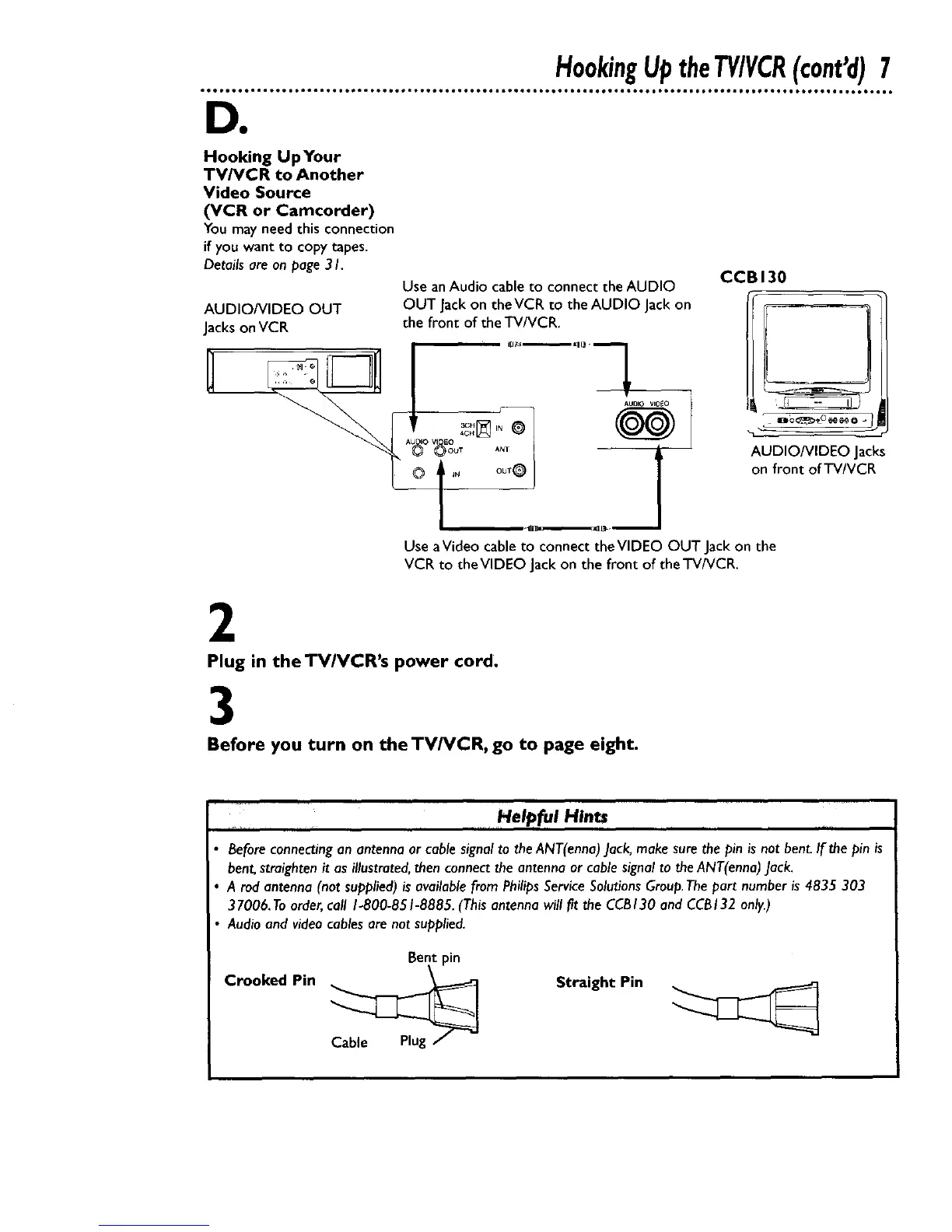
Use anAudio cableto connect the AUDIO
OUT Jackon theVCR to the AUDIO Jackon
the front of the TV/VCR.
AUDIO/VIDEO OUT
Jackson VCR
Use aVideo cable to connect theVIDEO OUT Jack on the
VCR to the VIDEO Jack on the front of the TV/VCR.
CCBI30
AUDIO/VIDEO Jacks
on front of TV/VCR
2
Plug in the TV/VCR's power cord.
3
Before you turn on theTV/VCR, go to page eight.
Helpful Hints
Beforeconnectingan antennaor cable signalto theANT(enna)Jack,makesure the pin is not bent.If the pin is
bent,straightenit asillustrated,thenconnectthe antenna or cablesignalto theANT(enna)Jack.
A rod antenna(not supplied)isavailablefrom PhilipsServiceSolutionsGroup.Thepart numberis 4835 303
37006. Toorder,call 1-800-851-8885.(Thisantenna will fit the CCB130 and CCB132 only.)
Audio and video cables are not supplied.
Crooked Pin
Straight Pin










 To Next Page