44 SmartLock(cont'd)
I
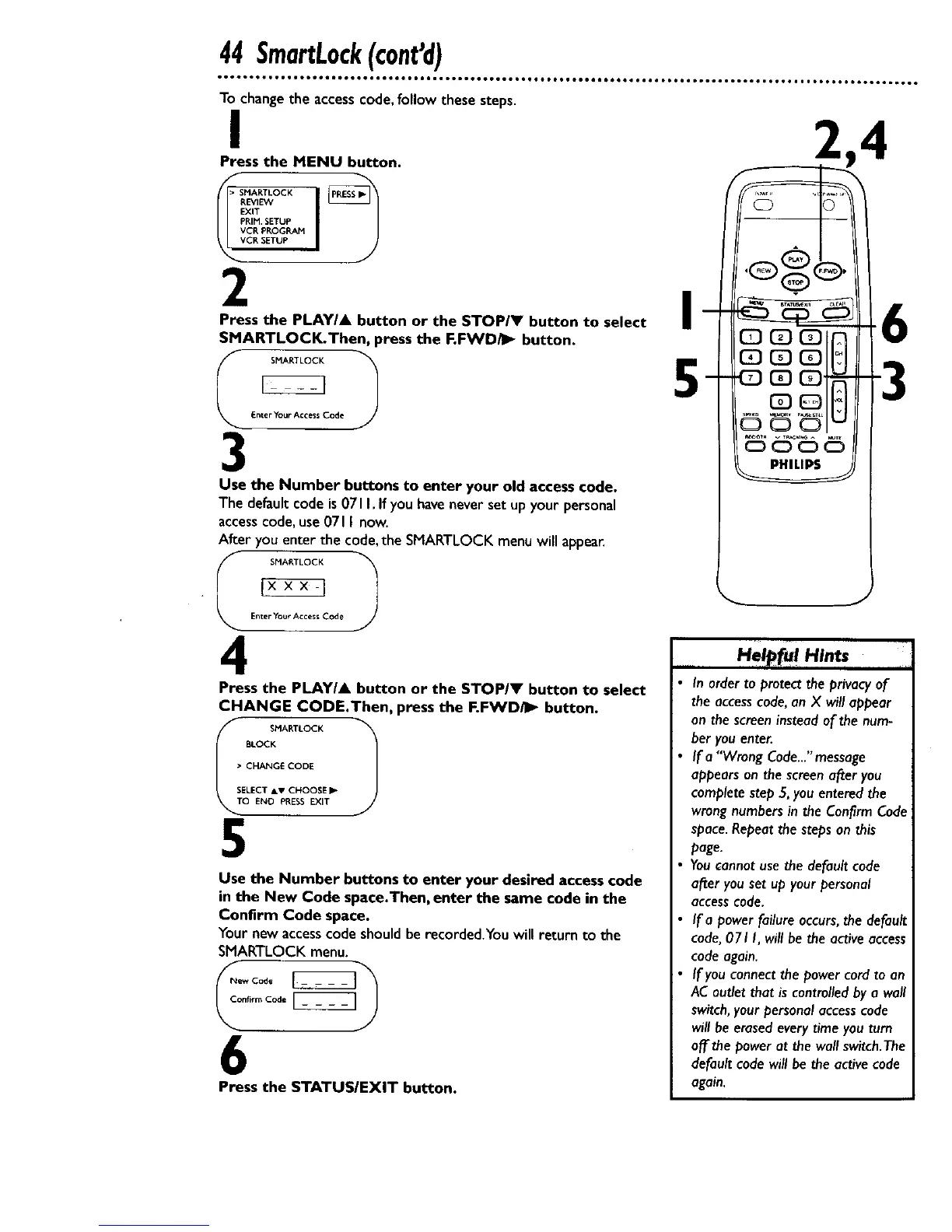
Press the MENU button.
EXIT
PRIM. SETUP
VCP, PROGRAM
CR SETUP
2
Press the PLAY/A button or the STOP/V button to select
SMARTLOCK.Then, press the F.FWD/I_ button.
SMARTLOCK
_nter Your Acce$_ C0d_
3
" _ Enter Your Access Code
Use the Number buttons to enter your old access code.
The default code is071I. If you haveneverset up yourpersonal
accesscode, use071I now.
After you enter the code,the SMARTLOCK menuwill appea_
SMARTLOCK
4
Press the PLAYIA button or the STOP/V button to select
CHANGE CODE.Then, press the F.FWD_ button.
Ii SMARTLOCK 1
BLOCK
• CHANGE CODE
SELECT &v CHOOSE •
O END PRESS EXIT
5
Use the Number buttons to enter your desired accesscode
in the New Code space.Then, enter the same code in the
Confirm Code space.
Your new accesscode shouldbe recorded.You will return to the
SMARTLOCK menu.
6
Press the STATUSIEXIT button.
I
5
PHILIPS
H. r,a.H,..
In orderto protect the privacy of
the accesscode,an X will appear
on the screeninsteadof the num-
ber you enter.
If a "Wrong Code..."message
appearson the screenafter you
completestep 5,you enteredthe
wrongnumbersin the Confirm Code
space.Repeatthe steps on this
page.
Youcannot usethe defaultcode
after you set up your personal
accesscode.
If a power failure occurs,the default
code,071 I, will be the activeaccess
codeagain.
If you connectthe power cord to an
ACoutlet that is controlledby a wall
switch,yourpersonalaccesscode
willbe erasedeverytime you turn
off the power at the wall switch.The
default codewill be the active code
again.










 To Next Page