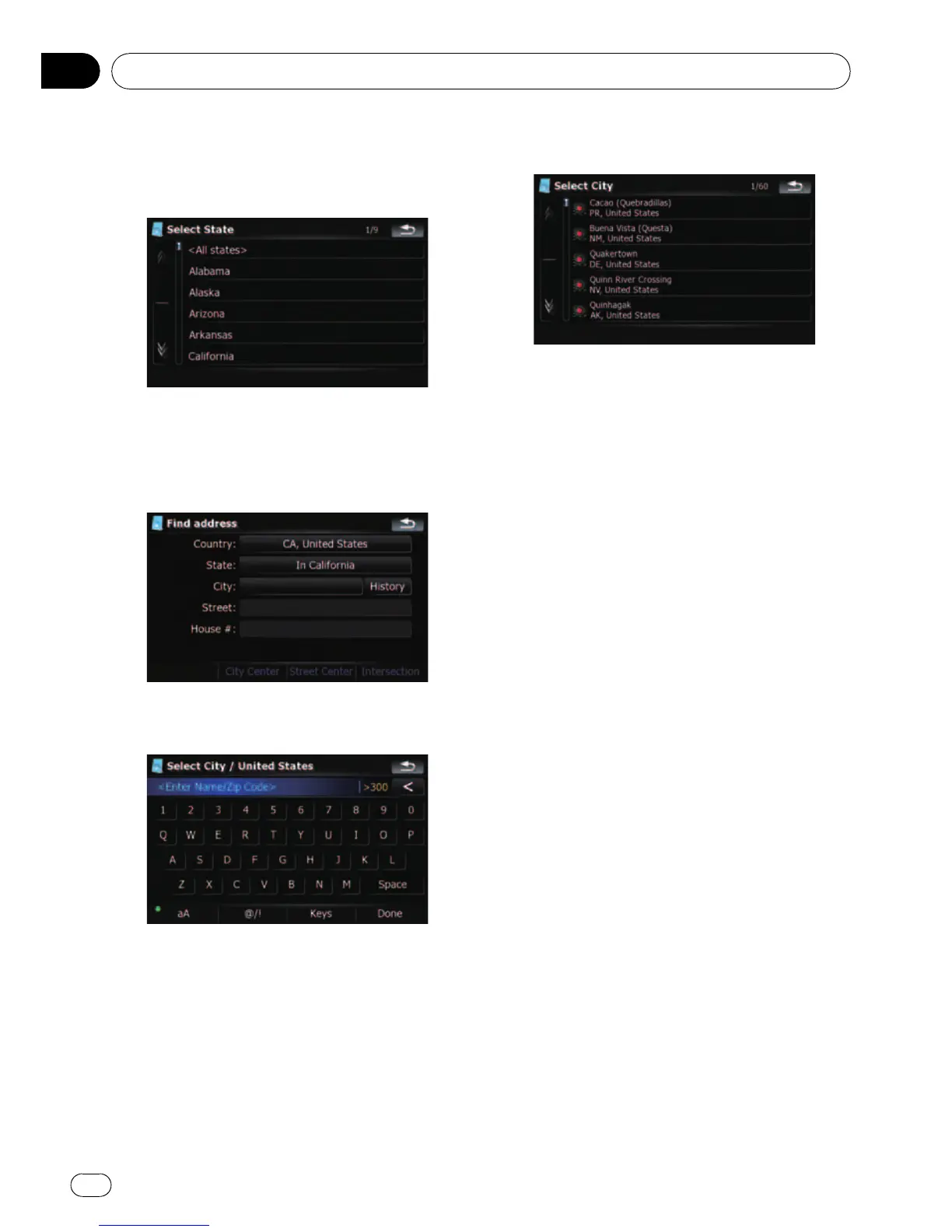
5 Touch the key next to “State:” and
touch the desired state, province, or terri-
tory on the list.
The screen returns to the previous screen.
6 Touch the key next to “City:” to enter
the city name.
7 Enter the city name or Zip code.
! When the options are narrowed down to six
or less, those are automatically listed.
! If you want to list the options matching to
the current information entered, touch
[Done].
! Touching [History] displays the list of cities
that you selected before.
8 Touch the desired city name.
! When a city is already set, touching [City
Center] allows you to select the representa-
tive location of the city and proceed to the
“Map Confirmation Screen”.
9 Enter the street name and touch the de-
sired one from the list.
! When a street is already set, touching
[Street Center] allows you to select the re-
presentative point of the street and proceed
to the “Map Confirmation Screen”.
! When a street is already set, touching [In-
tersection] allows you to search for an in-
tersection. After entering the second street
name and selecting the desired intersec-
tion, the “Map Confirmation Screen” ap-
pears. This is useful when you don’t know
the house number or cannot input the
house number of the selected street.
10 Enter the house number and then
touch [Done].
! If the house number you have entered is
not found, a message appears. In that case,
touch [OK] and try entering the existing
house number.
Searching for and selecting a location
En
26
Chapter
03



 To Next Page
 Loading...




