Internet Telephony PBX System
IPX-2500
192.168.10.0/255.255.255.0. Computer with other IPs is not allowed
to visit this IP PBX.
Audio Codec Select what audio codec you need to use.
1. There are few default extensions which number started with "8XX", you can add
or delete extension by your requirement
2.
Maximum extensions: 100.
3. For security reason the default password is random character or number e.g.
BB%ChH64rI, and every time when you reset to default system, it will randomly
have a new password again
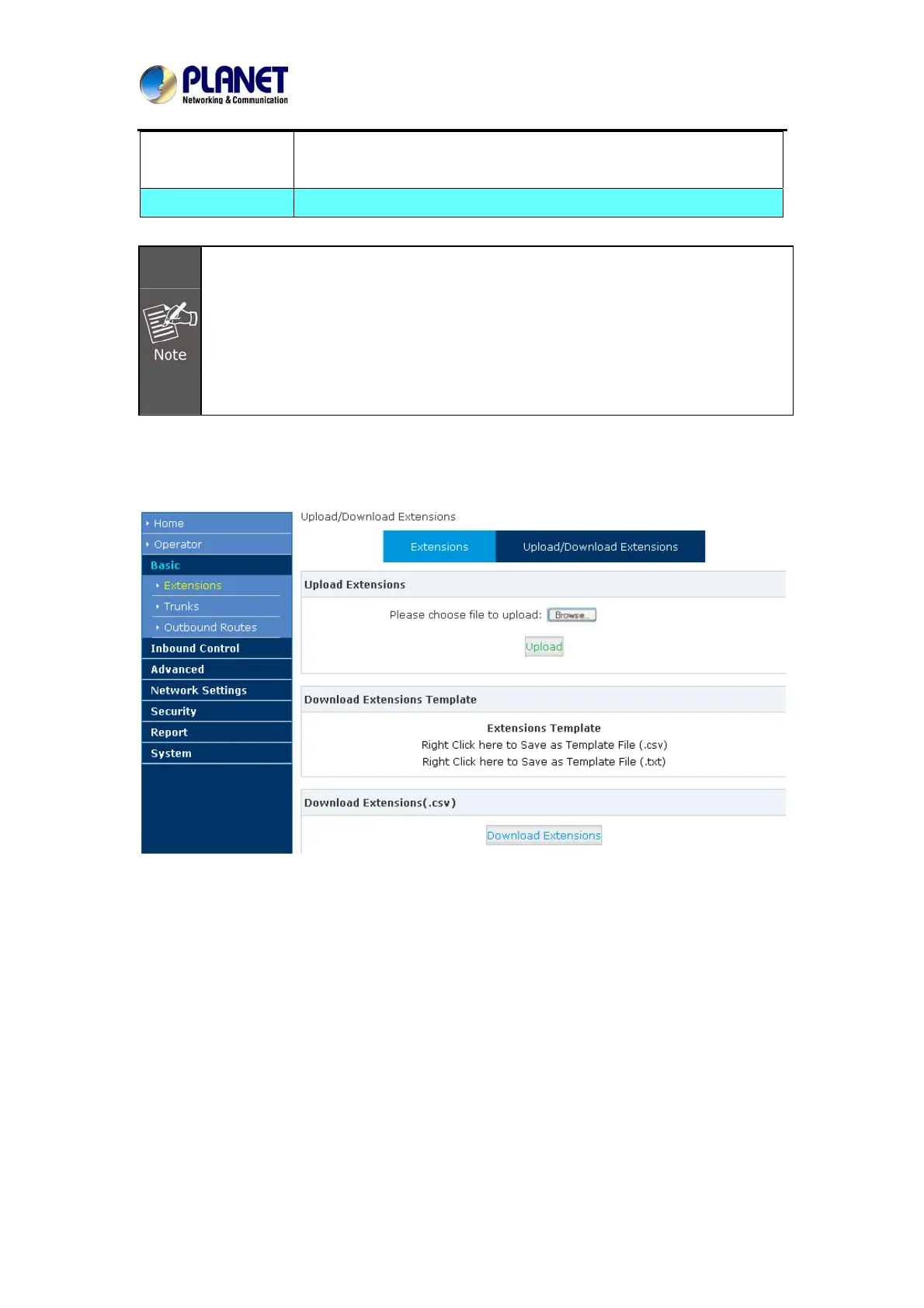
Upload / Download Extensions
Click【Upload/Download Extensions】to add extensions as shown below:
Download the extension template from the【Download Extensions Templet】, add extension
information based on the template format and save.
Select the extension file to upload from【Upload Extensions】
Download current extension information from【Download Extensions (.csv)】
3.2.4 Time-based Rules
Please set time rule for working time and after-working time, and deal with inbound calls based
on this time rule.
26



 To Next Page