Internet Telephony PBX System
IPX-2500
Please choose file to upload Select the music you want to upload. Note: music file must be
WAV (16bit/8000Hz / Single), GSM, ulaw or alaw, and less
than 15MB.
The sound file must be wav (16bit/8000Hz/Single), gsm, ulaw or alaw !! The size
is limited in 15MB
4.6 DISA
A trunk call is made to the PBX, and call is made to another trunk through outbound route of
the PBX. This trunk can make international calls. You are out of the office and want to contact
your customer in a foreign country. Now you can dial DISA number after PIN authentication.
You are now connected to your customer, and you can speak to your customer now.
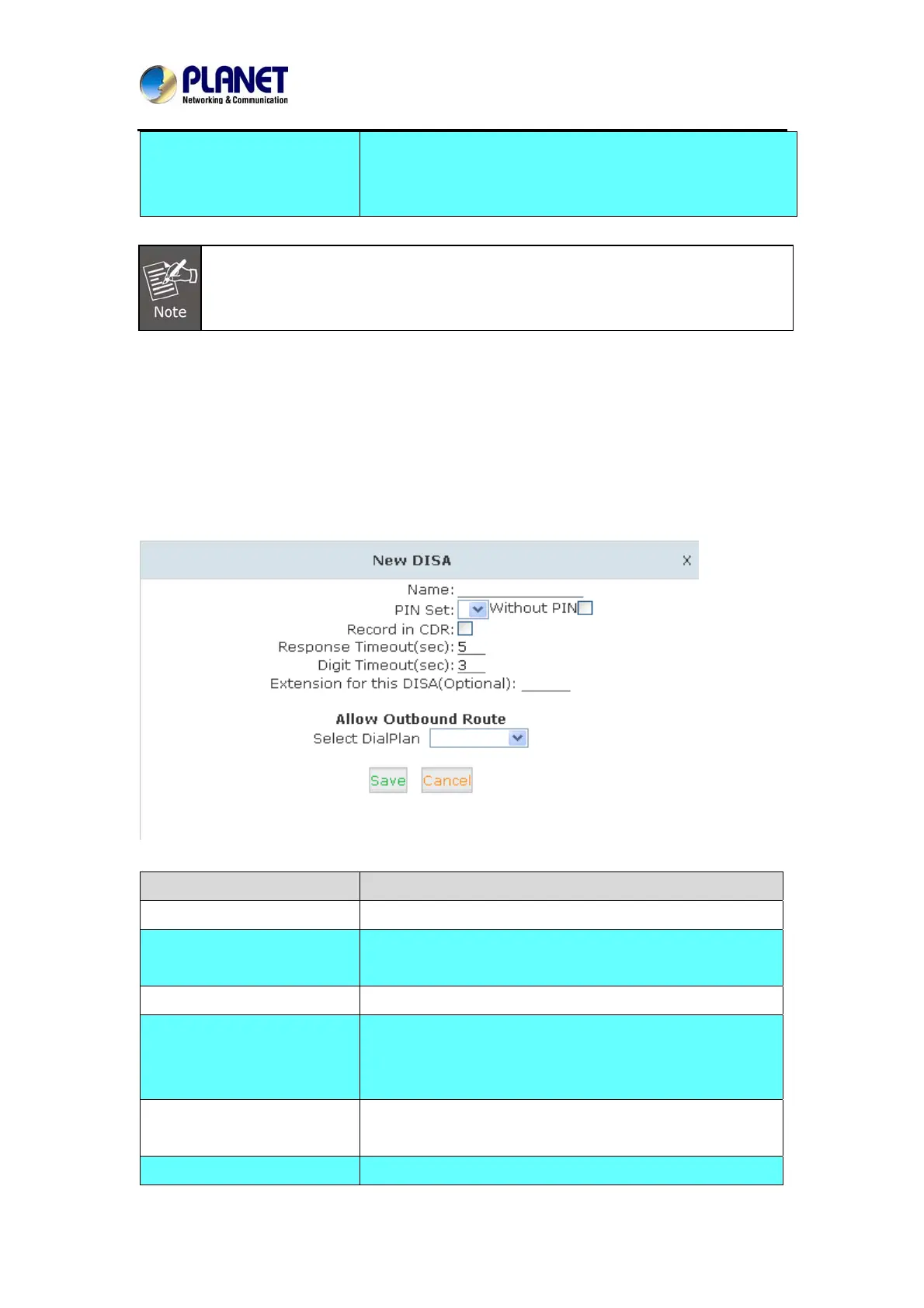
Click【DISA】---【New DISA】to display the dialog as shown below:
Item Explanation
Name Define a name for DISA.
PIN Set User will be prompted to input this number when PIN
Authentication is needed.
Record in CDR Check to record.
Response Timeout(sec) The maximum time for waiting before hanging up if the
dialed number is incomplete or invalid. Default is 10
seconds
Digit Timeout(sec) The maximum interval time between digits when typing
extension number is 5 seconds by default.
Extension for this If you want to access DISA by dialing an extension, you can
62



 To Next Page