Internet Telephony PBX System
IPX-2500
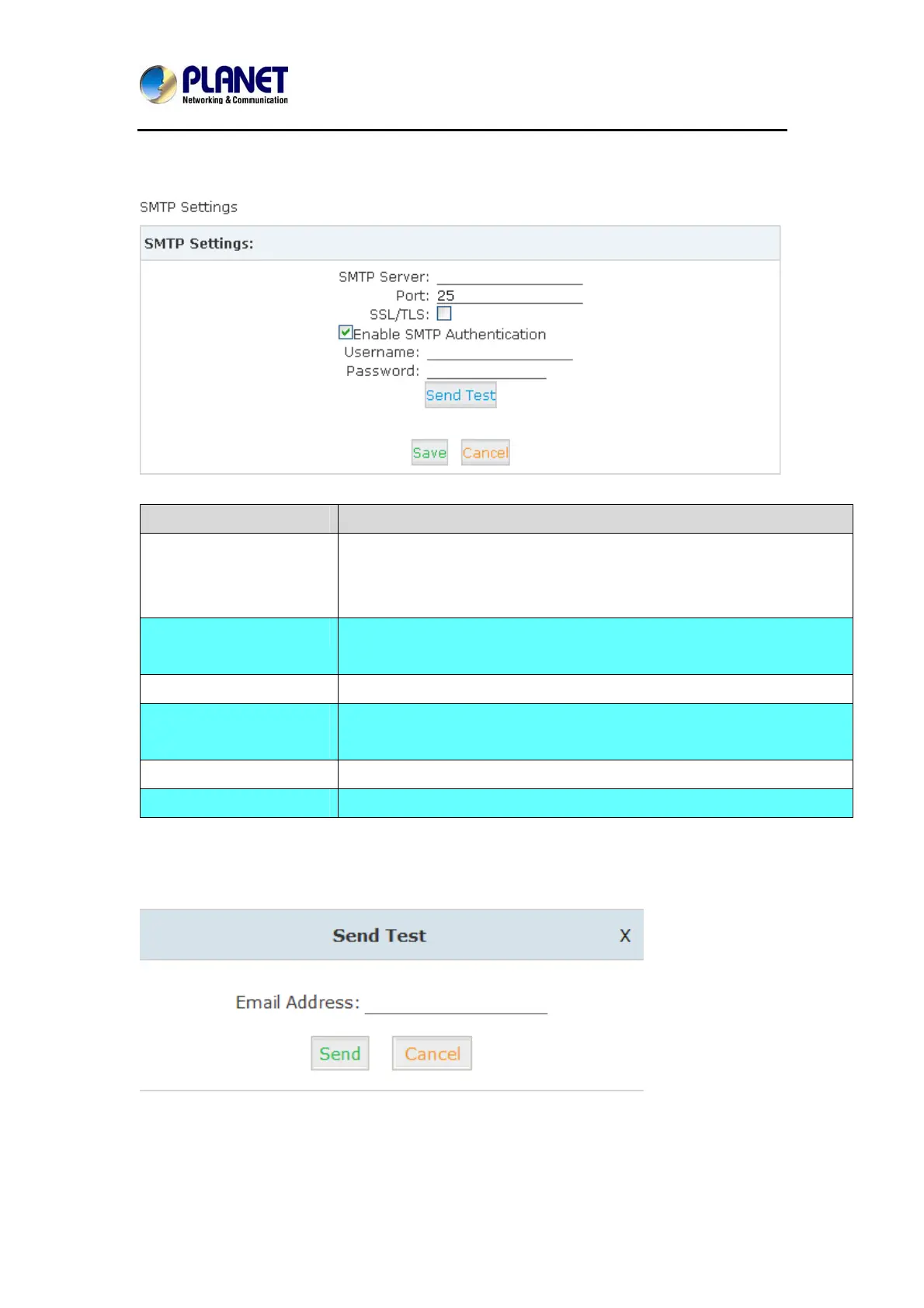
4.3 SMTP Setting
Item Explanation
SMTP server In order to send e-mail notifications of your voicemail, set the IP address
or domain name of a SMTP server that your IP PBX may connect to.
e.g. mail.yourcompany.com
Port The port number the SMTP server runs is generally port 25. If SSL is
encrypted, please use port 465 instead.
SSL/TSL Enable SSL/TLS to send secure messages to server.
Enable SMTP
Authentication
If your SMTP server needs Authentication, please enable SMTP
Authentication, and configure the following information.
User Name Input user name of your email box.
Password Input password of your email box.
Click【Send Test】after configuration, the following diagram will be displayed to ask you to input
the Email for receiving.
Input the Email and click【Send】to send the test email. Login your Email to check;
configuration is successful if you receive the test email; otherwise, it fails. Please check your
email settings.
59



 To Next Page