Internet Telephony PBX System
IPX-2500
DISA(Optional) define an extension number for this DISA.
Select Dial Plan Select the Dial Plan for this DISA.
4.7 Paging and Intercom
Paging and Intercom is used for calling a paging extension; all terminals which support this
function will be picked up automatically and listen;, meanwhile, it support duplex.
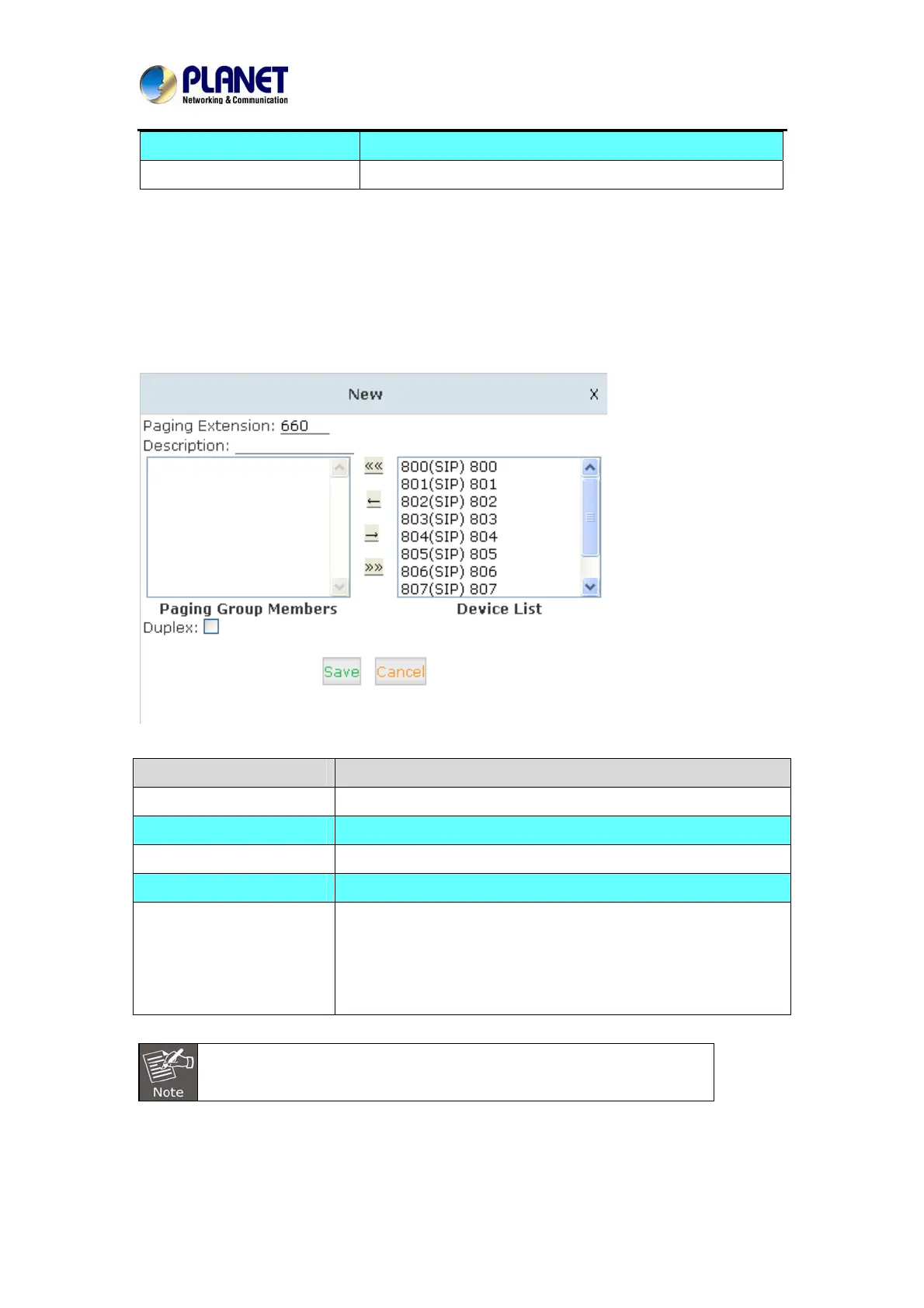
Click【Advanced】->【Paging and Intercom】->【New Paging Group】:
Item Explanation
Paging Extension The number users will dial to page this group.
Description Provide a descriptive title for this Page Group.
Paging Group Members Selected device(s) on this page
Device List Select Device(s) to page.
Duplex
Paging is typically one way for announcements only. Checking
this will make the paging duplex, allowing all phones in the
paging group to be able to talk and be heard by all. This makes it
like an "instant conference".
For Paging/Intercom function extension(IP phone), enable Auto Answer
63



 To Next Page