Planmeca Sovereign 99
INSTALLING THE PYLON AND ARM ACCESSORIES
Installation manual
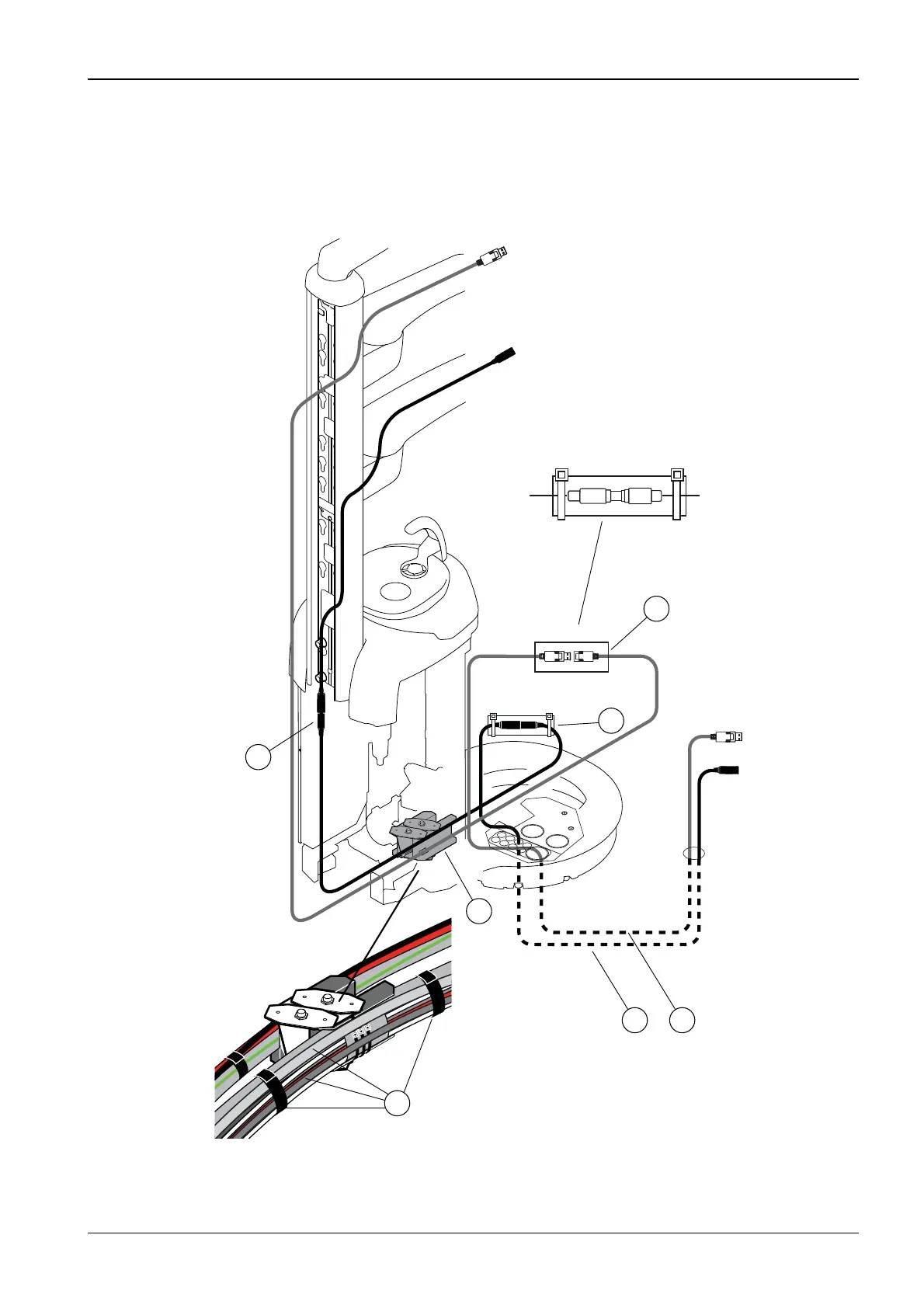
Route the DisplayPort cable into the base. Connect the S-video cable coming from the
instrument console to the S-video extension cable (1) and route also the extension cable into
the base. The cables are routed through the cable guide as shown on the figure below (2, 3).
Secure the cables to other cables/tubes with attachment strips (3). Connect the DisplayPort
cable to the extension cable (5). Isolate all connections (4 and 5). Route the cables out from
the base and attach the S-video (6) and DisplayPort (7) extension cables to the computer.
NOTE See also figure on section 19 “CONNECTIONS” on page 181.
S255.eps
S-Video
S-Video
S-Video
Dentists arm
Monitor arm
S-Video
3
Double isolation
Double isolation
DisplayPort,
Male
DisplayPort,
Male
DisplayPort,
Male
DisplayPort,
Female
Display
Port
Display
Port
2
4
5
6 7
1









 To Next Page