48
From your Recent Calls list, use the up and down arrow keys to highlight an entry, and
press the right arrow key.
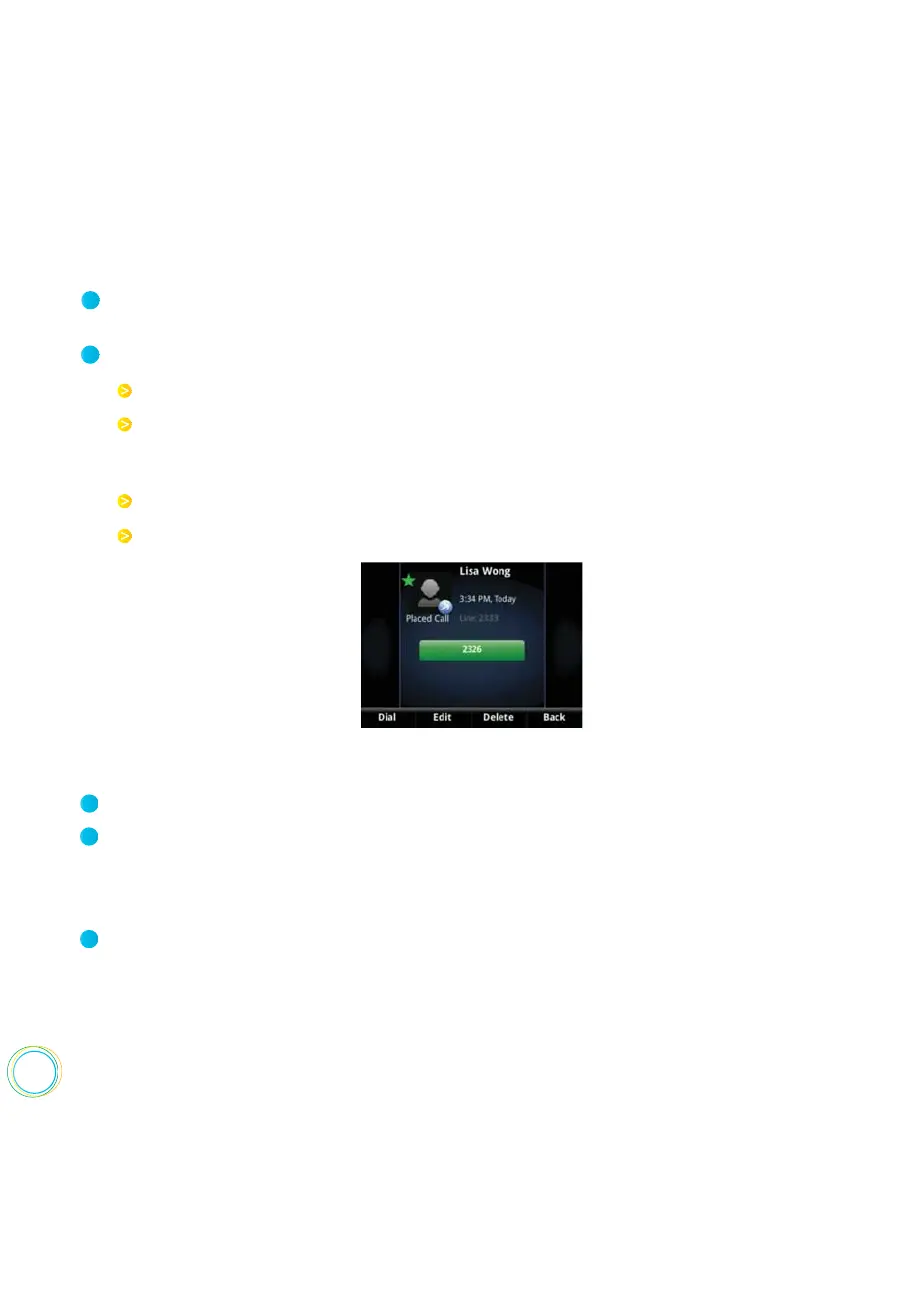
From the call details screen, shown next, you can :
To manage a call record :
1
2
Press Dial or the right arrow key to call the person.
Press Save to add the person to your Contact Directory. If the person is already in
your Contact Directory, but isn’t a Favorite,
Add to Favorites displays
instead. Press
Add to Favorites to automatically make the person a Favorite.
Press Delete to delete the call from the list.
Press Edit/Dial to edit the phone number before you dial the person.
From Home view, select Directories from Home view, and select Recent Calls.
Press Type to filter calls for specific lines or types of calls.
When you filter calls, you can choose to display only missed, received, or placed calls.
Or, you can choose to display all call types (the default). You can choose to display
only calls from a certain line.
Press Sort to sort the calls.
When you sort calls by the time of the call, you can to order calls in ascending (oldest
call first) or descending (most recent call first) order.
When you sort calls by call name, you can order calls in ascending (alphabetical) or
descending (reverse-alphabetical) order.
To customize the list :
1
2
3















 To Next Page