© 2017 PoolPak LLC. All rights reserved. MPK Series - Installation, Operation and Maintenance | 61
PoolPak
®
MPK Series IOM
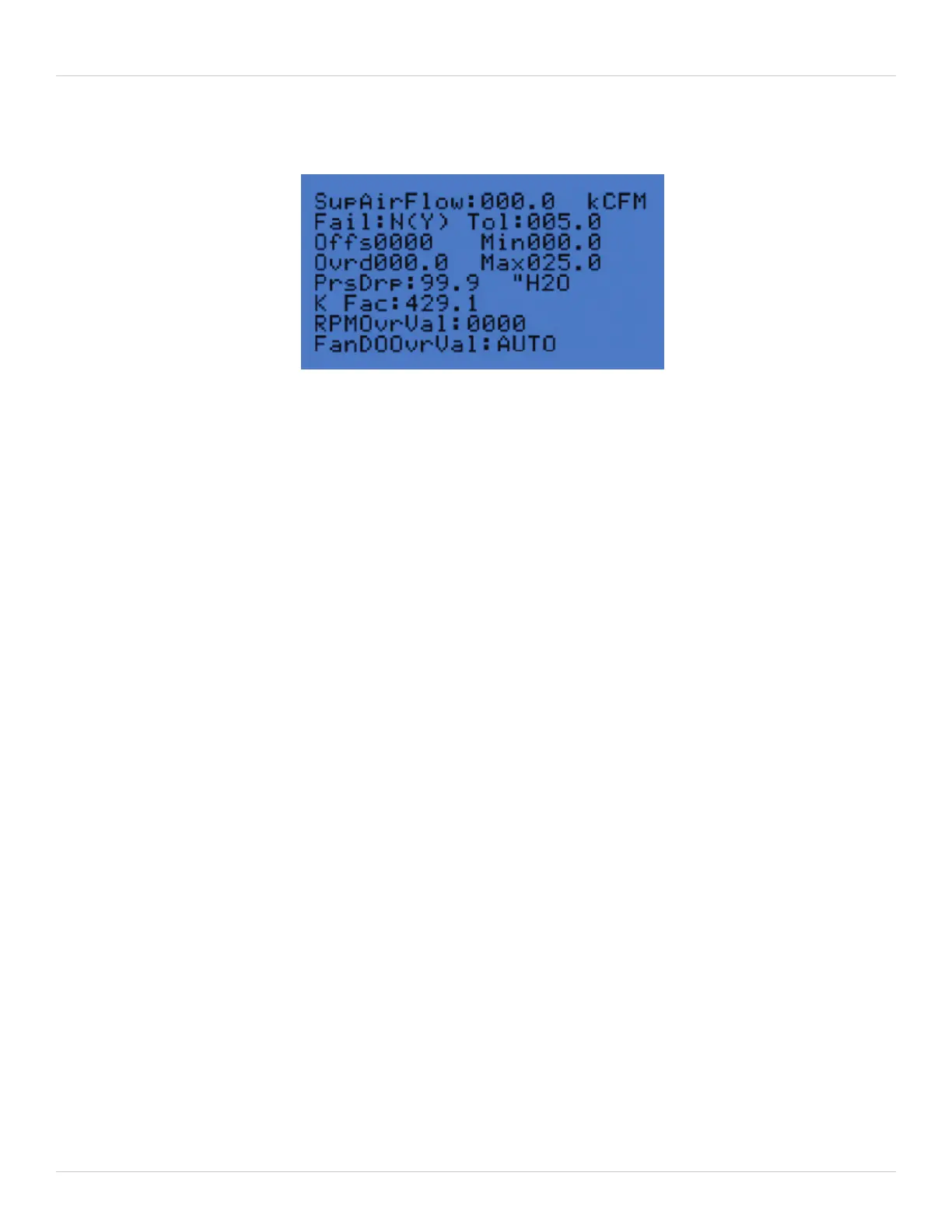
The analog input screens are typically used to calibrate sensors. Each sensor configuration screen contains the
following information:
Current Value (Read only) – displayed in the upper right of each screen
Fail Y (N) – indicates the read only status of the sensor with a writeable failure override in parenthesis. A value of N
indicates normal or non-failure. A value of Y indicates the sensor reading is outside of the expected range.
Tol – This value is the tolerance of acceptable readings outside of the sensor’s range. Therefore, for a sensor to be in
failure, the reading must exceed the max or min value by more than the tolerance value.
Offs – The offset value is useful for calibrating the sensor. For example, if the reading from the space temperature is
2°F higher than the actual value, setting the offset to -002.0 will calibrate the sensor reading.
Min – The minimum acceptable reading for the sensor. For current loop sensors (4-20 mA), this parameter is the
sensor value when the current in the loop is 4 mA. For voltage mode signals (0-10 VDC), this parameter is the
sensor value when the voltage is 0 VDC. For thermistor based sensors, this parameter is the low limit value.
Max – The maximum acceptable reading for the sensor. For current loop sensors (4-20 mA), this parameter is the
sensor value when the current in the loop is 20 mA. For voltage mode signals (0-10 VDC), this parameter is the
sensor value when the voltage is 10 VDC. For thermistor based sensors, this parameter is the high limit value.
Ovrd – Setting this parameter to a non-zero value will replace the sensor reading with this value. This parameter is
stored in permanent memory and will remain even if power to the controller is cycled. This parameter can be used
to temporarily restore unit operation if a sensor has failed.
AvgFilter – Some of the sensors have this additional parameter. This is for additional sensor calibration/dampening.
Do not change this value except under the instruction of PoolPak® authorized service technician.
In addition, the Supply, Purge, and Exhaust air flow sensor screens display the below parameters for help during
initial air balancing.
PrsDrp (read only) – Pressure Drop
K Fac – K Factor
RPMOvrVal – RPM Override Value
FanDOOvrVal – Fan Digital Output Override Value
Figure 5-17. Analog Inputs - Supply Air screen


 To Next Page