955725_4
29
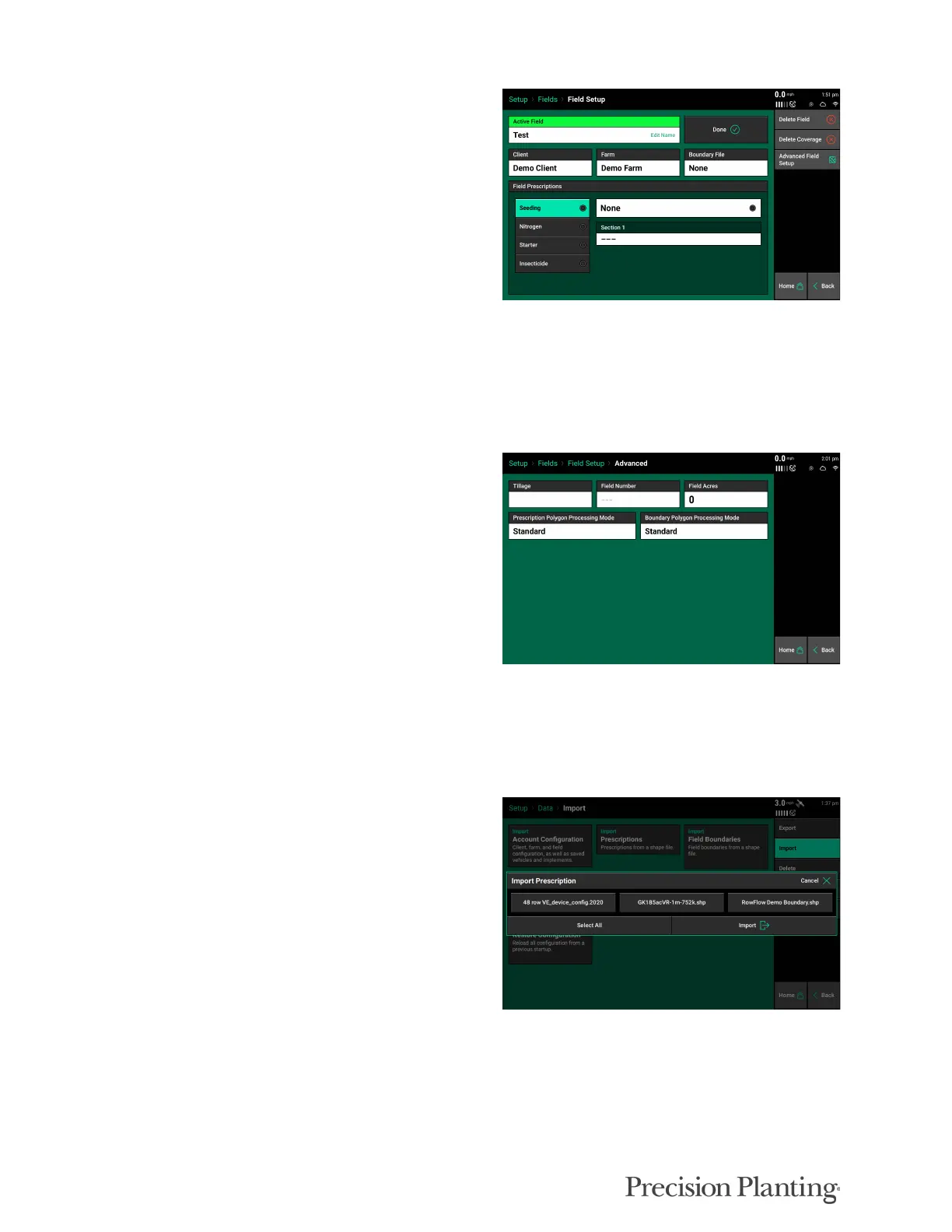
The 20|20 can use prescription files for Seeding
(vDrive), Liquid application (vApplyHD), and
Insecticide (vDrive Insecticide). The Field Setup
page will change with the type of products
configured. See following information in this
document for importing and assigning
prescriptions.
Note: The option to assign a prescription will
not be available unless a Seeding/Liquid/
Insecticide system is setup on the display. Refer
to the Product specific Operators Guide for how
to configure each system.
Advanced Field Setup
On the right side of the Field Setup page is the
Advanced Field Setup. This includes entries for
Tillage, Field Number, and Field Acres. This is
optional information that can be entered for
record keeping.
Prescription & Boundary Polygon Processing
Modes can be adjusted to make the display read
imported shape files differently.
The standard mode works for the majority of shape files. Selecting “All Exterior” will cause the
display to read all polygons within the shape file as an external boundary of the field. This mode
can help the system read shape files that were not saved in the typical ESRI file format.
Importing Prescription Files
To begin using the prescriptions, they must be
imported. Follow the below steps to import the
prescription(s).
1. Navigate to Setup - Data
2. Insert the USB Drive into the display
containing the prescription files
3. Tap on the 'Import Prescriptions' button.
Note: The 20|20 supports the import of .2020 file prescriptions or .shp file based prescriptions (.shp, .dbf,
.shx)



 To Next Page