User Manual
154
12.3 Configuring More Settings
Steps:
1. Enter the General Settings interface.
Menu > Configuration > General
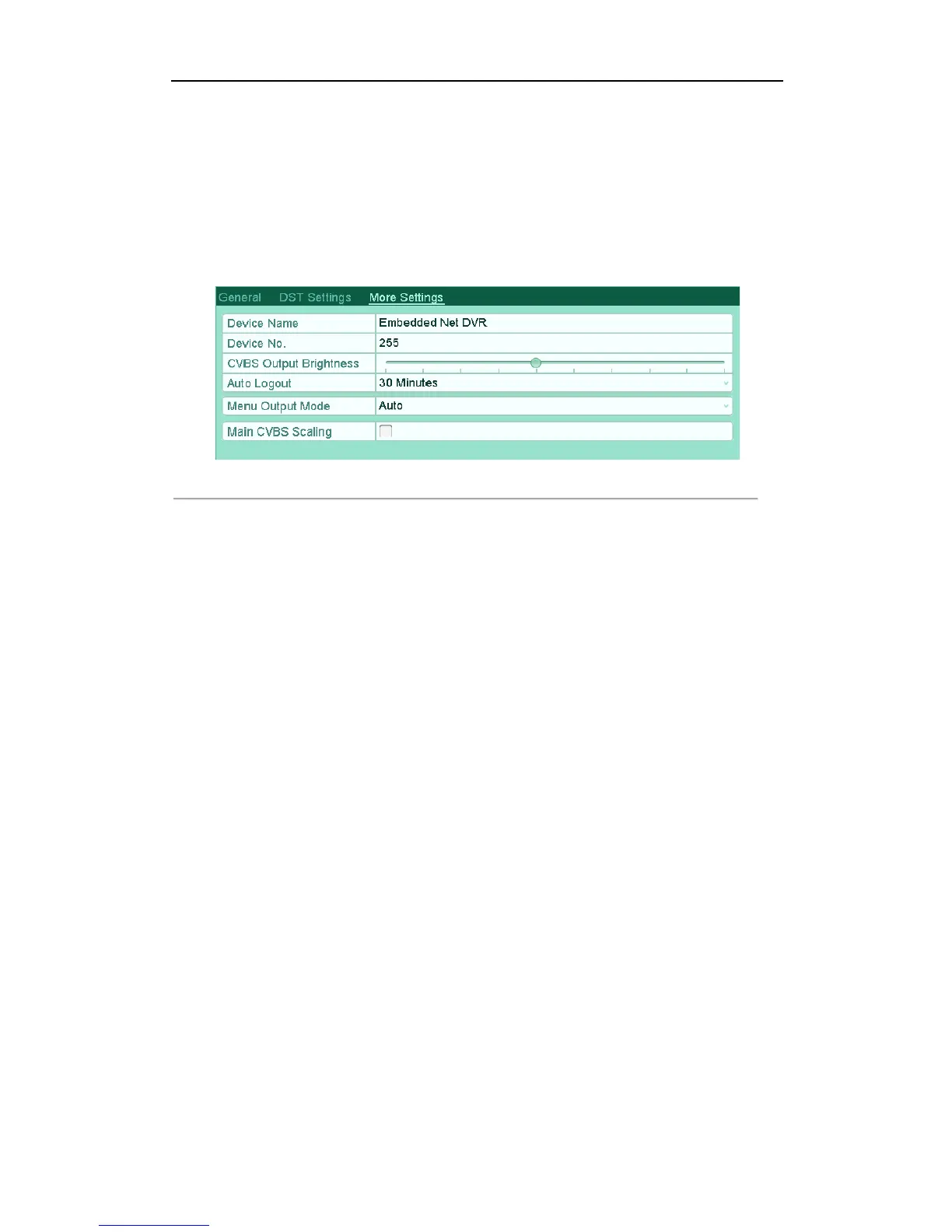
2. Click the More Settings tab to enter the More Settings interface.
Figure'13.3'More'Settings'Interface'
!
3. Configure the following settings:
• Device Name: Edit the name of device.
• Device No.: Edit the serial number of device. The Device No. can be set in the range of 1~255, and
the default No. is 255.
• CVBS Output Brightness: Adjust the video output brightness.
• Operation Timeout: Set timeout time for menu inactivity. E.g., when the timeout time is set to 5
Minutes, the system will exit from the current operation menu to live view screen after 5 minutes
of menu inactivity.
• Menu Output Mode: Select the menu output mode to Auto, HDMI/VGA or Main CVBS.
Notes:
! When you select Auto, the device can automatically detect the HDMI/VGA output as the main
output and the CVBS output as the auxiliary output when it starts up.
! After you have changed the output mode, you should restart the device to activate the new
settings.
• Main CVBS Scaling: Enable/disable video output scaling for main CVBS video output.
4. Click the Apply button to save the settings.



 To Next Page