EasyManua.ls Logo

PROLYNX PL-DVR1004N1 - Playing Back by Tag; Digital Zoom

PROLYNX PL-DVR1004N1
161 pages
Print Icon
To Next Page IconTo Next Page
To Previous Page IconTo Previous Page
Loading...
User Manual
70
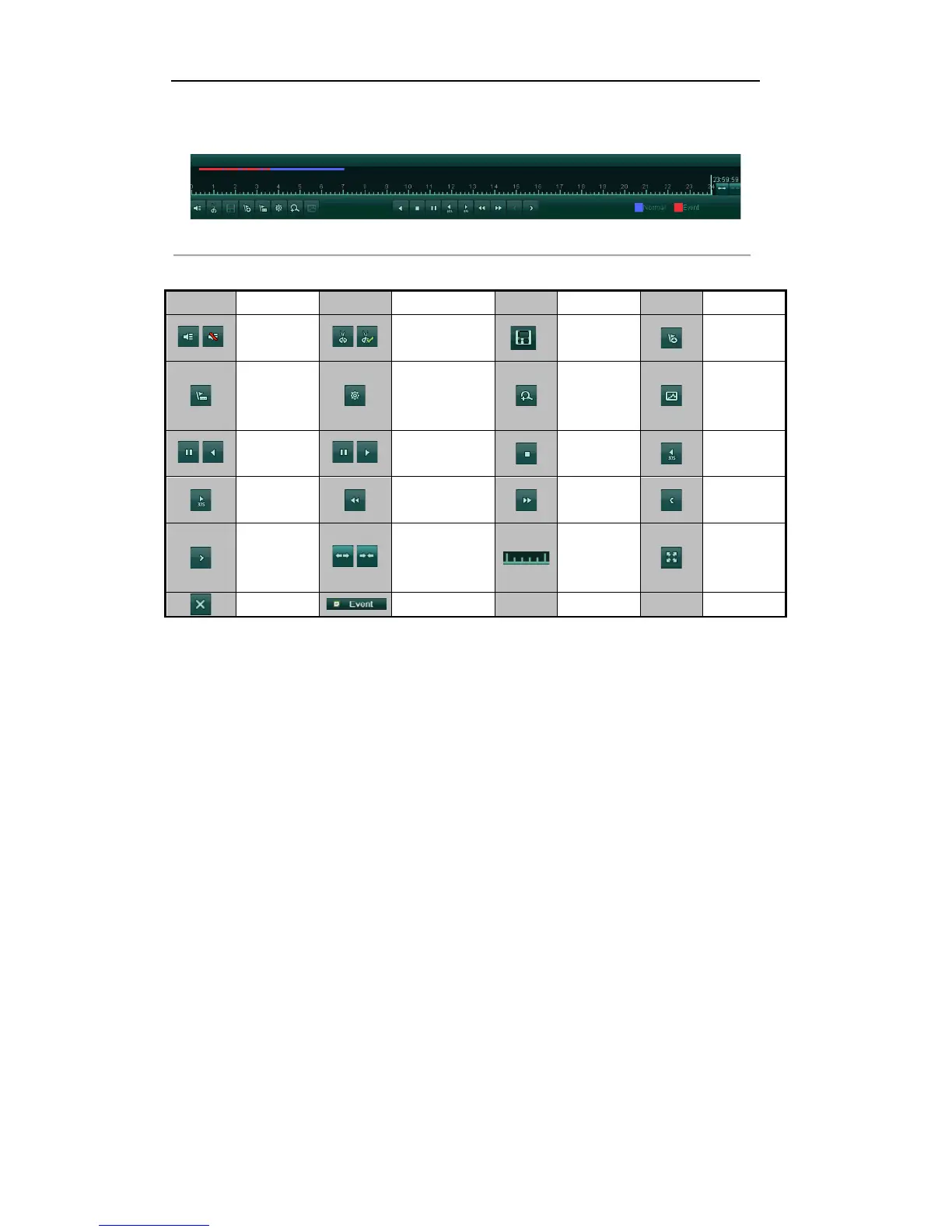
5. Event playback interface.
The toolbar in the bottom part of Playback interface can be used to control playing process.
Figure'6.10'Toolbar'of'Playback'by'Event
'
Table'6.3'Detailed'Explanation'of'Playback[by[event'Interface'
Button
Operation
Button
Operation
Button
Operation
Button
Operation
/
Audio on
/Mute
/
Start/Stop
clipping
Save clip(s)
Add
default tag
Add
customized
tag
Tag
management
Digital
Zoom
Smart
Search
/
Pause/Play
reverse
/
Pause/Play
Stop
30s reverse
30s forward
Slow forward
Fast forward
Previous
event
Next event
/
Scaling
up/down time
bar
Process bar
Full Screen
Exit
Event playback
5.1.4!Playing!Back!by!Tag!
Purpose:
Video tag allows you to record related information like people and location of a certain time point during
playback. You are also allowed to use video tag(s) to search for record files and position time point.
Before playing back by tag:
1. Enter Playback interface.

Table of Contents