EasyManua.ls Logo

PROLYNX PL-DVR1004N1 - Page 67

PROLYNX PL-DVR1004N1
161 pages
Print Icon
To Next Page IconTo Next Page
To Previous Page IconTo Previous Page
Loading...
User Manual
66
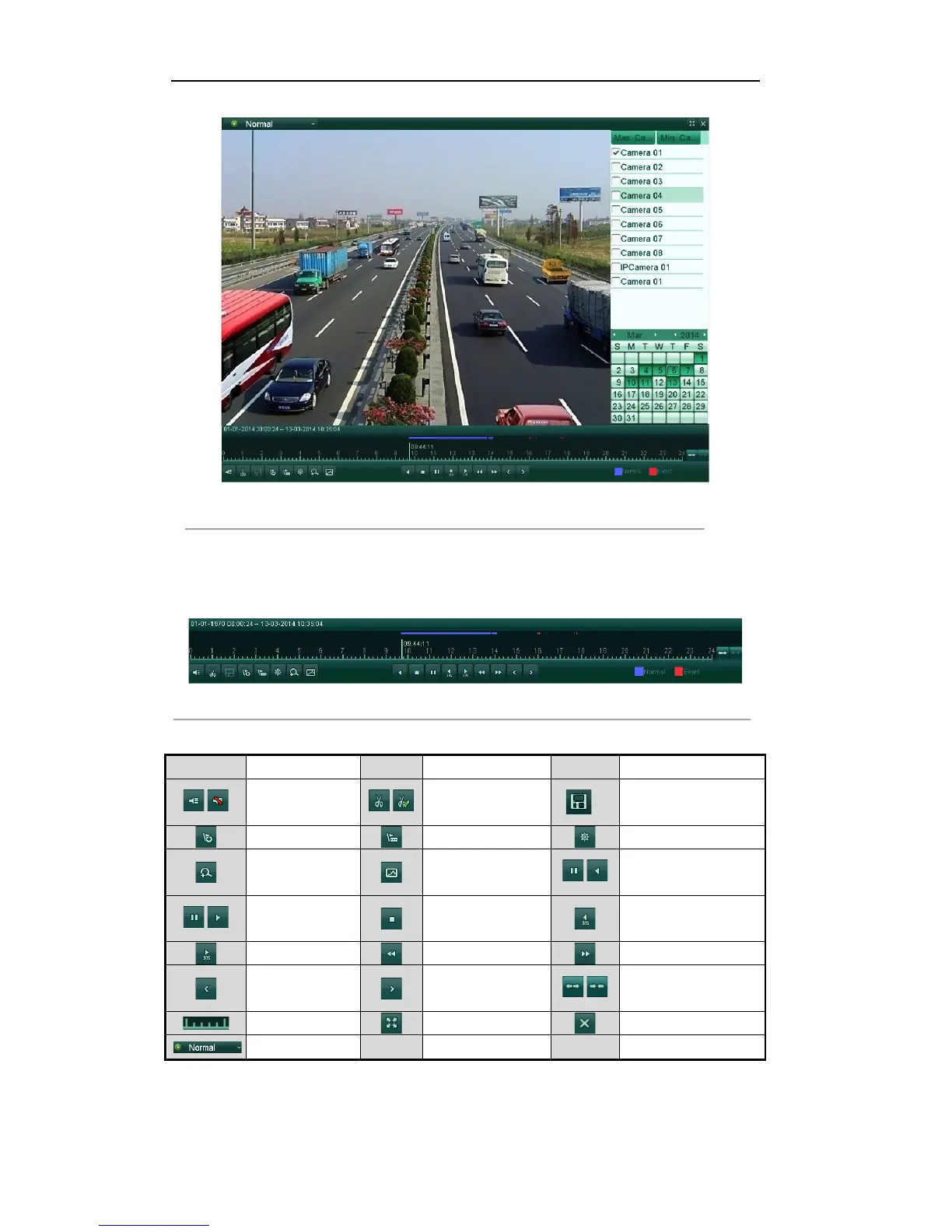
Figure'6.3'Playback'Interface'
Check the checkboxes to select the channel(s), and then the video from the selected channels will be played
back synchronously. Up to 16 channels can be set for synchronous playback.
Click the Max. Camera for Playback tab, and you can play back the video from 16 channels at a time.
Click the Min. Camera for Playback tab, and you can play back the video from only one channel.
Figure 6.4 Toolbar of All-day Playback
Table'6.1'Detailed'Explanation'of'All[day[playback'Toolbar'

Button
Operation
Button
Operation
Button
Operation
/
Mute/Audio on
/
Start/Stop clipping
Save clip(s)
Add default tag
Add customized tag
Tag management
Digital Zoom
Smart Search
/
Pause/
Play Reverse
/
Pause/Play
Stop
30s reverse
30s forward
Slow forward
Fast forward
Previous day
Next day
/
Scaling up/down time
bar
Process bar
Full Screen
Exit
Normal playback
Notes:
! Playback progress bar: use the mouse to click any point of the progress bar or drag the progress bar to
locate special frames.

Table of Contents