AHD DVR User Manual
24
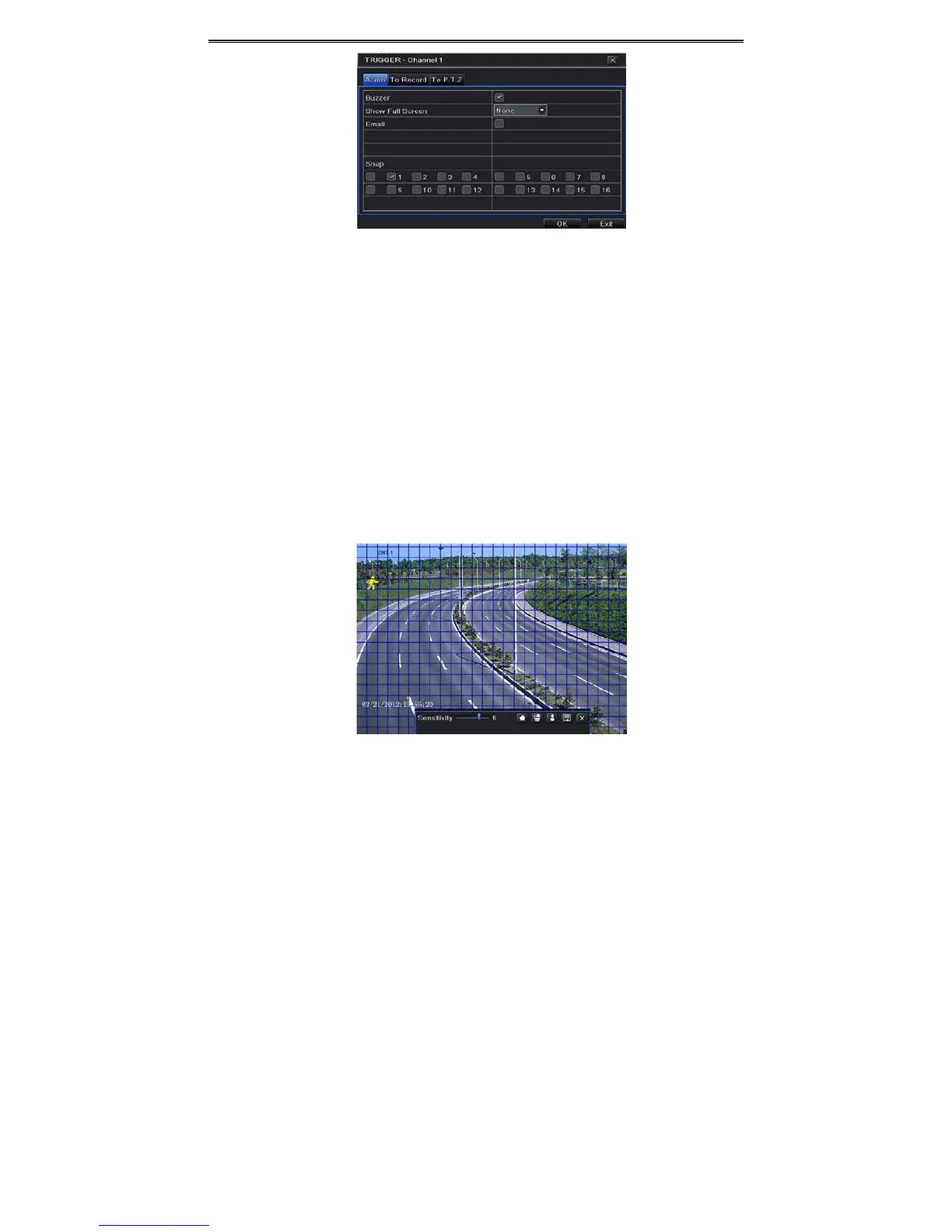
Fig4‐18AlarmConfiguration‐MotionTrigger
Buzzer:Ifselected,thelocalbuzzerwouldbeactivatedonanalarm.
ShowFullScreen:Ifselected,therewillpopupthechosenchannelonthemonitoronanalarm
trigger.
Email:Ifselected,theDVRwillsendanemailalerttothepreconfiguredemailaddressincase
ofa
motionbasedalarmfromtheparticularinput.
Snap:Ifselected,thesystemwillsnapimagesofthecheckedchannelsonanalarmandsave
themintheHDDautomatically.
④ GotoToRecordtab.Selectrecordingchannels.Itwouldberecordedincaseofanalarm.
ClickOKbutton
tosavethesetting.
⑤ Goto“ToPTZ”tab.Setpreset,cruiseandtrackoptionsforaPTZincaseofasensorbased
alarm.SingleormultiplePTZunitscouldbeprogrammedtoperformthisfunctiononthe
samealarm.
⑥ AfterclickingAreabutton,adialogboxwill
popupasFig4‐19.
Fig4‐19Motion‐Area
⑦ IntheAreainterface,youcandragslidebartosetthesensitivityvalue(1‐8).Thehigher
thevalueisthemoresensitiveitistomotion.Sincethesensitivityisinfluencedbycolor



 To Next Page