AHD DVR User Manual
29
5.6.3Email
TosetupEmail:
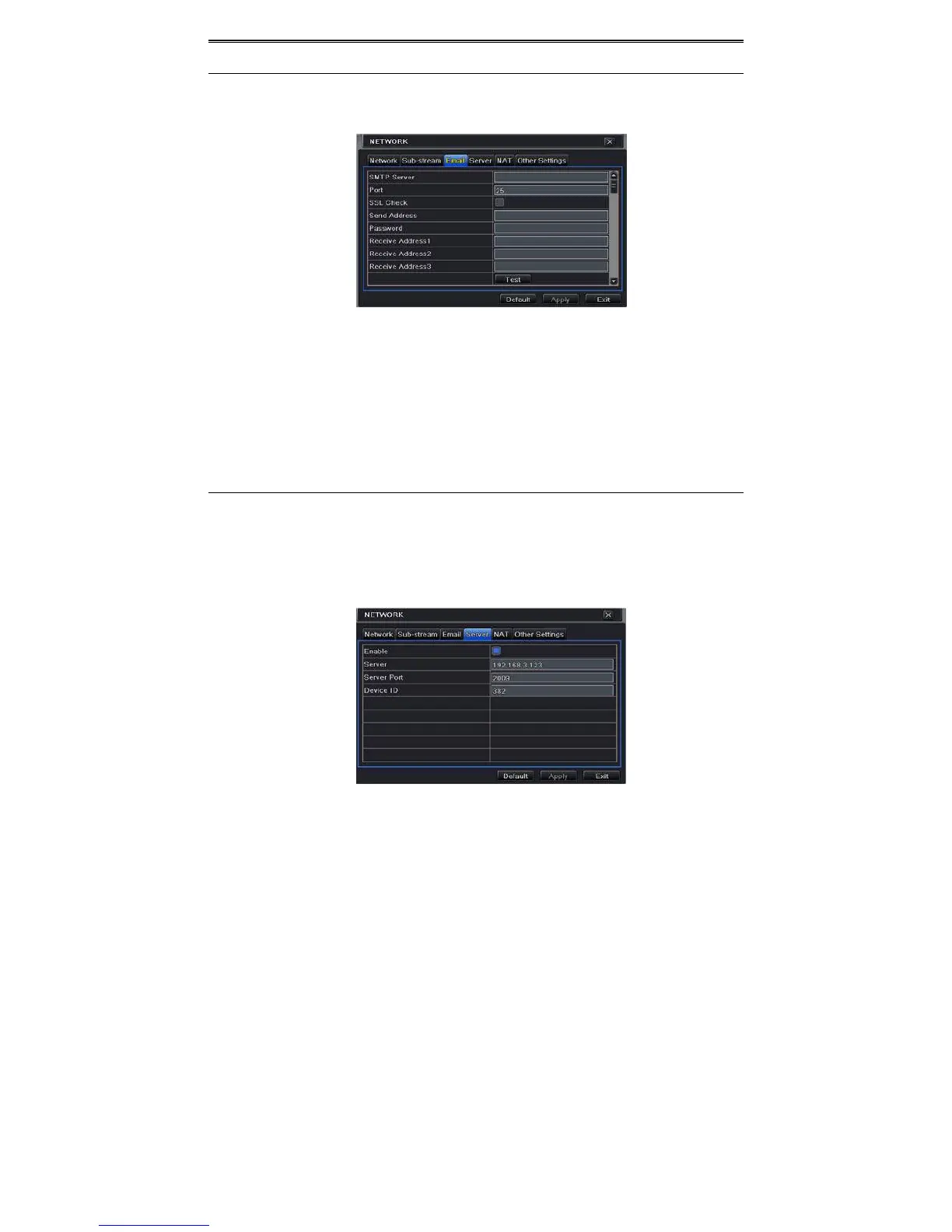
① GotoMainMenuSetupNetworkEmailinterface.RefertoFig4‐25.
Fig4‐25NetworkConfigura tion ‐Em ail
② SetSMTPServerandport.
SMTPServ er /Port:ThenameandportnumberofSMTPserver.YoucansetupSSLcheck
(suchasGmail)accordingtoactualneeds.
③ Setsender’saddressandpassword.
④ Setreceiver’semailaddressandclick“Test”buttontotestthevalidityofthemailbox.
Attachingimage:Ifselected,thesystemwillattachimageswhensendingemails.
5.6.4Server
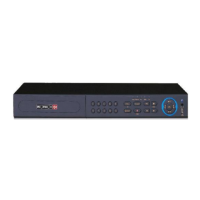
ThisfunctionismainlyusedforconnectingECMS/NVMS.Thesettingstepsareasfollows:
① Intheserverinterface,select“Enable”asshownintheFig4‐26.
② ChecktheIPaddressandportofthetransfermediaserverintheECMS/NVMS.Thedefault
server port for auto report is 2009. If it is modified, please go to the transfer media
interfacetocheck.
Fig4‐26NetworkConfigura tion ‐Server



 To Next Page