AHD DVR User Manual
51
1.ConnecttheDVRtointe rnetthroughrouterorvirtualserver.
① Thenetworksetupsarethesameassteponetostepfourofpoint1onWANofIEremote
surveillance.
② Enter WAN IP and HTTP port in the Safari browser to install the Active control. The
concretestepsarethesameasstep5and6ofChapter7.3.1.
2.ConnecttheDVRtointe rnetdirectly.
① Thenetworksetupsarethesameassteponeofpoint2onWANofIEremotesurveillance.
② Enter WAN IP and HTTP port in the Safari browser to install the Active control. The
concretestepsarethesameasstep5and6ofChapter7.3.1.
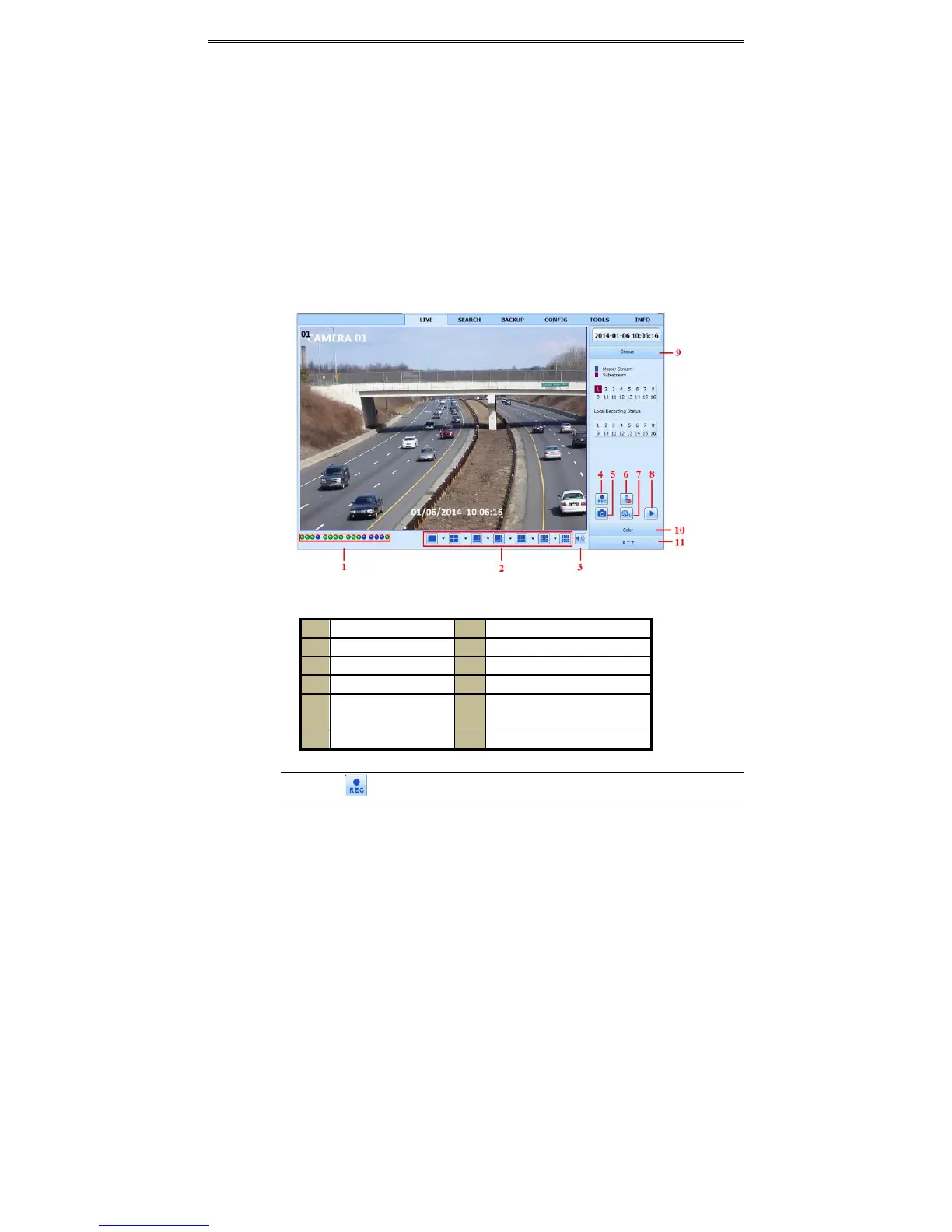
8.4 TheRemoteLivePreview
Fig7‐1RemoteLivePr eviewIn terface
1 Channelindicator 2 Screendisplaymode
3 Volume 4 Startrecording
5 Snappingpicture 6 Bidirectionaltalk
7 StartIErecord 8 Pla yback
9 Master/sub stream
status
10 Color
11 PTZcontrol
Note:Click buttontostartrecording.Therecordfilewillbesavedinuser’sPC.



 To Next Page