AHD DVR User Manual
40
6 Search,Playback&Backup
Searchconfigurationincludesfoursubmenus:timesearch,eventsearch,filemanagementand
image.
6.1 TimeSear ch
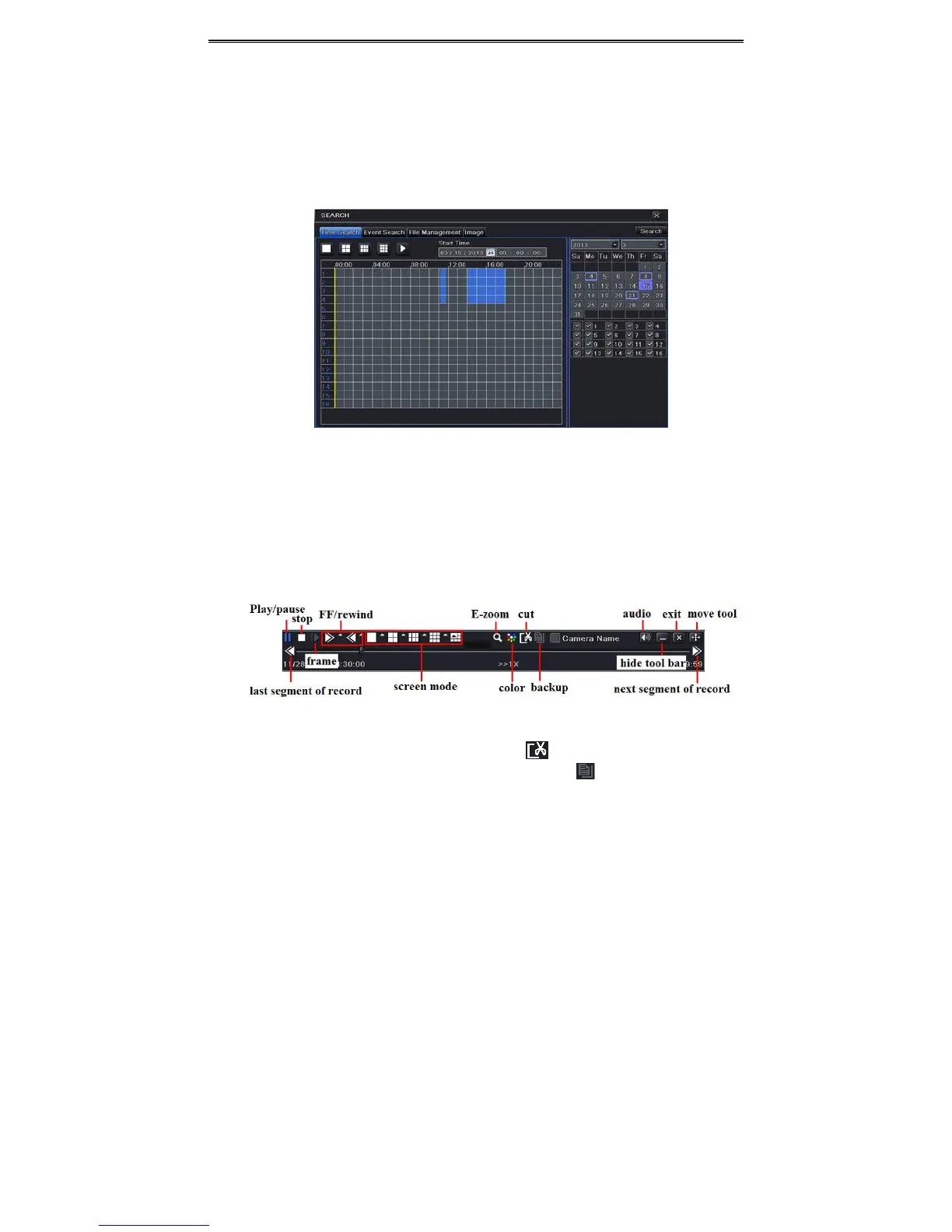
① GotoMainMenuSearchTimeSearch.RefertoFig5‐1.
Fig5‐1SearchConfigura tion ‐TimeSearch
② Selectdateandchannelsontherighthandsideandpressthe“Search”button.Adate
withhighlightedborderlineindicatespresenceofdata.
③ Setthestarttimebyclickingaparticulargridorbyenteringthespecificvalueinthestart
timefield.
④ SelectthechanneldisplaymodeandclickPlaybuttontoplayrecord.Usetheplayback
toolbartocontroltheplayback.
Tosetbackupduringacertainperiodintheplaybackinterface:
Selectthestarttimebydraggingthesliderandclickicon.Thenselecttheendtimeand
clickthisiconagaintoconfirmtherecordperiod.Next,clickicontobackuptherecord
duringthisperiod.



 To Next Page