AHD DVR User Manual
70
Q7.ActiveXcontrolcannotbedownloaded.
a. IEbrowserblocksActiveX.Pleasedosetupasperthestepsmentionedbelow.
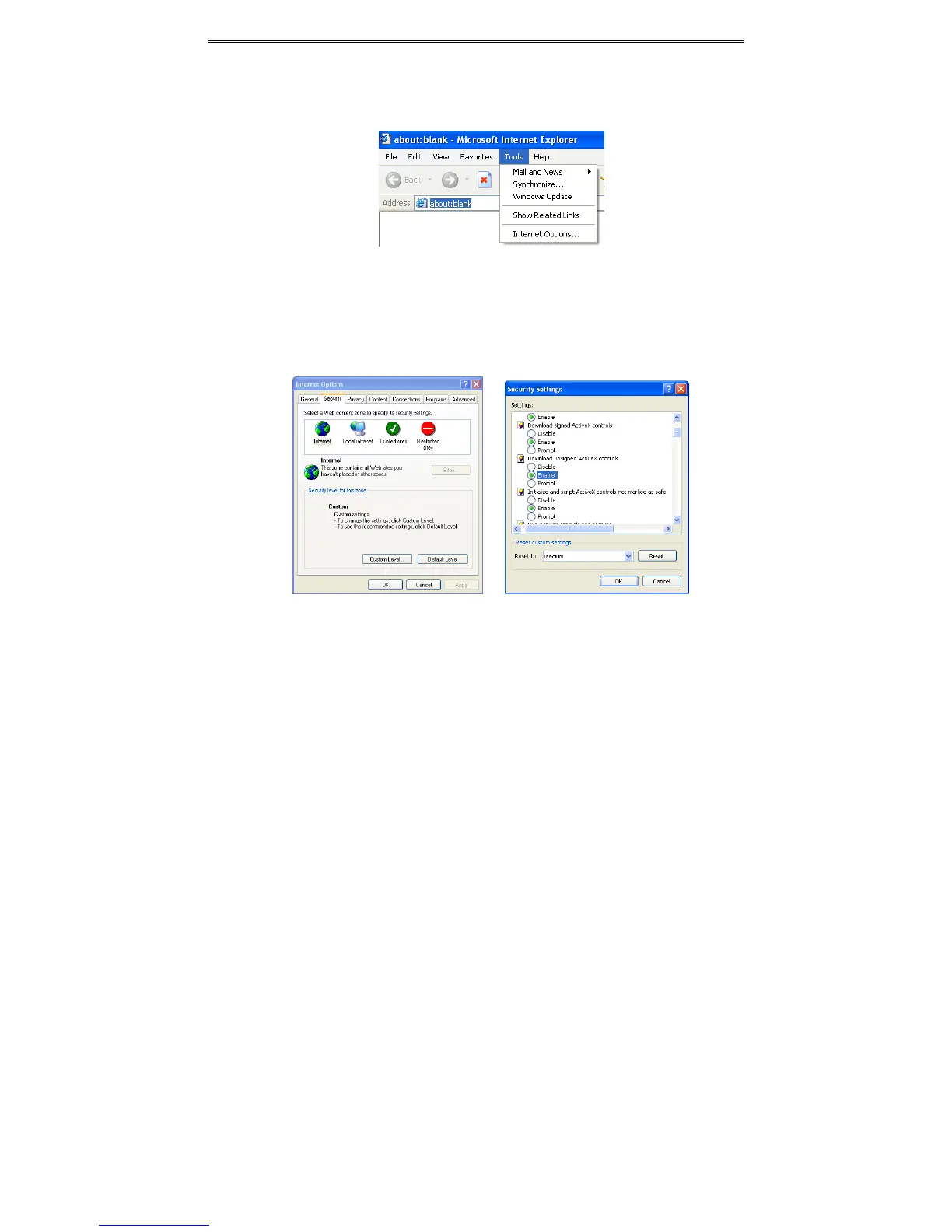
① OpenIEbrowser.ClickToolsInternetOptions.
② SelectSecurityCustomLevel.RefertoFig7‐1.
③ Enableallthesuboptionsunder“ActiveXcontrolsandplug‐ins”.RefertoFig7‐2.
④ ThenclickOktofinishsetup.
b. Otherplug‐insoranti‐virusblocksActiveX.Pleaseuninstallordotherequiredsettings.
Fig7‐1Fig7‐2
Q8:DVRdisplays“pleasewait…”allthetime.
a. HDDpowercableanddatacablemaynotbewellconnected.Pleasechecktheconnections
forHDD.
b. ItisalsopossiblethattheDVRwasforcedtostopbecauseHDDhasabadsectorandit
mayhavecausedthesystem
tohalt.CheckwithagoodknownHDDortryformattingthe
existingHDD.
Q9:Howtoinputpasswordanddigitalnumbers?
Clickthepasswordortheinputboxtopopupasmallkeyboard.Pleaseselectcharactersto
beinput(theinitialpasswordis123456),oryoucanuse
thedigitalkeysonthefrontpanel,or



 To Next Page