Q24/Q48 Tape Library Installation and Operations Manual
3.2.7.7 Changing the User settings
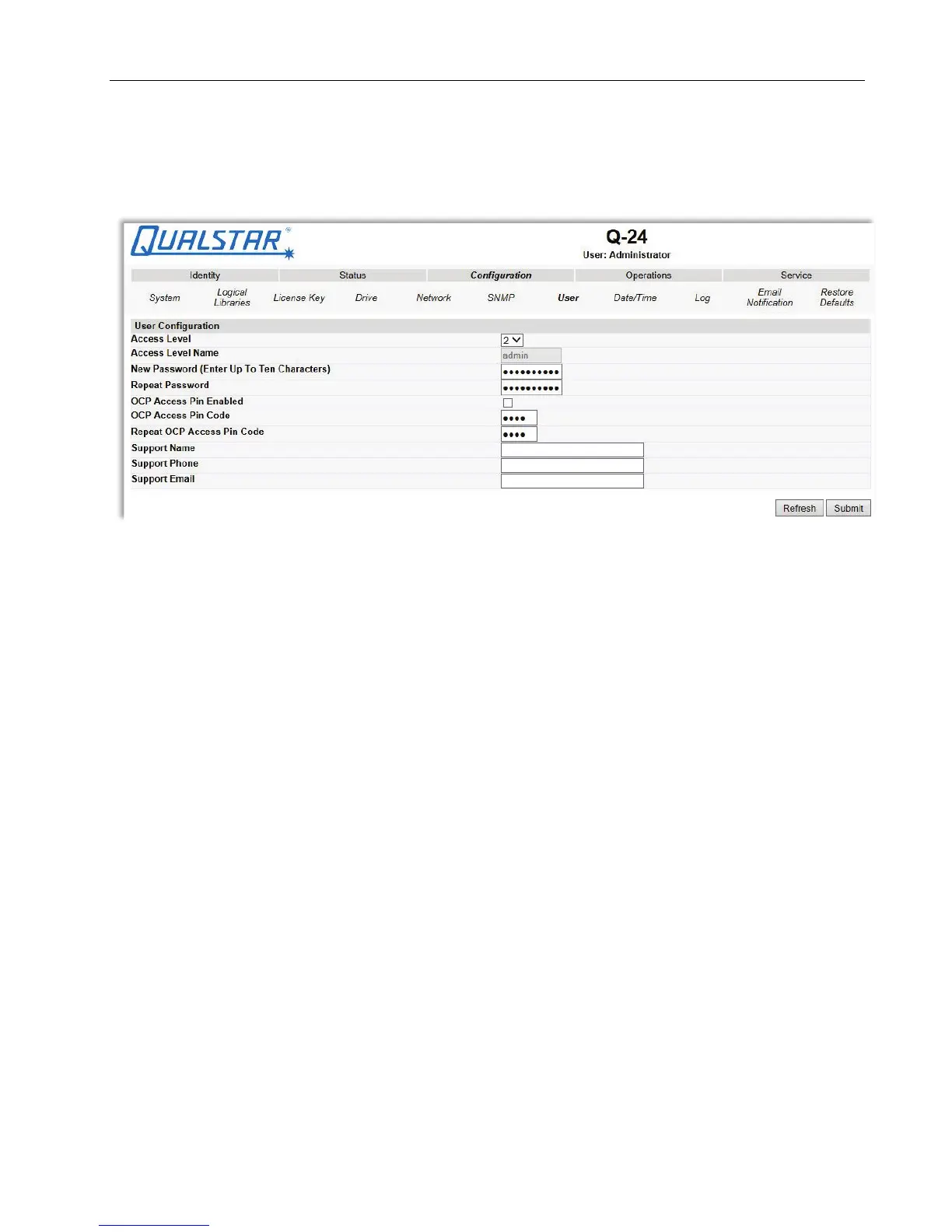
This page allows the user to add and modify user accounts.
Figure 46 User account settings
Changes that can be made are:
• Access Level: Choose from 1 (Standard), 2 (Admin), or 3 (Service).
• Access Level Name: The name associated with the chosen access level.
• New Password: The password can be a maximum of ten characters.
• Repeat Password: Enter the new password again.
• OCP Access PIN Enabled: Select this item, if you would like the Operator Control Panel
display to be password protected.
• OCP Access PIN Code: The password for accessing the OCP when the OCP Access PIN is
enabled; max 4 characters
• Repeat OCP Access PIN Code: Enter the OCP Access PIN Code again.
• Support Name: The name of the individual within your company to contact for
RMU or library support; max 30 characters
• Support Phone: The phone number of the individual within your company to
contact for RMU or library support; max 30 characters
• Support Email: The email address of the individual within your company to
contact for RMU or library support; max 30 characters
© Copyright QUALSTAR 2015 51



 To Next Page