Q24/Q48 Tape Library Installation and Operations Manual
3.2.7.8 Setting Date/Time
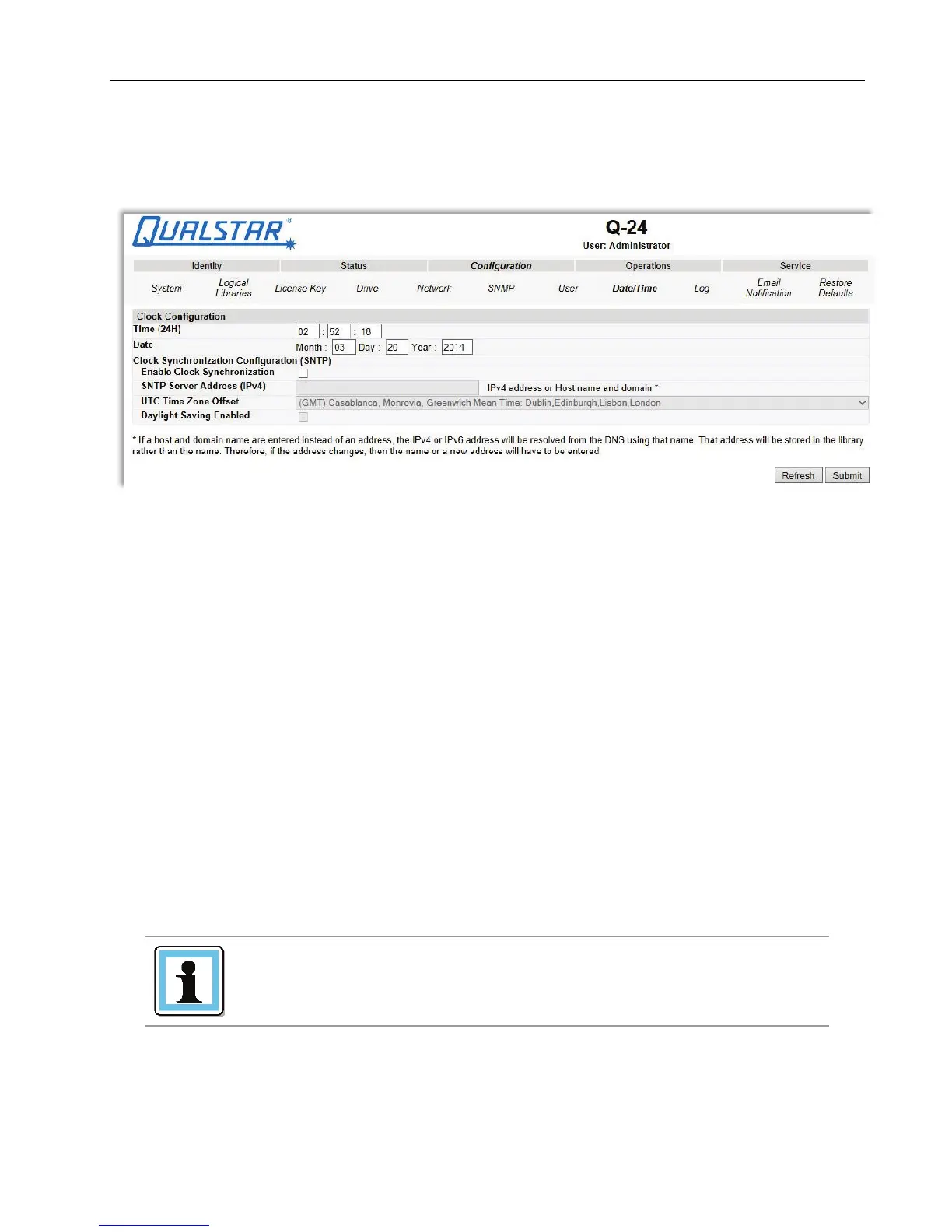
This page allows the user to set the time and date, and how it will be displayed.
Figure 47 Date/time settings
Changes that can be made are:
Clock Configuration
• Time (24 hour format): hh:mm:ss
• Date: MM:DD:YYYY
• Clock Synchronization Configuration (SNTP):
o Enable Clock Synchronization: If checked the unit will attempt to synchronize its clock with
an external time source. The following apply:
o SNTP Server Address (IPv4): This is the IP address of the network SNTP time server, the
address may be a maximum of 40 characters.
o UTC Time Zone Offset: This drop down menu allows the administrator to select the
appropriate time zone offset so that the time will be displayed in the actual local time.
o Daylight Saving Enabled: Provides for automatic offset of daylight savings time.
3.2.7.9 Setting Error Log mode
Only service personnel can set the log configuration.
The Log menu can be used to set behavior of the error log collection. Your service person may ask you
to alter settings in this field during the diagnostic process. The default setting is for continuous
collection of logs, with the most recent events overwriting the oldest events (circular buffer).
© Copyright QUALSTAR 2015 52



 To Next Page