109
Updates, Settings & Maintenance
11
Camera Selection
The current camera can be selected with the camera switch button, if multiple cameras are available.
Camera Settings
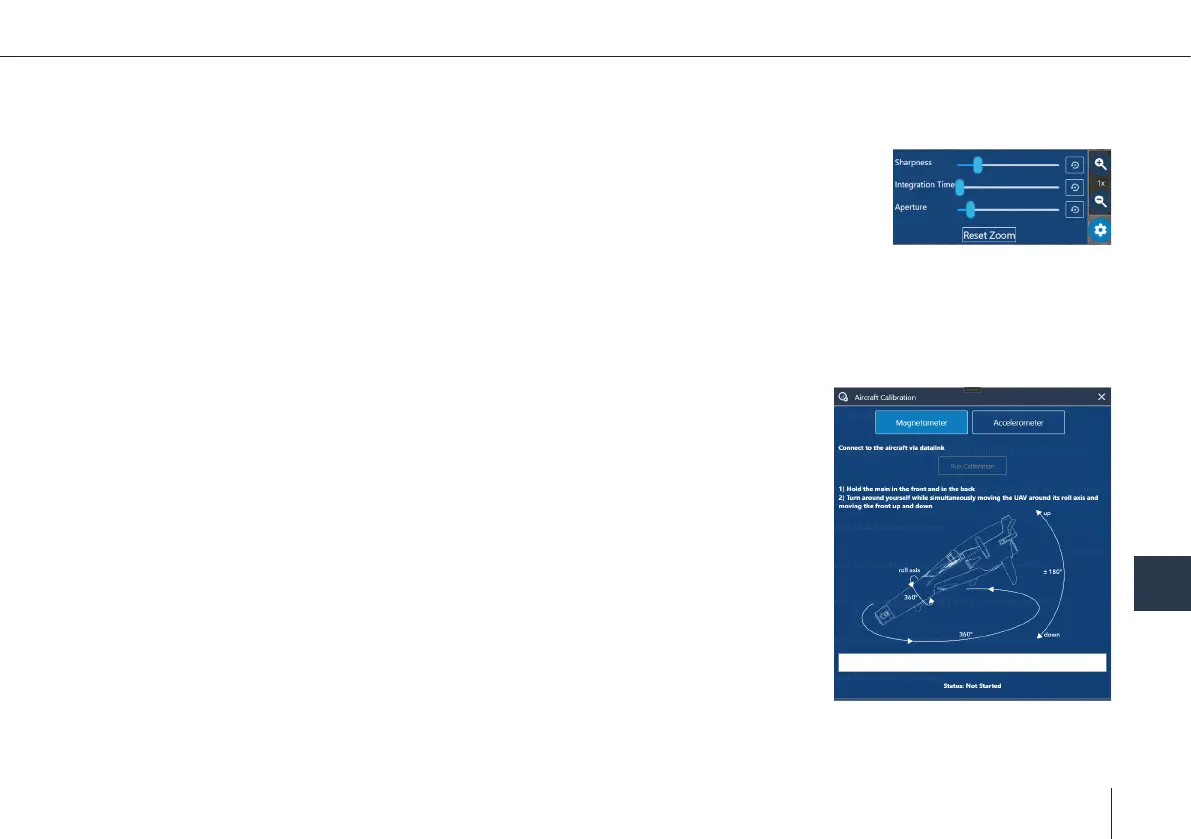
The camera settings panel is opened by clicking the gear button. It features camera specic set-
tings like sharpness, integration time or aperture.
11.10 Calibrating the Magnetometer
The magnetometer needs to be calibrated if the heading of the UAV is not correct or the actual ight location is more than
50 km away from the location where the magnetometer was calibrated before.
Always calibrate the magnetometer outside. Make sure no buildings, cars or other
obstacles that distract the calibration are within 10 m (33 ft) around you.
Also make sure that no metal (like parking decks, steel buildings or other metal
structures, ships, cars or other machines) or any devices causing electric or magnetic
elds (power lines, generators, mobile phones and watches) are close.
1. The data link handheld, the Skynav/Toughbook, the main body & the batteries are
needed.
2. Connect the battery packs. Attach the cover to secure the batteries.
The UAV will power automatically.
3. Open QBase and connect the data link handheld to the Skynav/Toughbook.
4. Ensure the connection between the UAV and the Skynav/Toughbook is established.
5. Open QBase > Main Menu > Tools > Aircraft Calibration > Magnetometer
6. The calibration mode starts.



 To Next Page