Current Section: Water Days 38
Navigation:
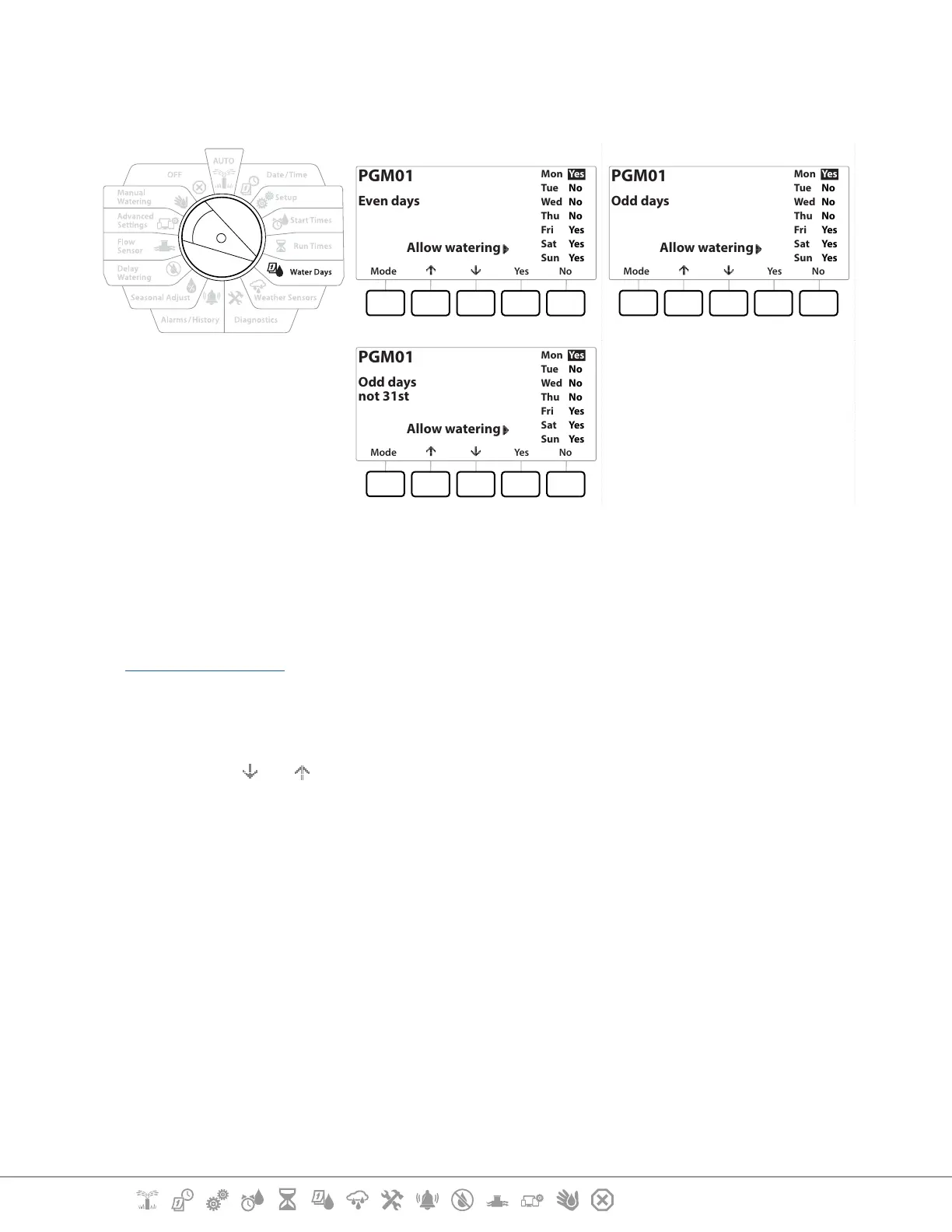
7.4.3 Even days, Odd days, Odd no 31st
The process for setting up Even, Odd, and Odd no 31st Watering Cycles is very similar.
Mode Yes No
Mon
Tue
Wed
Thu
Fri
Sat
Sun
Yes
No
No
No
Yes
Yes
Yes
PGM01
Even days
Allow watering
Mode Yes No
Mon
Tue
Wed
Thu
Fri
Sat
Sun
Yes
No
No
No
Yes
Yes
Yes
PGM01
Odd days
Allow watering
Mode Yes No
Mon
Tue
Wed
Thu
Fri
Sat
Sun
Yes
No
No
No
Yes
Yes
Yes
PGM01
Odd days
not 31st
Allow watering
1 Turn the controller dial to Water Days
2 At the Watering Cycle screen, press the Mode key to navigate to the Even days, Odd
days or Odd 31st screen.
•
If the desired program is not selected, press the Program Select button to choose the desired program. See
“Program Select Button” for more details.
3 Press the Yes key to allow irrigation to start on a given day of the week or else press No to
prevent irrigation from starting that day.
4 Press the and to navigate through the days of the week.


 To Next Page
 Loading...












