COPYRIGHT © 2015 RED.COM, INC
RED DSMC OPERATION GUIDE: EPIC/SCARLET
955-0020_V6.0, REV-J | 62
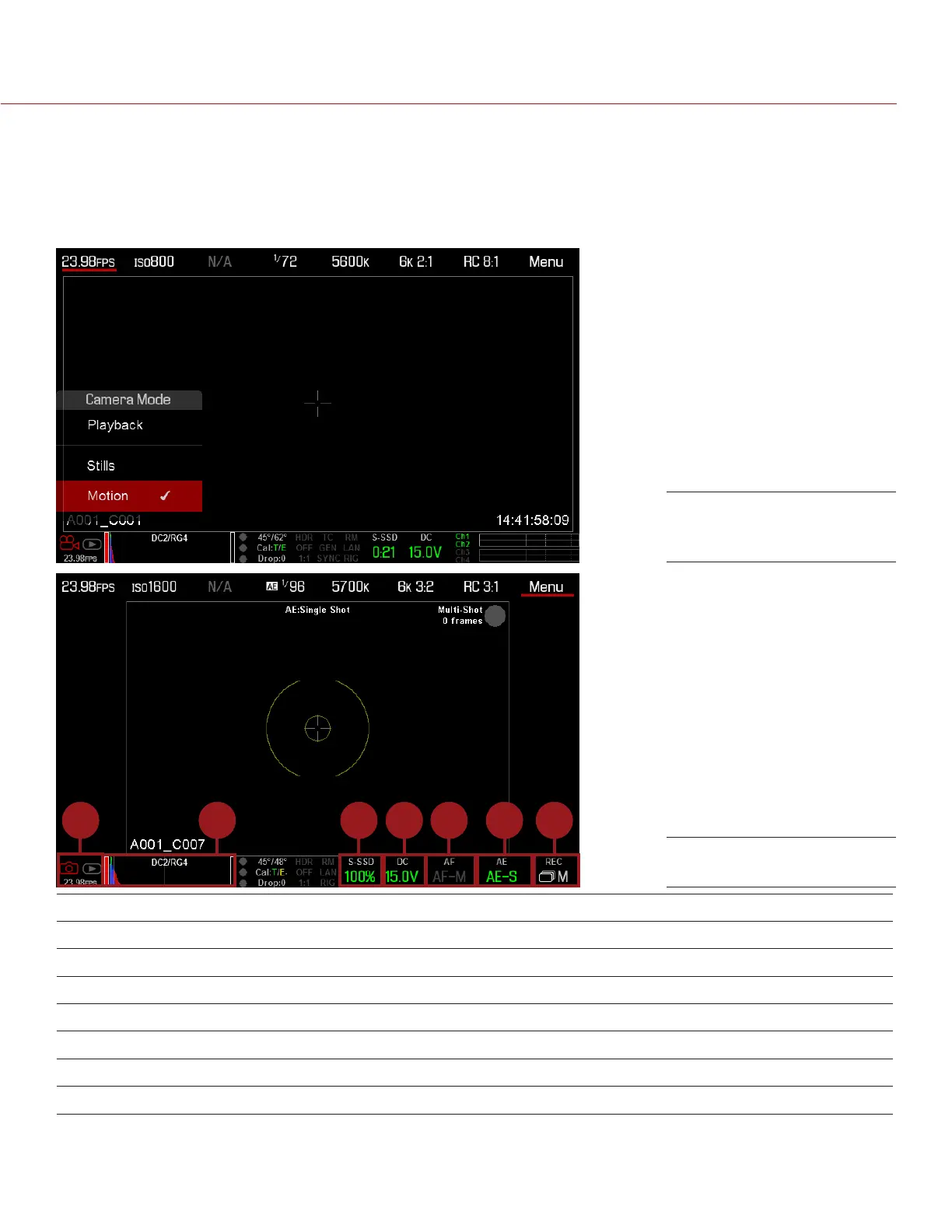
SWIPE-UP MENU
The Swipe-Up Menu is available in the Lower Status Row on RED Touch displays and provides Swipe-Up
Shortcuts for Motion mode, Stills mode, and Playback.
NOTE: Swipe-Up shortcuts are available on v6.0 firmware or later.
For example, select the Camera Mode icon in the Lower Status Bar, swipe up, and select a Camera Mode.
1 42 3 5 6 7
# SWIPE-UP SHORTCUT DESCRIPTION
1 Camera Mode
1
Select Playback, Motion, or Stills
2 Tools Set Horizon, RAW, Magnify, and False Color
3 Media View as Percentage or Time Remaining, eject media, view clip thumbnails
4 Power View as Percentage or Time Remaining
5 Auto Focus
2
Set Zone, Size, and Mode
6 Auto Exposure
2
Set Exp Comp, Speed, Metering, Priority, and Mode
7 Record Mode
2
Select Multi-Shot or Motion + Stills
1. For more information about Stills mode and Motion mode, go to “Camera Mode” on page 57.
2. Shortcuts only available in Stills Mode.
Swipe Up to Select a
Camera Mode
Stills Mode



 To Next Page