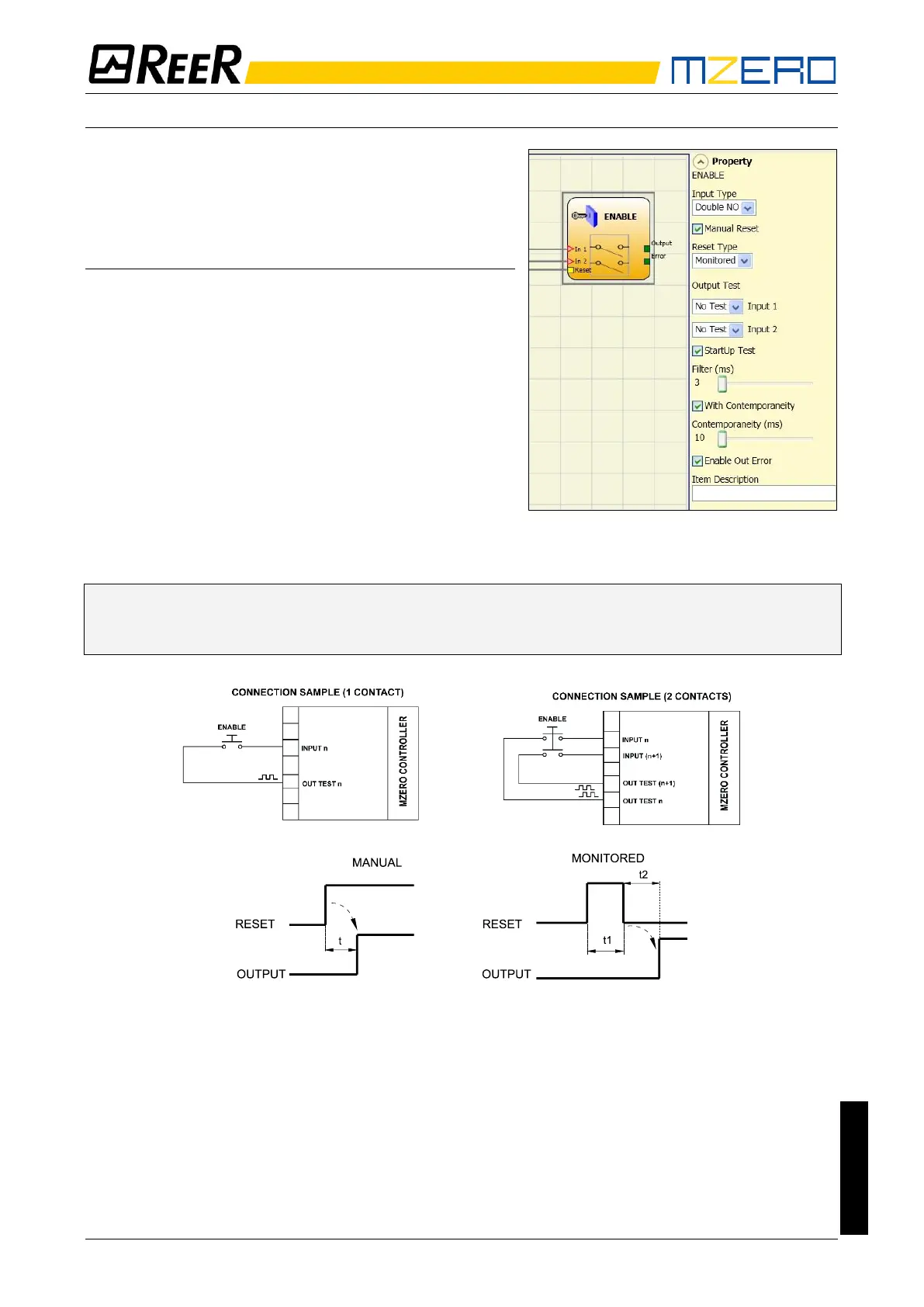
ENABLE (enable key)
ENABLE function block verifies a manual key device
Input status. If the key is not turned the output is 0
(FALSE). Otherwise the output is 1 (TRUE).
Parameters
Input type
- Single NO – Allows connection of components with
one NO contact;
- Double NO – Allows connection of components with
two NO contacts.
Enable reset: If selected this enables the request to
reset each time the command is activated. Otherwise,
enabling of the output directly follows the input
conditions.
There are two types of reset: Manual and Monitored.
When Manual is selected the system only verifies the
signal's transition from 0 to 1.
If Monitored is selected the double transition from 0 to 1 and then back to 0 is verified.
➔ If the Manual Reset is active, a consecutive Input have to be used.
Example: Input 1 and Input 2 are used for the fuctional block, then Input 3 have to be used
for the Reset Input.


 To Next Page