www.resourcedm.com
Revision 2.3 Page 15 of 72
Commissioning & Service Guide DMTouch
Warning
Please Note
The specifications of the product detailed on this
Set-Up Guide may change without notice. RDM
Ltd. shall not be liable for errors or for incidental
or consequential damages, directly and indirectly,
in connection with the furnishing, performance or
misuse of this product or document.
Ensure that all power is
switched off before
installing or maintaining
this product
Factory Default Alarm Actions
The DMTouch, when shipped, will have the following default Alarm actions;
Relay 3 All alarms
Front Panel All alarms
Console All alarms
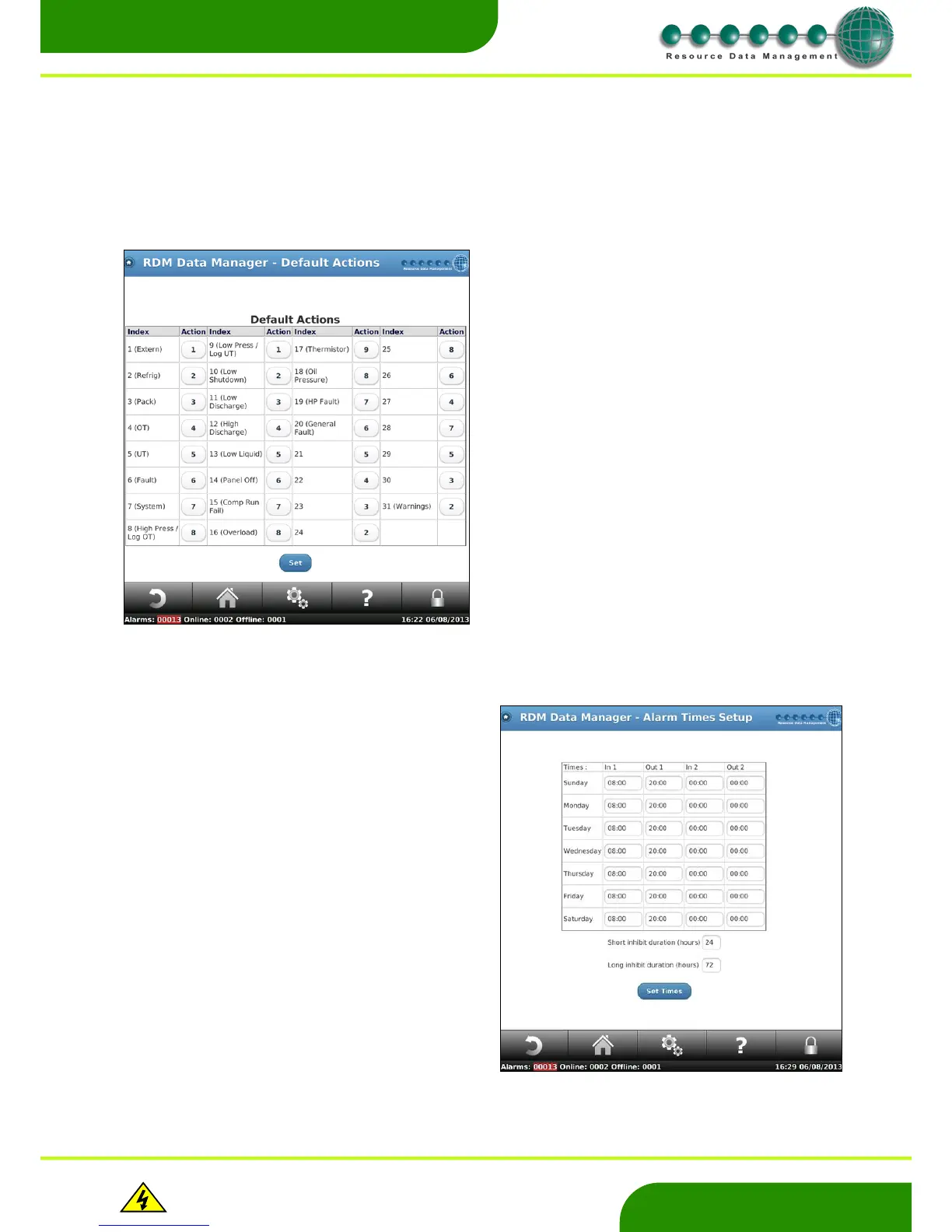
Default Actions
Alarm Times
Use this page to define the “Day” and “Night” settings used in the alarm
action setup. Each day can have 2 day periods. In1 and Out 1 define
period 1; In 2 and Out 2 define period 2. All times outside of these 2
periods are the “Night” times.
If you set In1 and Out1 for a given day of the week to 00:00 the
weekday configured would be classed as night for the 24 hour period.
In1 = Day start period 1
Out 1 = Day end period 1
In2 = Day start period 2
Out 2 = Day end period 2
Each day of the week can be configured to have a different Day/ Night
period.
Additionally, set the short and long inhibit periods from this page. The
factory set defaults times are 24 Hours for the short Inhibit and 72 Hours
for the long Inhibit.
Note: when a case is inhibited a system alarm is generated. This alarm
can be directed via alarm indexes and is configurable for each device.
The default ‘Alarm Inhibit’ index number is ‘6’ and can be changed if
required.
This allows the user to configure the default alarm index to actions.
These actions will be used by controllers as they come online, before
dedicated actions have been assigned.
Note: when replacing a controller or communication module it is
important to check that the controller has the correct Alarm Indexes and
that alarms are being directed to the appropriate Alarm Action. Ensure
the appropriate response occurs when an alarm is generated.


 To Next Page