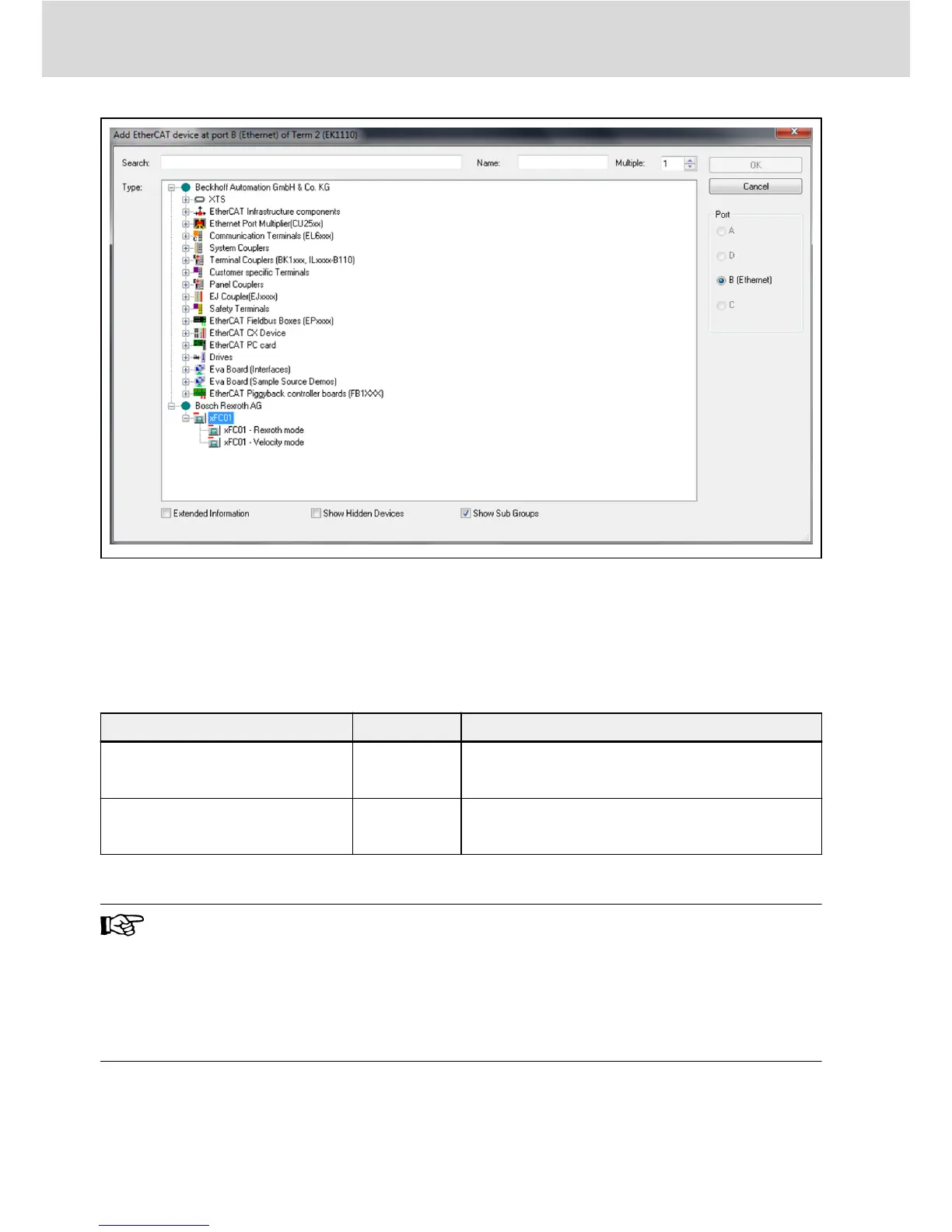
Fig. 8-1: Add EtherCAT device
8.2.2 Mode Selection
Beside the Rexroth profile mode described in chapter 4.4, the CiA 402 velocity
profile mode is also supported by MEP card when the EtherCAT protocol is ac-
tive. These two modes are selected by CAN object index [0x6060].
Mode
Value Default Process Data Configuration
Rexroth mode -128
Consumer {[H0.00], [H0.10]}
Producer {[H0.01], [d0.02]}
CiA 402 velocity mode 2
Consumer {[0x6040], [0x6042]}
Producer {[0x6041], [0x6044]}
Tab. 8-1: Mode selection
A mode selection has to be carried out before cyclic data exchange
can start. Failing to do so will make MEP deliver “invalid settings”
when switching from PreOp to SafeOp. The user parameters can be
configured freely. After changing a process data configuration, the
first switch to SafeOp yields “unknown” error. A second attempt
should succeed and no errors are thrown in case the process data
configuration did not change.
8.2.3 Topology
The line topology is supported.
Bosch Rexroth AG
EtherCAT
Multi-Ethernet Card
44/61
DOK-RCON0*-XFCX610*MUL-IT02-EN-P


 To Next Page