7.2 System Configuration
7.2.1 XML file
The SDDML and SPDML xml files are provided to add the EFCx610 to the device
database of IndraWorks Engineering.
Users can download the XML file through the following steps:
1. Click on http://www.boschrexroth.com/dcc.
2. Choose “Frequency converter -> EFC 3610 (or EFC 5610)” from the naviga-
tion bar on left-hand side of the operation interface.
3. Choose “Download area” tab from right-hand side of the interface.
4. Click on “DEVICE_DESCRIPTIONS_MULTI-ETHERNET_EFCX610_xxxx-xx-
xx.ZIP” to download the ZIP file.
5. Extract the ZIP file and get the XML file.
"xxxx-xx-xx" indicates the date.
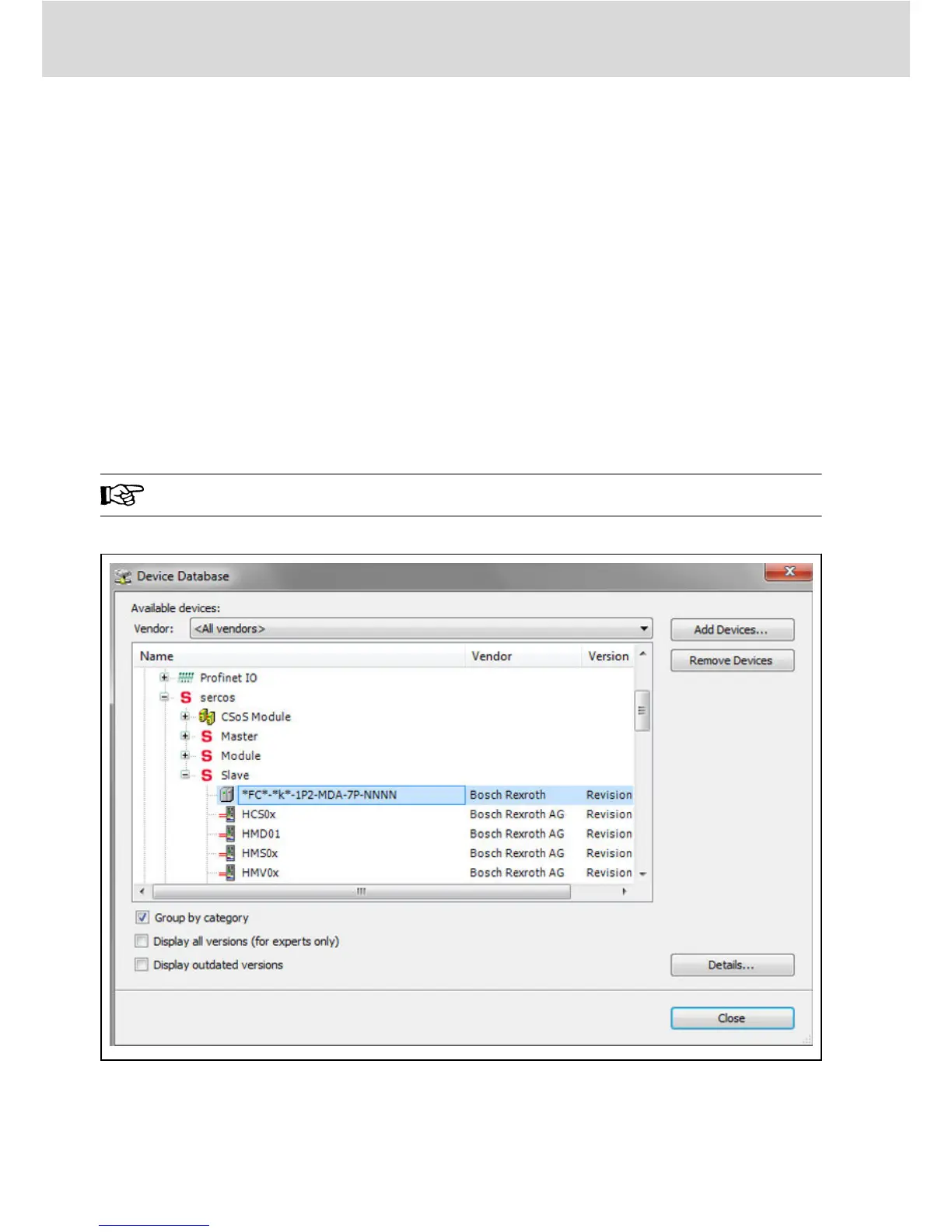
After installation, you can find the device in device database as showing below.
Fig. 7-2: Device database
Bosch Rexroth AG
SERCOS III
Multi-Ethernet Card
32/61
DOK-RCON0*-XFCX610*MUL-IT02-EN-P


 To Next Page