116
Setup Files
Setting a start up le
When a setting is saved in a start up le, the unit can be started using the
setting.
1. Set the unit to the intended condition, so that measurement parameters
and other settings are as desired.
2. Use the keys to select [System (Language)] and press
the MENU/ENTER key. The system screen appears.
3. Use the
keys to select [Read/Save setting] and press the MENU/
ENTER key. The setting operation screen appears.
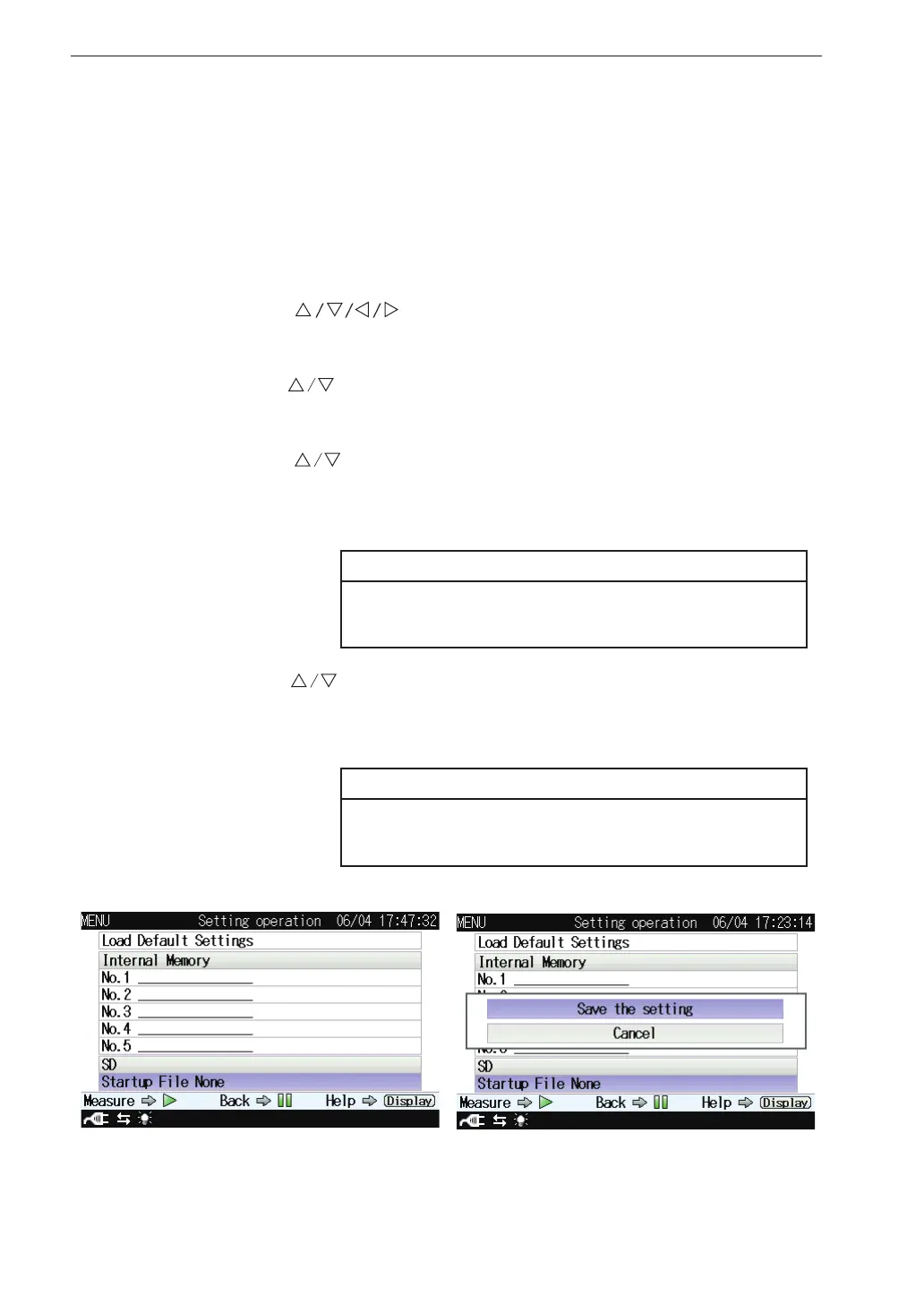
4. Use the
keys to select [Startup File None] of [SD] and press
the MENU/ENTER key. The [Save the setting]/[Cancel] selecting
screen appears.
Note
When a start up le has already been saved, select
[Startup File Exist].
5. Use the keys to select [Save the setting] and press the MENU/
ENTER key. When “The setting was saved” is displayed, it means
that the saving process has been completed.
Note
When selecting [Startup File Exist] to overwrite the
data, select [Yes] on the con rmation screen.



 To Next Page