Advanced Features
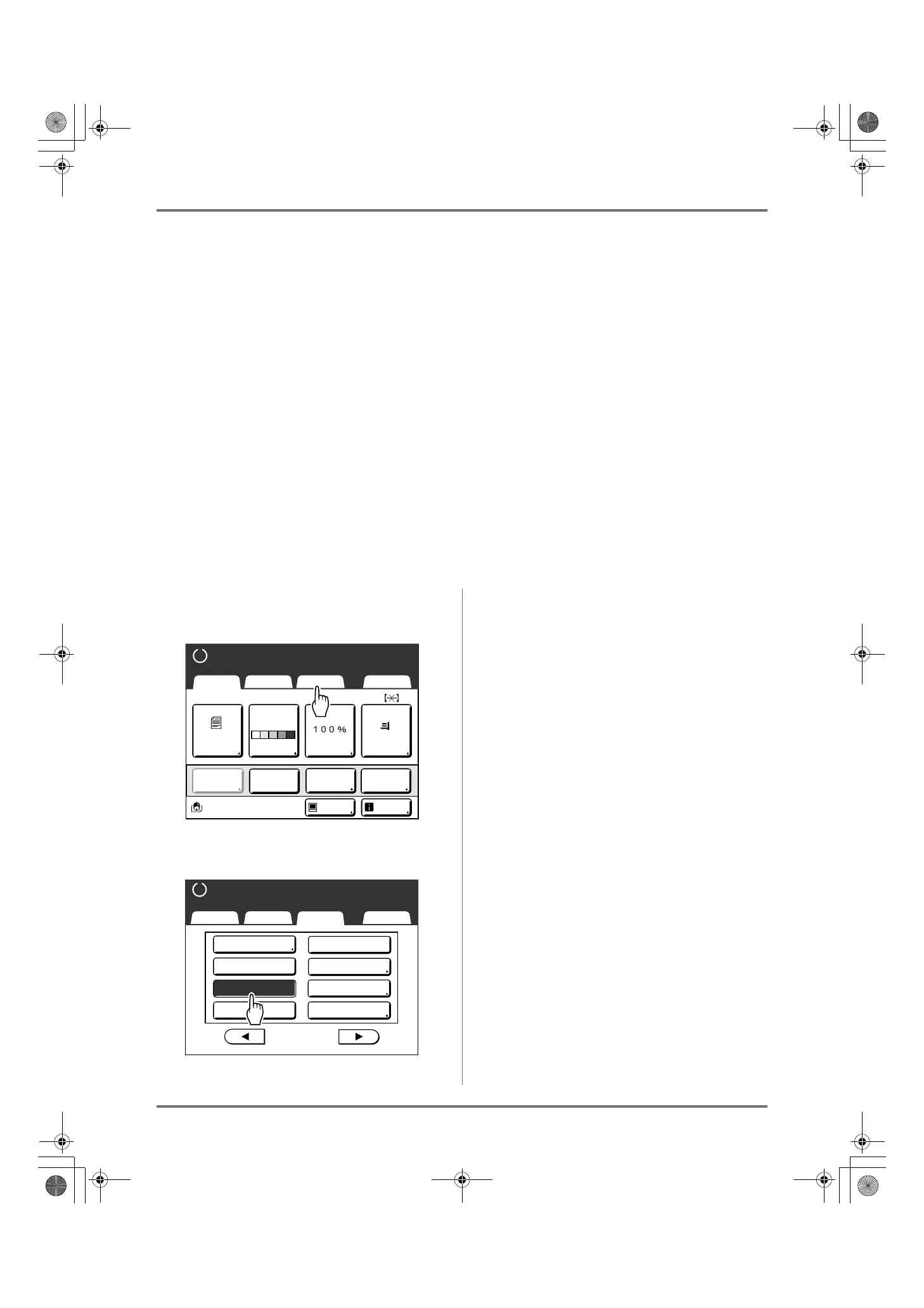
Extending the Reserve Period [Reservation]
142
Extending the Reserve Period [Reservation]
This function is useful when the machine is connected to a computer. When the machine is inactive for a certain
period of time, it determines that the current job is completed, even if the actual printing is still under way.
If another person accidentally initiates another job from the computer, this will cause a new master to be made, dis-
carding the current one.
By extending “Reserve Period”, such interruption can be prevented. We recommend that you activate the “Reserva-
tion” setting when temporarily pausing a job or when printing leaflets, etc. to prevent interruption.
Note:
• Select from 5, 10, or 30 minutes as the “Reserve Period” on the Admin. screen. The factory default is 5 minutes.
)p.161
• The following operations do not count towards reservation period.
– When the machine is operating (making a master, printing, confidential action, idling, etc.)
– When the Job Separator (option) is operating
– When Control Panel buttons are being entered
– When the setup screen for some function is displayed
• Auto Sleep and Auto Power-OFF will be disabled during the reservation period.
Auto Sleep/Auto Power-OFF: timer re-activates after the reservation period is up.
Power-OFF Schedule: Will not shut off until next day on time.
)p.162
1
Touch [Functions] on the Master
Making Basic Screen.
2
Touch [Reservation].
Reservation period is extended.
A4
Black
Page(A4)
Basic Selections Functions Admin.
Contrast Size Paper
Idle Info
Ready to Make Master
Reserva-
tion
Multi-Up
Print
Editor
Dot
Process
Line
Auto
Basic Selections Functions Admin.
Ready to Make Master
P
.
Max. Scan
Side Margin
2/4
Reservation
ADF Semi-Auto
USB Job List
Storage Memory
Overlay
Preview
REG-ML_EN.book Page 142 Wednesday, September 21, 2011 5:19 PM



 To Next Page