Functions for Master-Making
Adjusting Photo Gradation [Tone Curve]
67
Adjusting Photo Gradation [Tone Curve]
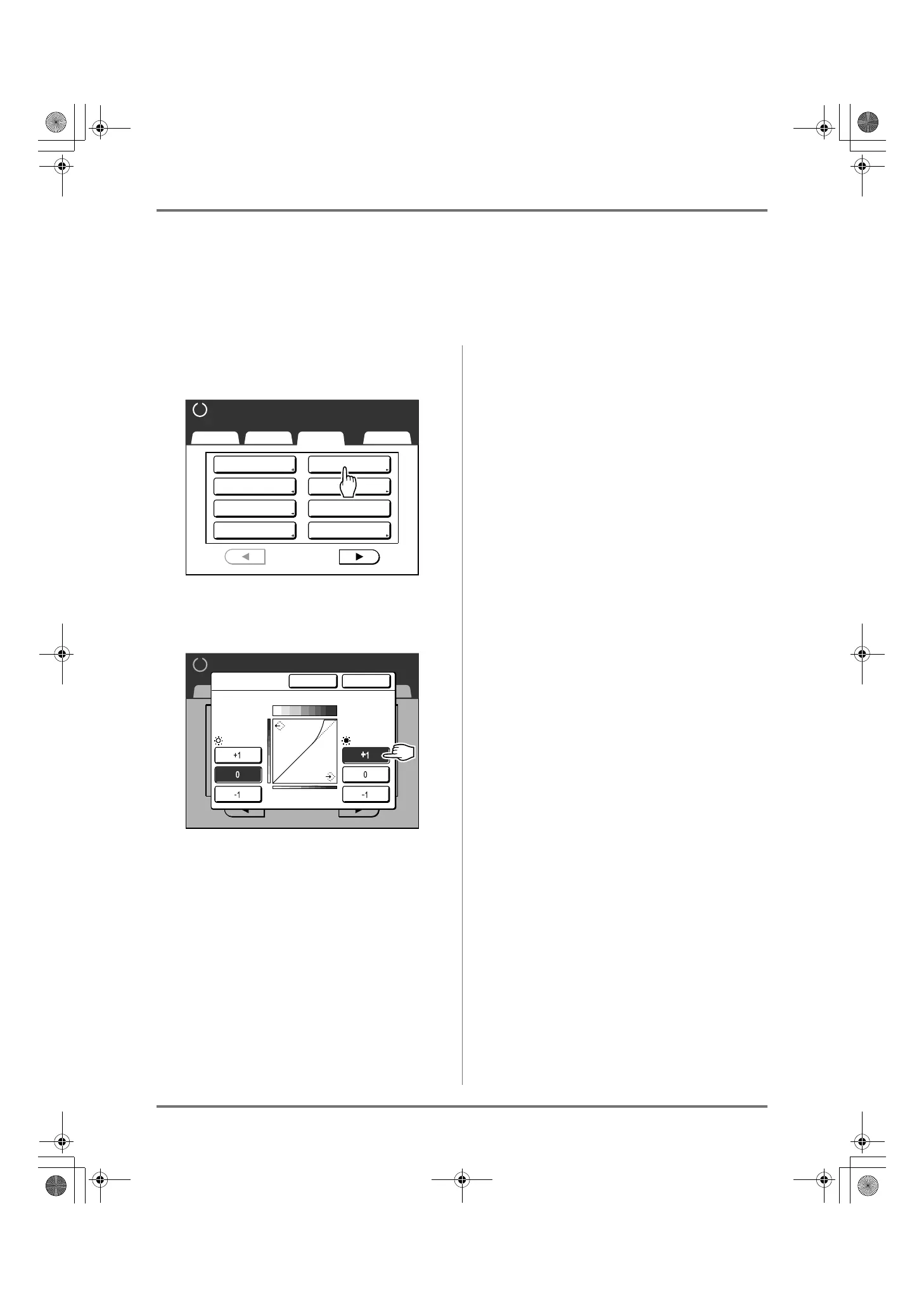
You can adjust the light and shadow portions of a photo by 3 tones respectively.
Important!:
• If the “Image” is set to “Line”, “Tone Curve” cannot be used.
1
Touch [Tone Curve] on the Func-
tions Screen.
2
Touch the “Lights” and “Shadows”
adjustment buttons.
• Lights: Adjusts the portion of the picture most
exposed to light.
• Shadows: Adjusts the portion of the picture
least exposed to light.
Use [+1] or [-1] to strengthen or weaken each
respectively.
3
Touch [OK].
Returns to the Functions screen. “Tone Curve”
setting is updated.
Basic Selections Functions Admin.
Ready to Make Master
P
.
Program
Book Shadow
2 Up
1/4
Job Memory
Dot Process
Multi-Up Print
Contrast Adj
Tone Curve
Ready to Make Master
P
.1/4
Basic Selections Functions Admin.
Cancel OK
Tone Curve
Lights Shadows
Gradation Image
REG-ML_EN.book Page 67 Wednesday, September 21, 2011 5:19 PM



 To Next Page