Getting Acquainted
Display
30
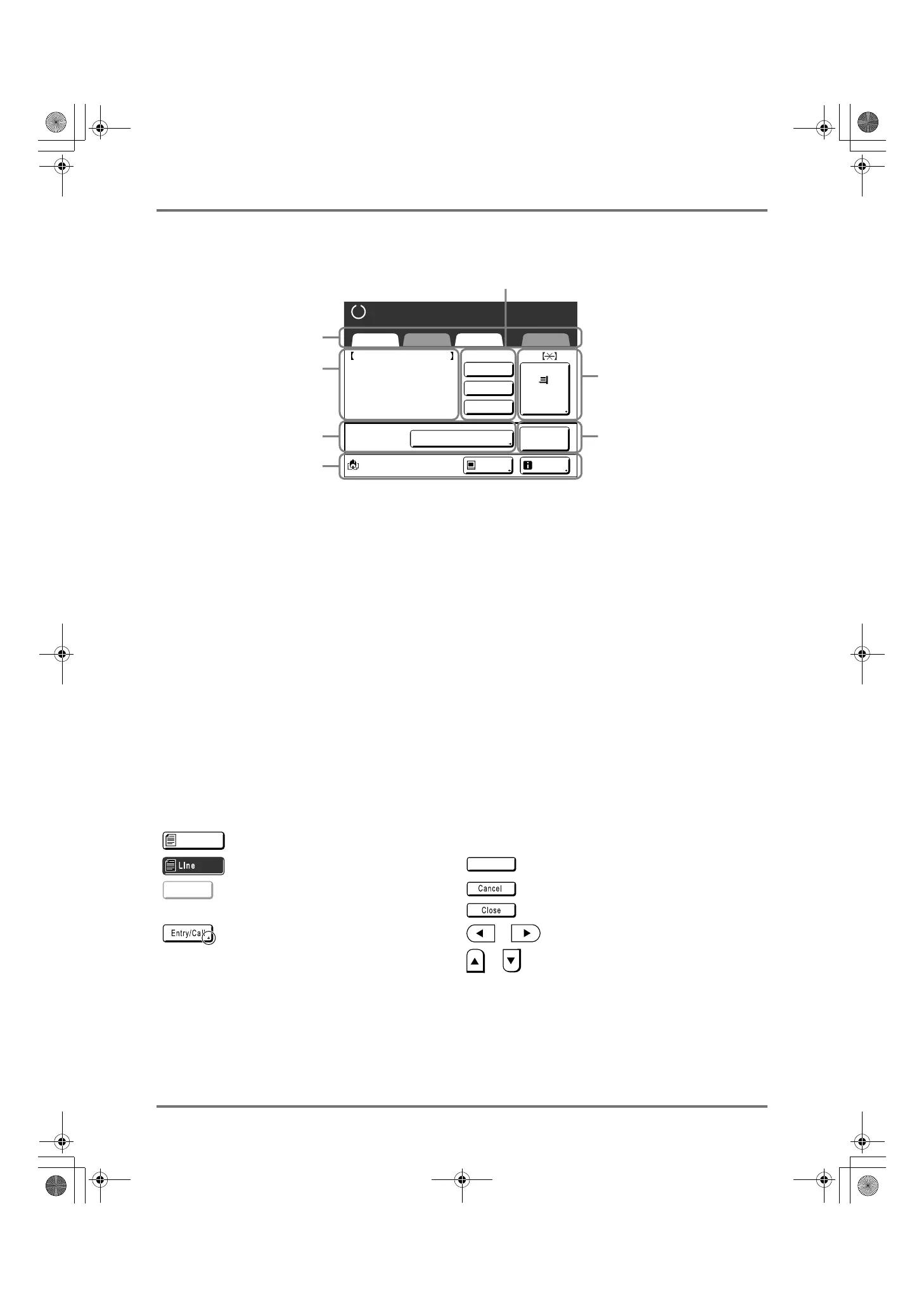
Printing from a Computer Data
1) Tab Area
(“Selections” and “Admin.” tabs are disabled)
Touch a tab to display its screen.
2) Job* Properties Area
Properties of the current print job is displayed.
*Refers to the computer data ready for print output.
3) Job Operation Area
• [Renew Page]: Create another master when current
one is damaged or compromised, without having to
download data from the computer.
• [Preview]: Displays the master making image of the
page currently awaiting creation. (Available only in the
Master Making Basic Screen.)
• [Skip Page]: Stops processing the current page and
moves on to process the next page.
• [Clear All]: Stops the current process altogether.
4) Paper Button
)p.63
5) Auto Print
A printing operation can be set to stop at certain points.
(overrides driver settings)
)p.54
6) Optional Device Area
Displays when an optional device is attached.
Touch to activate.
7) Status Area
Displays the current status of the machine.
This area shows the same information as that on the
“Printing from a paper Document” screen.
Buttons on Touch Screen
Select buttons by lightly touching with a finger.
Touch again to cancel the selection. Avoid pressing with excessive force.
A4
Black
Basic Selections Functions Admin.
Paper
Process:
Job
Separation
Info
Ready to Make Master
Document_1.doc
Owner
ReceiptTime
Format
P.1/10
Skip Page
Clear All
Pause before "Master"
Pause
: A4
: 30/09/11 05:30
: RISO
Preview
1
3
4
6
2
5
7
Not Selected. Frequently Used Buttons
Selected. Activates/Executes a setting.
Buttons in gray cannot be selected. Cancels a setting.
Closes a current window.
Press a button with a + on the right
side to expand options or display
Setup screens.
Switch pages.
Increases/decreases selected values
(numbers, location, etc.).
Scrolls through screens.
Line
OK
Revise
REG-ML_EN.book Page 30 Wednesday, September 21, 2011 5:19 PM



 To Next Page