Maintenance
Cleaning
222
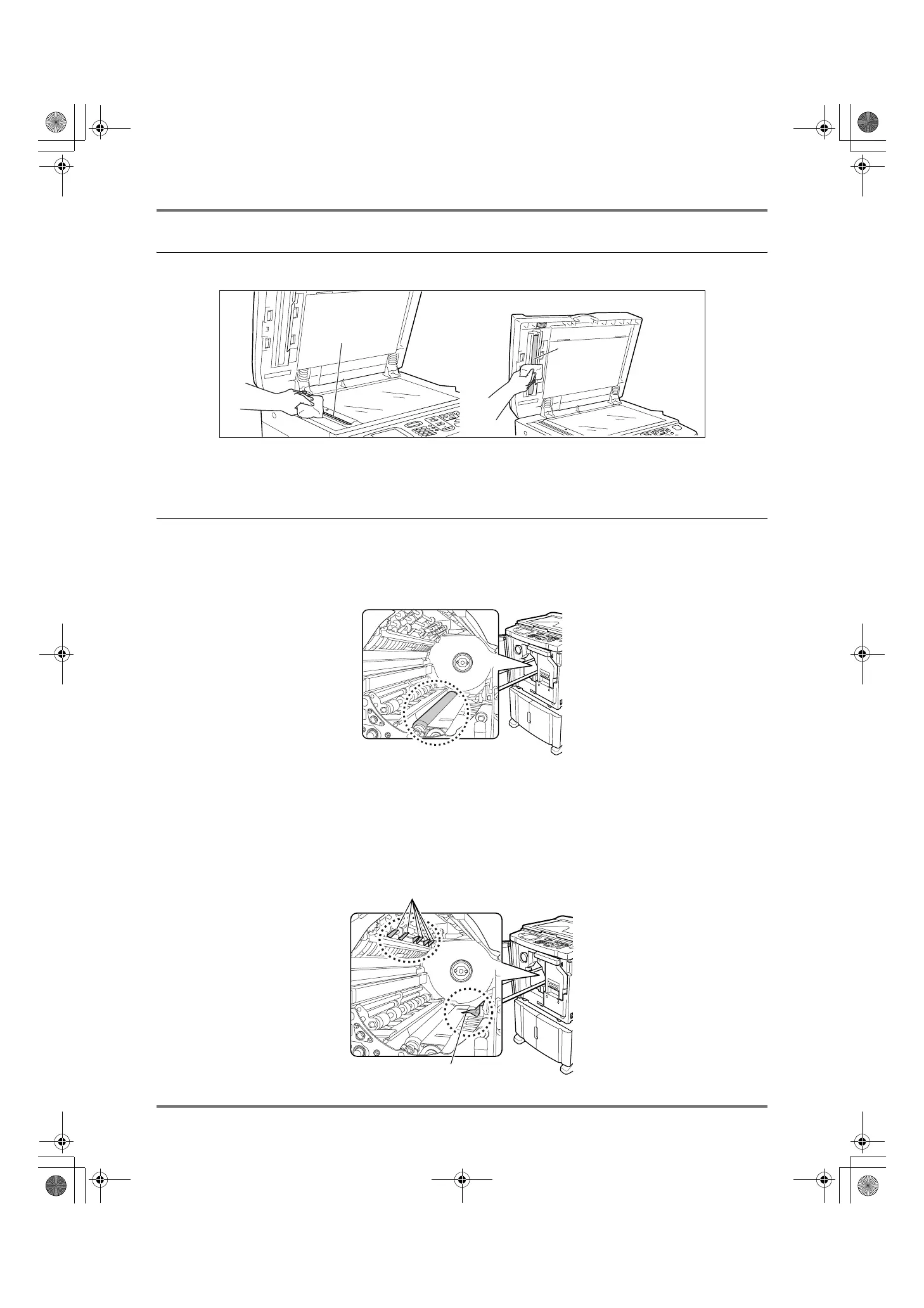
Scanner Glass and White Roller of ADF unit (Option)
Gently wipe the Scanner Glass, and the White Roller several times with a soft cloth or tissue.
BCaution:
• Since the Glass Platen is very delicate, avoid shocks or scratches with a hard object.
Pressure Roller
If the Pressure Roller, which presses print paper against the Print Drum (Cylinder), is stained, smudged strips may
appear on the back of copies.
If this happens, gently wipe the Pressure Roller with a soft cloth dampened with alcohol.
To remove the Print Drum (Cylinder), see )p.215.
BCaution:
• Be sure to turn OFF power to the machine when cleaning the Pressure Roller.
• When putting your hand into the unit, do not touch the paper separation hook or master removal hook. The sharp
tips of the hooks can hurt your hand.
• Ink may be left on the area near the Print Drum (Cylinder), so take care not to smudge your hands or clothes. Wash
immediately with soap if you should get ink on your hands, etc.
Scanner Glass
White Roller
Separation Hook
Master Removal Hook
REG-ML_EN.book Page 222 Wednesday, September 21, 2011 5:19 PM



 To Next Page