Changing the Print Speed [Print Speed Adjustment]
92
Functions for Printing
Changing the Print Speed
[Print Speed Adjustment]
You can select the print speed from five levels; from 60 to 130 pages/minute.
The print speed may be changed while printing is in progress.
Note:
• The default print speed can be set on the Admin. screen.
The factory default is level 3 (approximately 100 pages/minute).
)p.159
• When the “ECO mode” is selected, the initial setting for the print speed is set to “3”.
The print speed can be adjusted even while the ECO mode is set to “ON”.
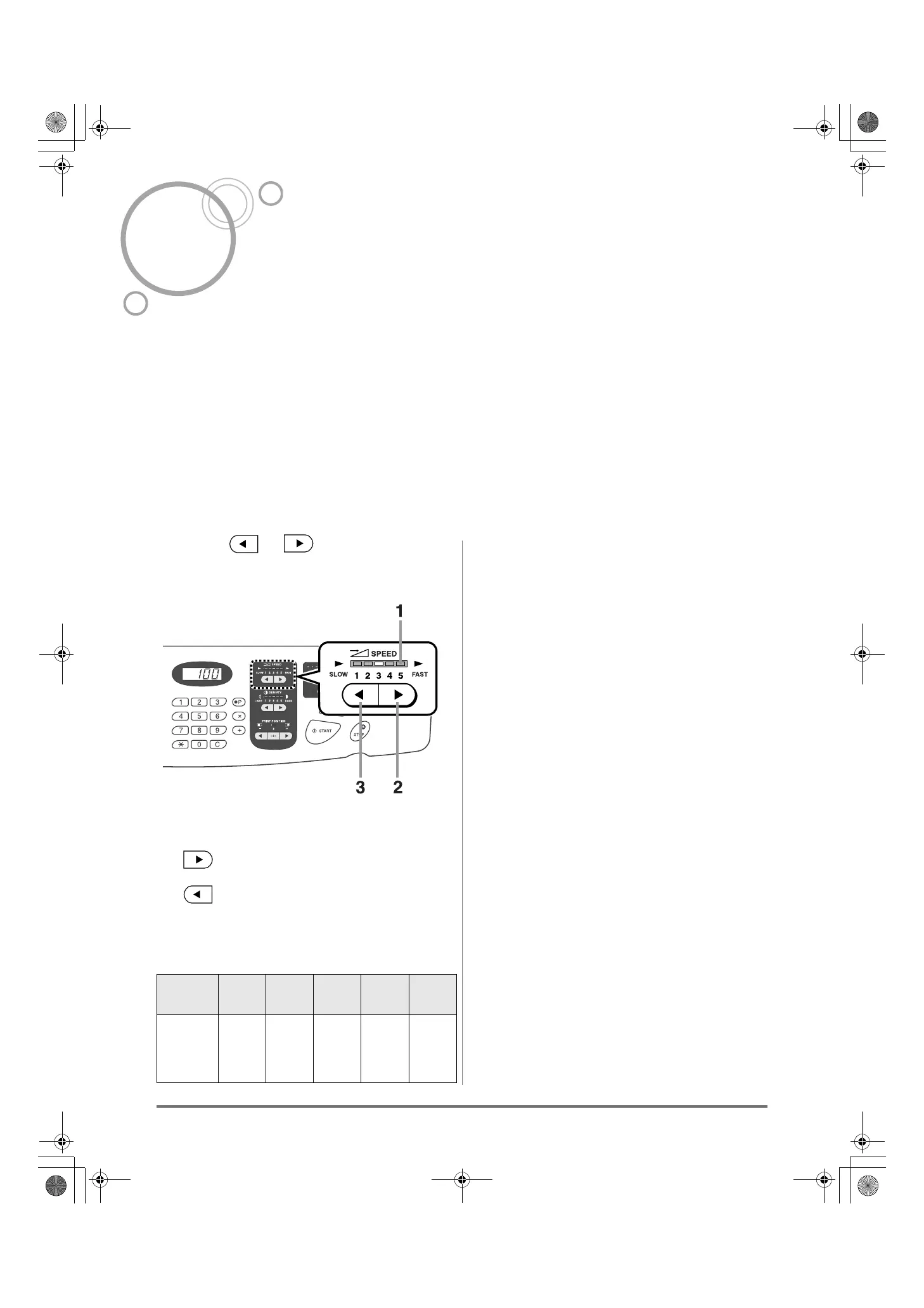
Press the or key to change the
print speed.
1) Print Speed Adjustment Indicator
Shows the current print speed.
2) Key
Increases the print speed incrementally.
3) Key
Decreases the print speed incrementally.
Indicator level and print speed
Indicator
Level
1 2 3 4 5
Print
Speed
(pages/
minute)
Approx.
60
Approx.
80
Approx.
100
Approx.
120
Approx.
130
REG-ML_EN.book Page 92 Wednesday, September 21, 2011 5:19 PM



 To Next Page