Functions for Master-Making
Printing Multiple Originals on One Sheet [2 Up] [Multi-Up Print]
76
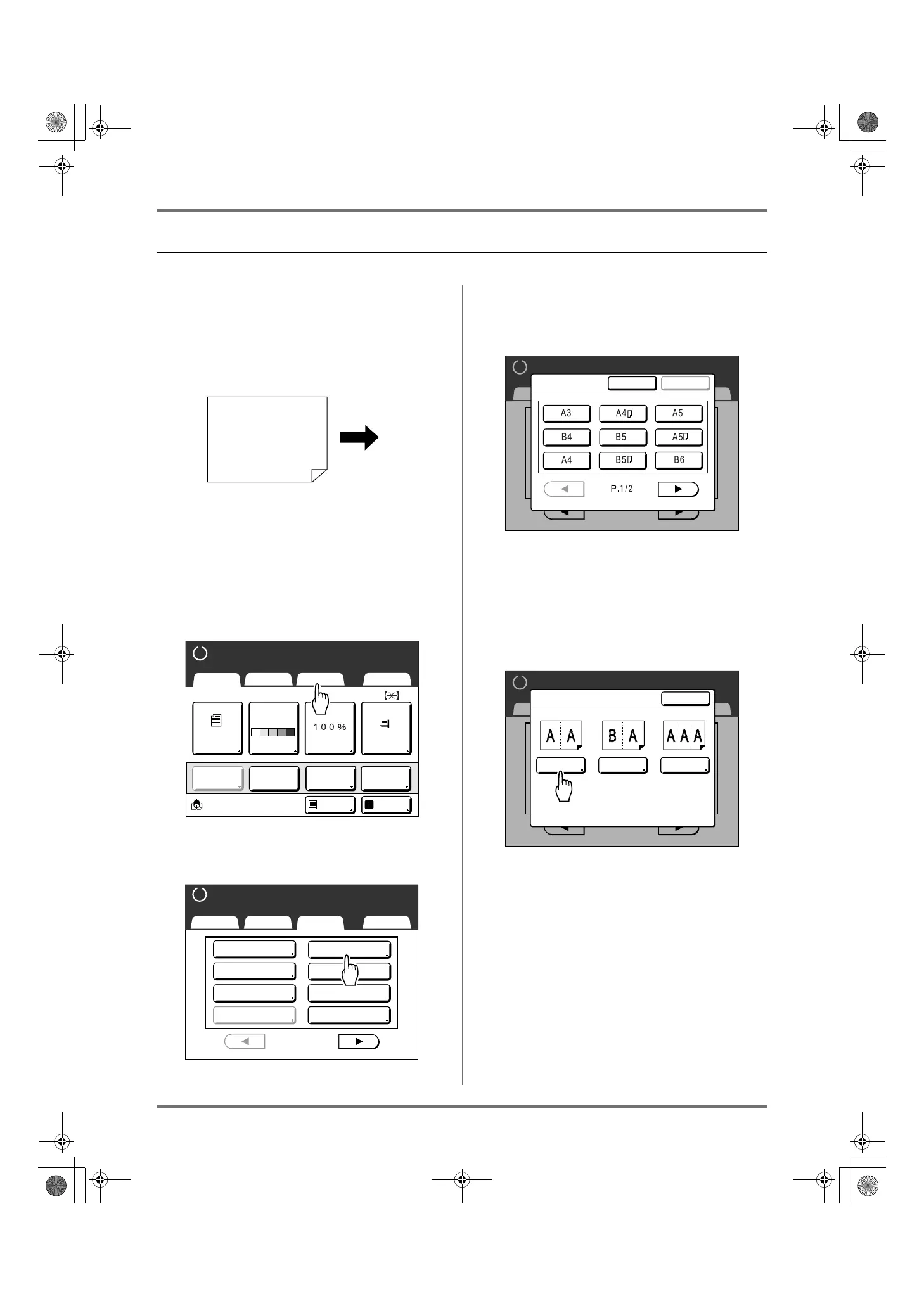
Operation for Multi-Up Printing
1
Set the original and print paper.
Important!:
• Pay attention to the orientation of the original.
)p.70
• Make sure to load paper as shown below.
Note:
• It is convenient to place all originals in the ADF
unit (Option) when using the “Multiple-Original”
mode. )p.37
2
Touch [Functions] on the Master
Making Basic Screen.
3
Touch [Multi-Up Print].
4
Select a Page size to use.
Touch the button to match the original size and
touch [Next>].
The enlarging/reducing is automatically set and
the Multi-Up Print screen is displayed.
5
Touch [Single] for Single-Original,
touch [Multiple] for Multiple-Origi-
nal.
Except for the original placement method, opera-
tions for “Single-Original” and “Multiple-Original”
are basically the same. This example is for “Sin-
gle-Original”.
Paper output
direction
A4
Black
Page(A4)
Basic Selections Functions Admin.
Contrast Size Paper
Idle Info
Ready to Make Master
Reserva-
tion
Multi-Up
Print
Editor
Dot
Process
Line
Auto
Basic Selections Functions Admin.
Ready to Make Master
P
.
Program
Meter Display
1/4
Job Memory
Dot Process
Top Margin
Book Shadow
2 Up
Multi-Up Print
P
.1/4
Basic Selections Functions Admin.
Ready to Make Master
Page Size
Cancel
Next >
P
.1/4
Basic Selections Functions Admin.
Ready to Make Master
Close
Multi-Up Print
TicketMultipleSingle
REG-ML_EN.book Page 76 Wednesday, September 21, 2011 5:19 PM



 To Next Page