Getting Acquainted
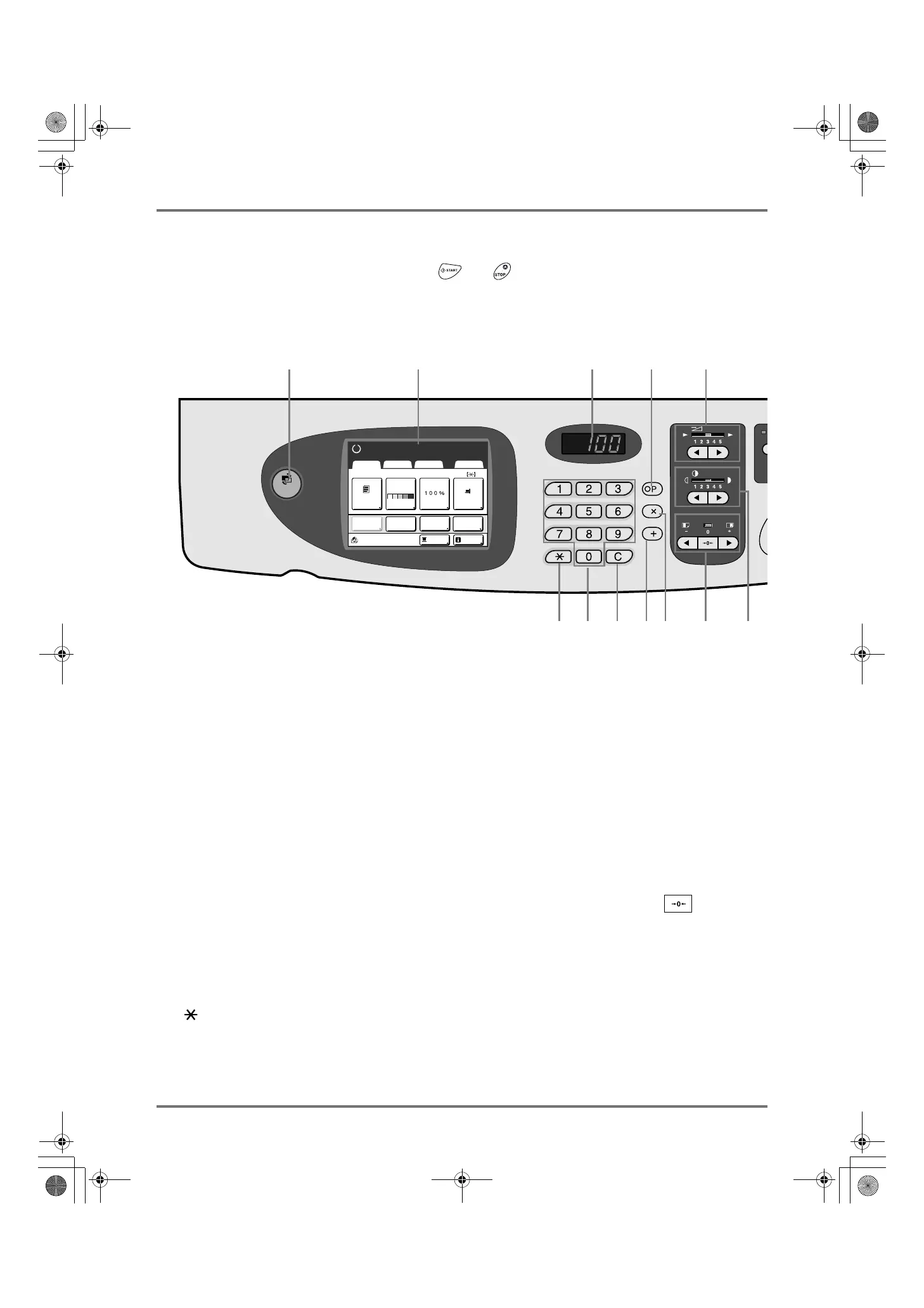
Control Panel
22
Control Panel
The Control Panel features permanent keys such as and . It also has a large-size display that shows var-
ious messages and function buttons.
This section introduces hardware Key names and functions, as well as the display window and its functions.
1) MODE Key ()p.24)
Use to change modes.
2) Display ()p.24 ∼ p.30)
3) Print Quantity Display
Displays the number of copies, or numeric values
entered for various settings.
4) P Key ()p.126)
Use to retrieve stored programs. The indicator on the key
lights when set.
5) × Key ()p.126)
Use to move between fields in setup screens, or set up
programed printing.
6) + Key ()p.126)
Use to move between fields in setup screens, or set up
programed printing.
7) C Key
Cancels entered numerical values, or reset the counter
to 0.
8) Print Quantity Keys (0 to 9 Keys)
Use to enter the number of copies, or the numerical val-
ues for various settings.
9) Key ()p.126, )p.134)
Use to move between fields in setup screens, or retrieve
stored memory.
10) Print Speed Adjustment Keys/Indicator
()p.92)
Selects the print speed from five levels.
The indicator above the keys shows the current speed
level.
11) Print Density Adjustment Keys/Indicator
()p.93)
Selects the print density from five levels.
The indicator above the keys shows the current density
level.
12) Vertical Print Position Adjustment Keys/
Indicator ()p.94)
Adjusts the print position in the vertical direction (within
±15 mm (±
19
/
32
")) after making a master.
The indicator above the keys shows the offset amount
from the center.
To clear the offset amount, press .
MA
SPEED
DENSITY
PRINT POSITION
SLOW FAST
LIGHT
DARK
MODE
A4
Line
Black
Page(A4)
Basic Selections Functions Admin.
Contrast
Auto
Size Paper
Idle
Reserva-
tion
Info
Ready to Make Master
Multi-Up
Print
Editor
12 34
56789
10
1112
Dot
Process
REG-ML_EN.book Page 22 Wednesday, September 21, 2011 5:19 PM



 To Next Page