Troubleshooting
When a Message Displays
231
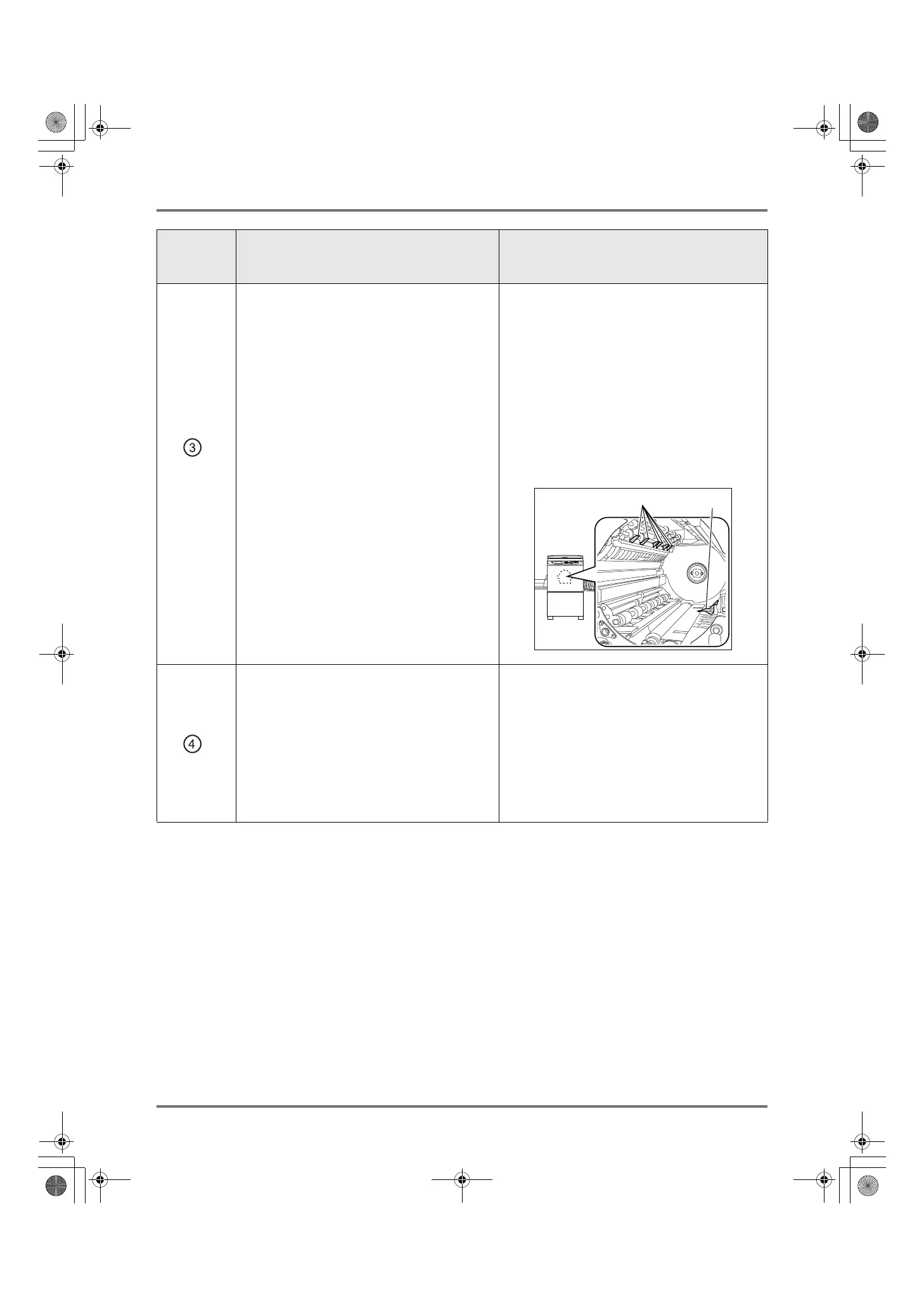
Paper is jammed in the Print Drum (Cylinder)
area.
1) Pull out the Print Drum (Cylinder).
)p.215
2) Remove the jammed paper.
3) Return the Print Drum (Cylinder) in place.
4) Touch [OK].
BCaution:
• Do not touch the separation hook or master
removal hook when putting your hand into the
unit to remove paper. The sharp tips of the
hooks can hurt your hand.
Paper did not eject correctly.
1) Check for any jammed paper on the paper
exit area.
2) Touch [OK].
Note:
• When using special paper, adjust the
Paper Arranger on the Receiving Tray
Paper Guides according to the paper
characteristics.
)p.32
Area
Indicated/
Blinking
Possible Cause Action
Separation Hook
Master Removal Hook
REG-ML_EN.book Page 231 Wednesday, September 21, 2011 5:19 PM



 To Next Page