Basic Operations
Preparing to Print
33
4
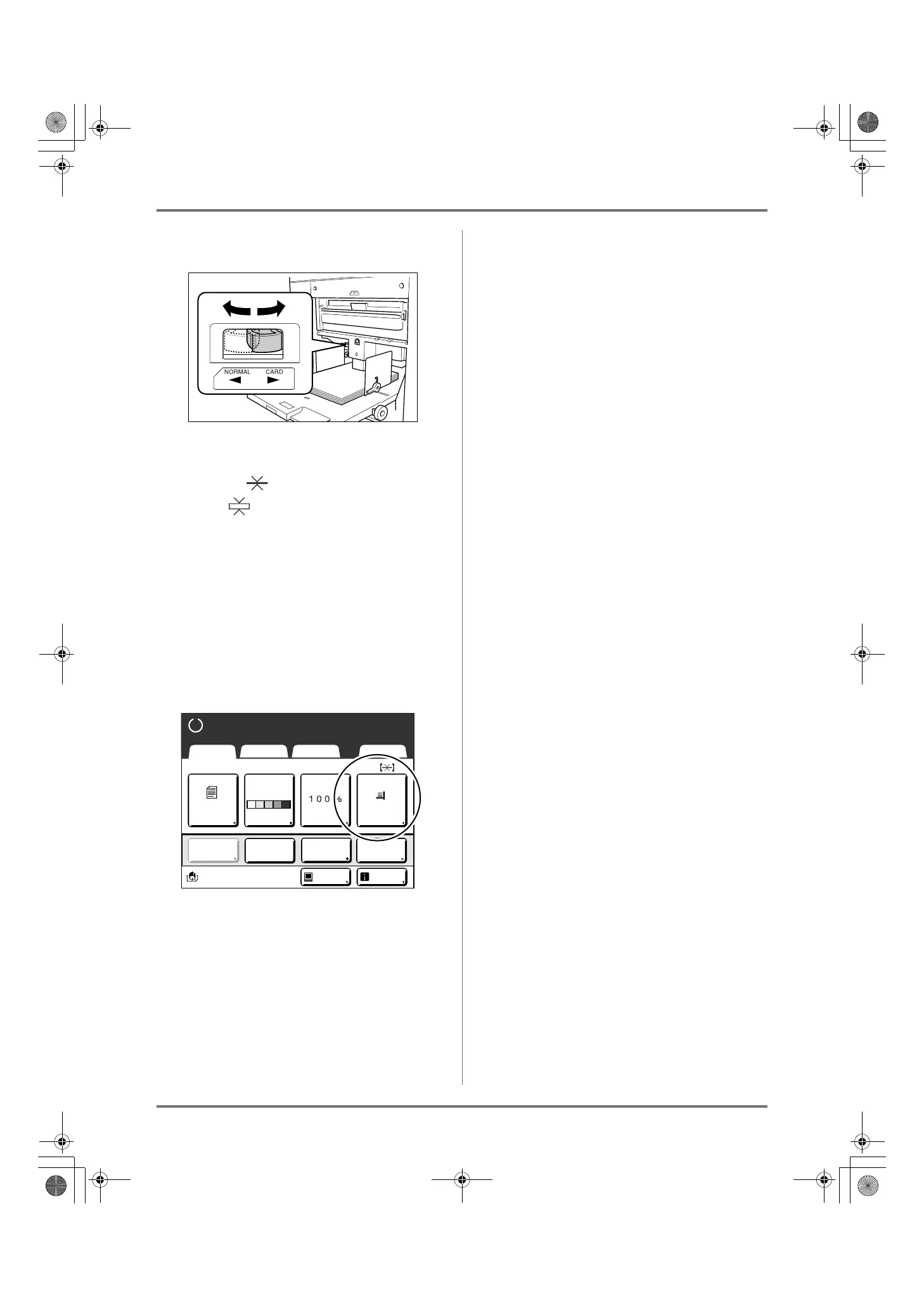
Select the paper feed pressure.
Position the Paper Feed Pressure Adjustment
Lever according to the finish of the paper.
NORMAL ( ): For standard or thin paper
CARD ( ): For thick or smooth-surface paper
Note:
• The setting condition of the paper feed pressure
is displayed at the top of the [Paper] button on
the Basic Screen.
5
Check the Basic Screen.
1) Select a mode.
2) Touch [MasterMake] on the Operation
Selection Screen.
The Master Making Basic Screen appears.
Note:
• Paper size is automatically detected. If the size
display shows [Custom] even if a standard-
sized paper is loaded, the Feed Tray Paper
Guides are not properly set against the paper.
Make sure that the paper fits tightly against the
Feed Tray Paper Guides.
)p.32
A4
Line
Black
Page(A4)
Basic Selections Functions Admin.
Contrast
Auto
Size Paper
Idle Info
Ready to Make Master
Reserva-
tion
Multi-Up
Print
Editor
Dot
Process
REG-ML_EN.book Page 33 Wednesday, September 21, 2011 5:19 PM



 To Next Page