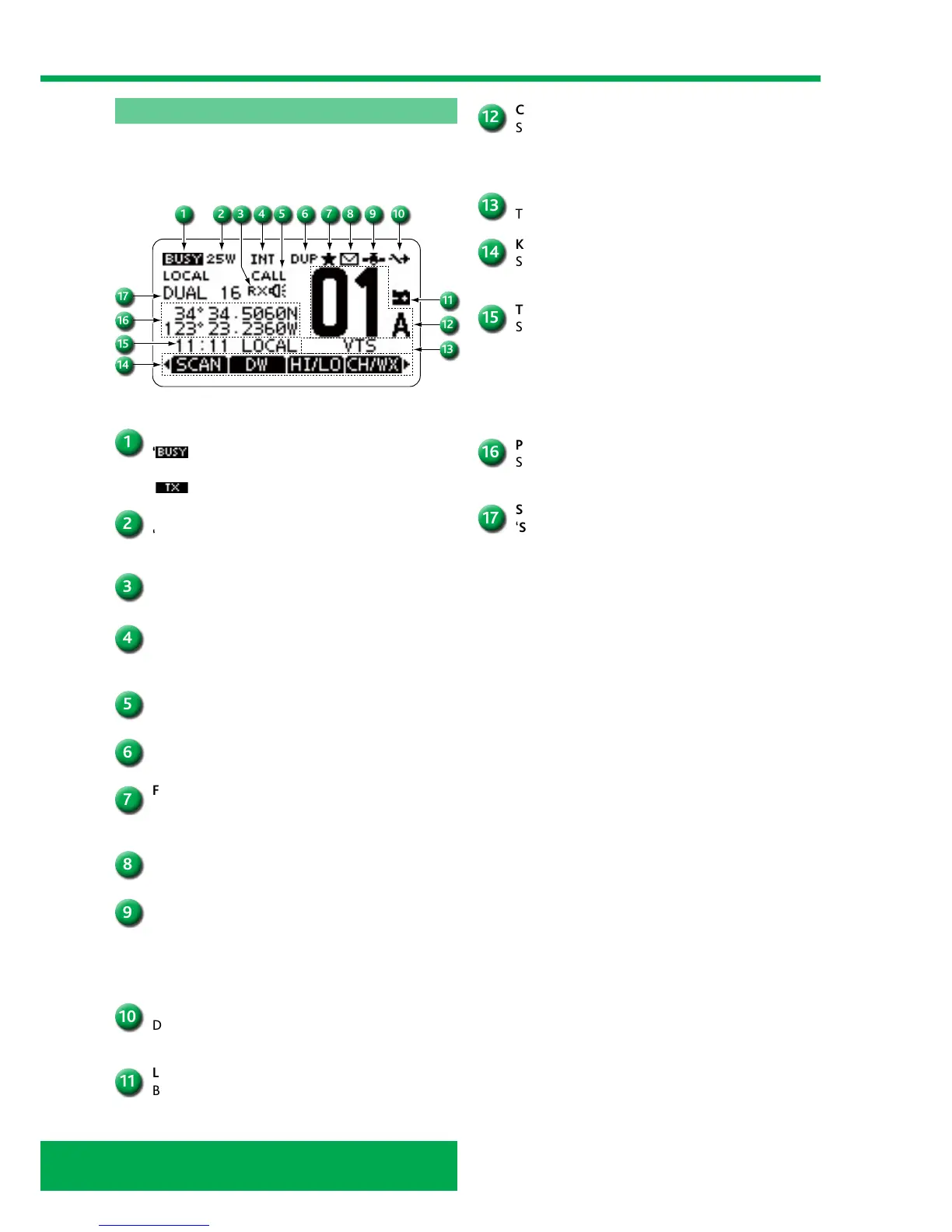
CHANNEL NUMBER READOUT
Shows the selected operating channel number.
• When a simplex channel is selected, “A”
is displayed.
CHANNEL NAME FIELD
The channel name is displayed, if entered.
KEY ICON
Shows the preset function of the softkeys on the
front panel.
TIME ZONE INDICATOR
Shows the current time when GPS data is received,
or the time is manually entered.
• When the GPS current time is invalid, ‘??’ will
blink every 2 seconds instead of the current time.
After 23.5 hours has passed, ‘NO TIME’
is displayed.
POSITION INDICATOR
Shows the current position when position data is
received, or the position is manually entered.
SCAN INDICATOR
‘SCAN 16’ is displayed during a Priority scan.
‘SCAN’ is displayed during a Normal scan.
‘DUAL 16’ is displayed during Dualwatch.
‘TRI 16’ is displayed during Tri-watch.
ICOM IC-M423G function display
The graphic below shows the display with all of its functions
visible. The key following explains these functions.
BUSY/TRANSMIT ICON
‘
’ is displayed when receiving a signal or when
the squelch is open.
‘
’ is displayed while transmitting.
POWER ICON
‘25W’ is displayed when high power is selected.
‘1W’ is displayed when low power is selected.
RX SPEAKER ICON
Displayed while in the RX Speaker mode.
CHANNEL GROUP ICON
Shows which channel group is selected, INT, USA,
CAN, ATIS or DSC, depending on the version.
CALL CHANNEL ICON
Displayed when the Call channel is selected.
DUPLEX ICON
Displayed when a duplex channel is selected.
FAVORITE CHANNEL ICON
Displayed when a Favorite (Tag) channel is
selected.
MESSAGE ICON
Blinks when there is an unread DSC message.
GPS ICON
Stays ON when the built-in GPS receiver* or an
external GPS receiver is receiving valid position
data.(*For only IC-M423G and IC-M424G.)
Blinks when searching for valid position data.
SWITCH ICON
Displayed when the ‘CH 16 SWITCH’ in DSC
Settings is set to OFF.
LOW BATTERY ICON
Blinks when the battery voltage drops to
approximately 10 V DC or less.



 To Next Page