INFORMATION ABOUT THE USE
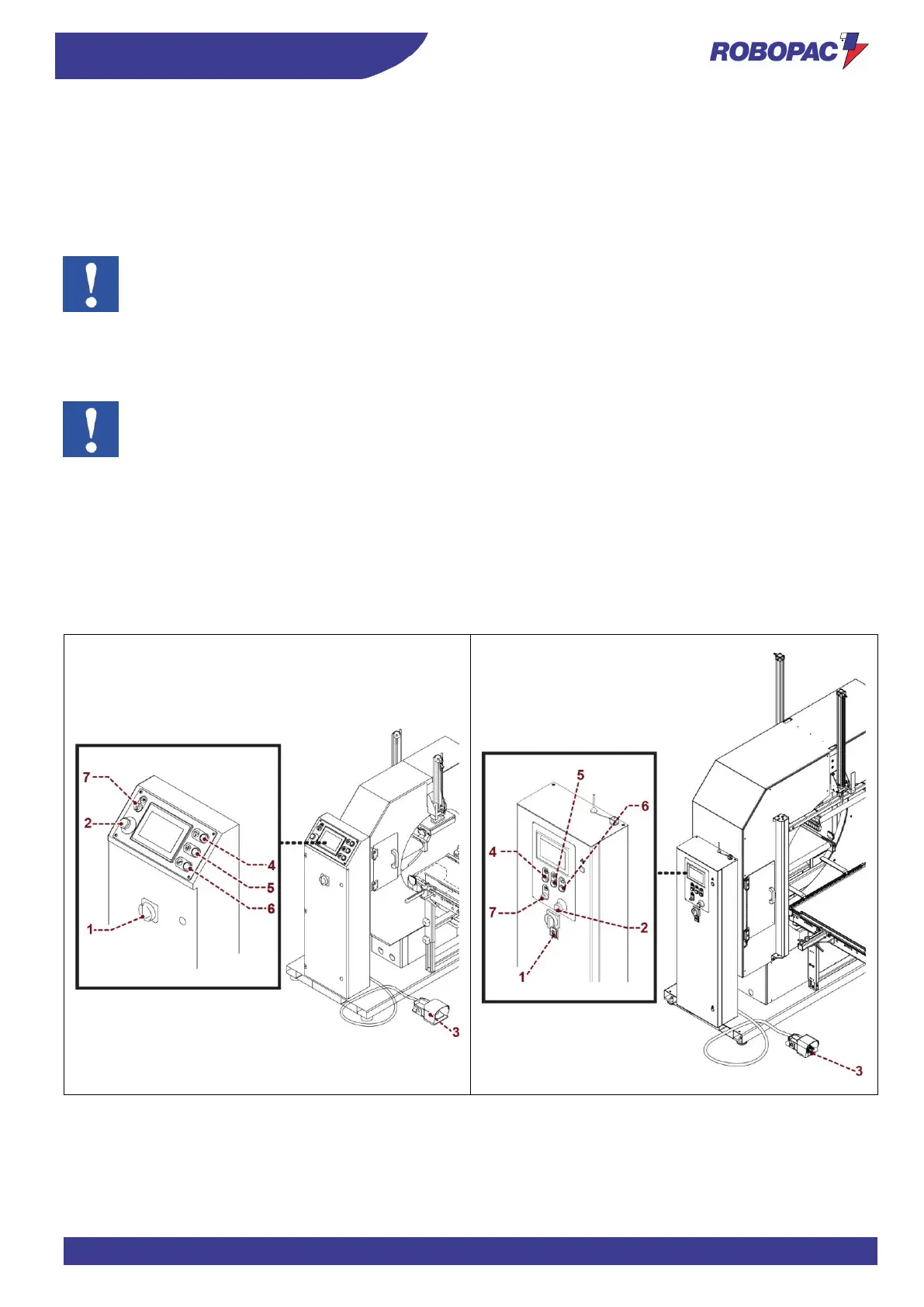
6.2. DESCRIPTION OF THE CONTROLS
1. Main switch
It turns the power supply on and off.
Position 0 (OFF) indicates that the machine is not powered.
Position 1 (ON) indicates that the machine is powered.
2. Emergency button
It immediately cuts off the power supply in emergency situations stopping the machine.
Important
After the emergency button activation, you must press the reset button to enable the automatic cycle.
3. Foot pedal control (Cycle start)
By pushing the foot pedal control the machine begins the working cycle.
4. Stop button
Press the button to interrupt the automatic wrapping cycle.
Important
The button is enabled only during the second part of the work cycle, from the moment in which the presser
at product outfeed lowers down.
5. Start button
Press the button to enable the automatic work cycle.
6. Reset button
Press the button to set up the machine.
Press to reset the machine before restarting it after an emergency stop or after a shut-down due to the
disconnection of the power supply.
7. Key-operated switch
Safety switch for hazardous movements.



 To Next Page