Robustel GoRugged R3000 Lite User Guide
RT_UG_R3000 Lite_v.1.4.1 15.11.2016 41 / 135
Confidential
One of the PPP initialization strings. In general, you don’t need to modify
this value.
Enable to obtain the DNS server’s address from the ISP.
Set the primary DNS server’s address. This item will be unavailable if you
enable “Use Peer DNS”.
Set the secondary DNS server’s address. This item will be unavailable if
you enable “Use Peer DNS”.
Address/Control
Compression
Used for PPP initialization. In general, you need to enable it as default.
Protocol Field
Compression
Used for PPP initialization. In general, you need to enable it as default.
You can enter some other PPP initialization strings in this field. Each
string can be separated by a space.
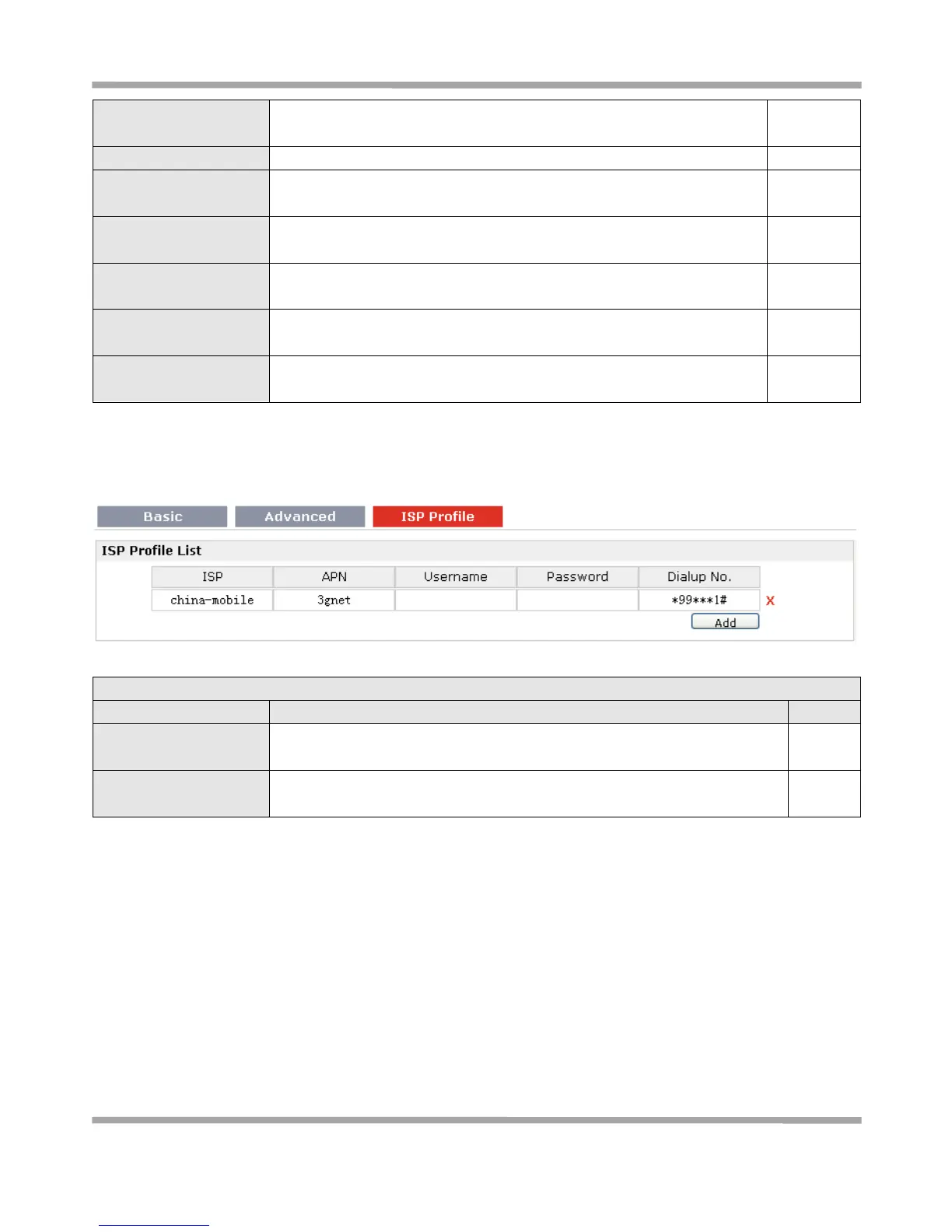
ISP Profile
This section allows users to preset some ISP profiles which will be shown in the selection list of Configuration >
Cellular WAN > Network Provider Type.
ISP Profile @Cellular WAN
Input the ISP’s name which will be shown in the selection list of
Configuration > Cellular WAN > Network Provider Type.
APN, Username,
Password, Dialup No.
All these parameters were provided by the ISP.








 To Next Page