Robustel GoRugged R3000 Lite User Guide
RT_UG_R3000 Lite_v.1.4.1 15.11.2016 40 / 135
Confidential
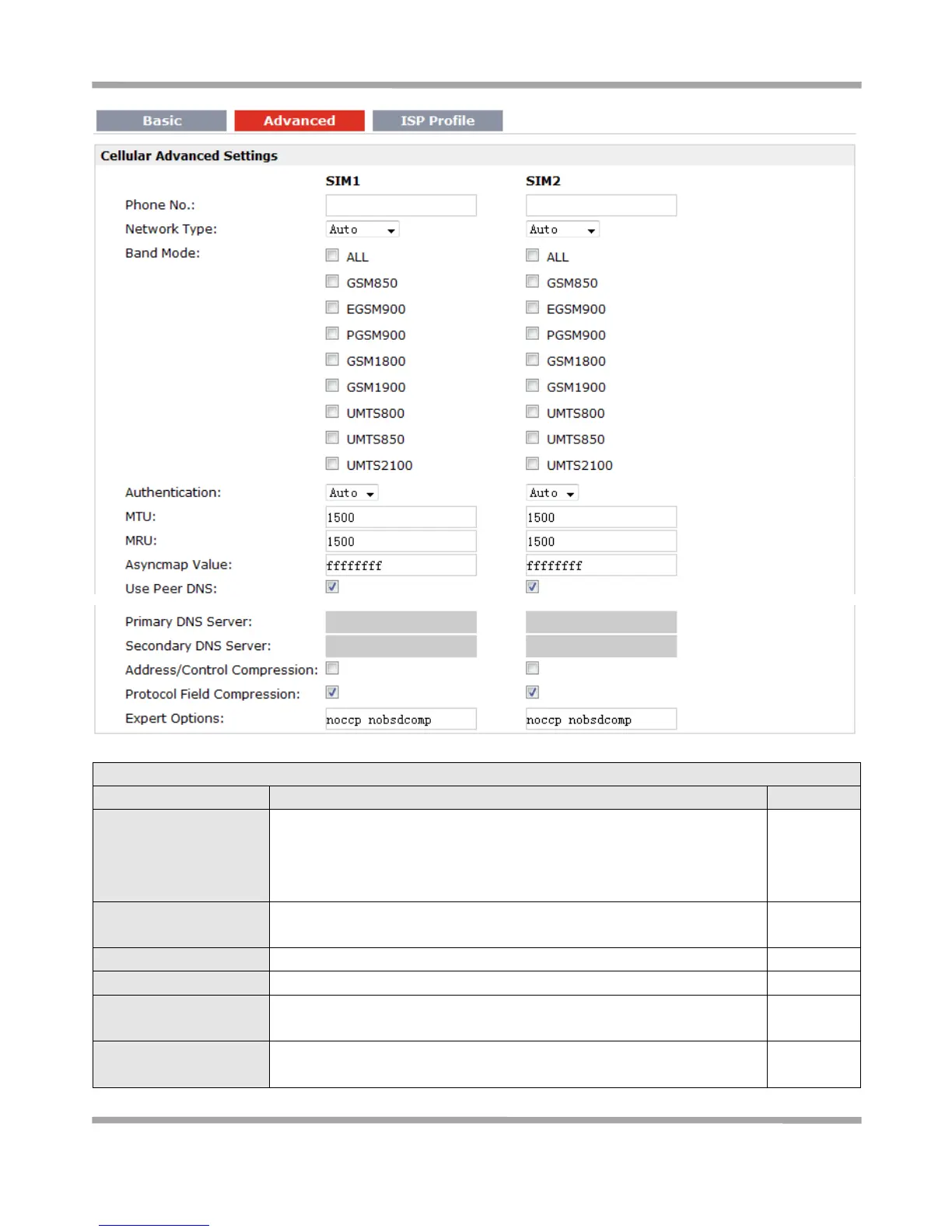
Set the SIM card’s phone number, and it will be showed in Status >
System > System > Cellular WAN Information > SIM Phone Number.
In general, you don’t need to set this number because router will read it
from the SIM card automatically.
Select from “Auto”, “2G GSM” and “3G UMTS” as the SIM card
supported.
Tick the Band Mode options to fix the bands router working with.
Select from “Auto”, “PAP” and “CHAP” as the local ISP required.
Maximum Transmission Unit. It is the identifier of the maximum size of
packet, which is possible to transfer in a given environment.
Maximum Receiving Unit. It is the identifier of the maximum size of
packet, which is possible to receive in a given environment.








 To Next Page