88 Rockwell Automation Publication 7000-UM202H-EN-P - November 2023
Chapter 2 Power Component Definition and Maintenance
Checking Clamping Pressure
Periodically inspect the clamping force in the PowerCage module. Ensure
there is no power to the equipment.
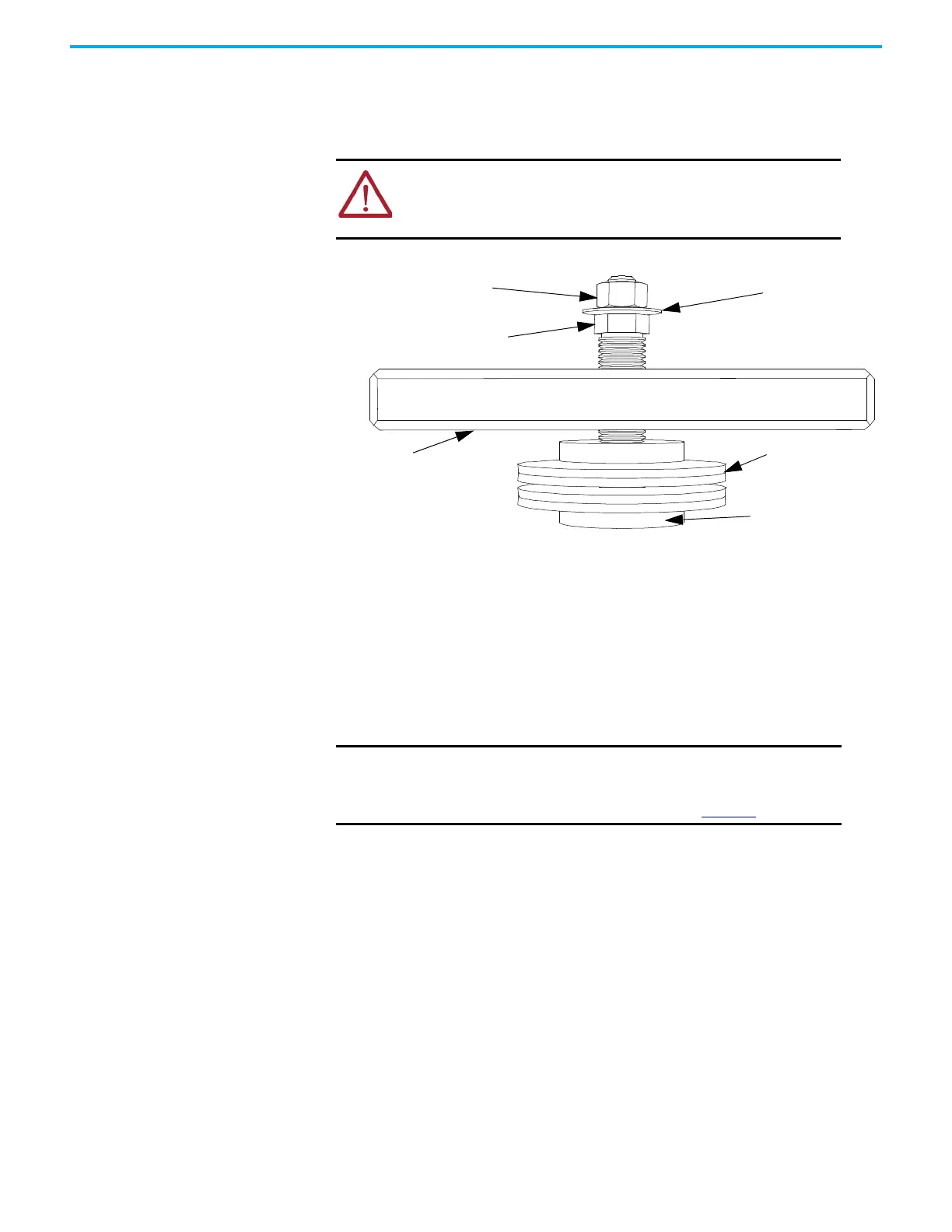
Figure 80 - Clamp Head Illustration
Clamping Pressure Adjustment
1. Disconnect all power to the drive.
2. Do not loosen the adjustment nut. If you loosen the clamping pressure,
carry out the assembly procedure to ensure uniform pressure on the
thyristors.
3. Tighten with a 21 mm wrench on the adjustment nut (upward motion)
until you can turn the indicating washer by fingers with some resistance.
The calibration nut should not spin freely.
ATTENTION: To prevent electrical shock, disconnect the main power
before working on the drive. Verify that all circuits are voltage-free
using a hot stick or appropriate voltage-measuring device. Failure to
do so may result in injury or death.
Calibration Nut - DO NOT ADJUST
Clamp Bar
Disc Springs
Pressure Pad Face
Indicating Washer
Adjustment Nut
IMPORTANT Do not adjust the calibration nut located outside the indicating
washer at the end of the threaded rod. The rotation of the
calibration nut will affect the torque calibration, which is factory-
defined. Only adjust the adjustment nut (see Figure 80
).


 To Next Page
 Loading...