Controller functions
Page 30 RES-445
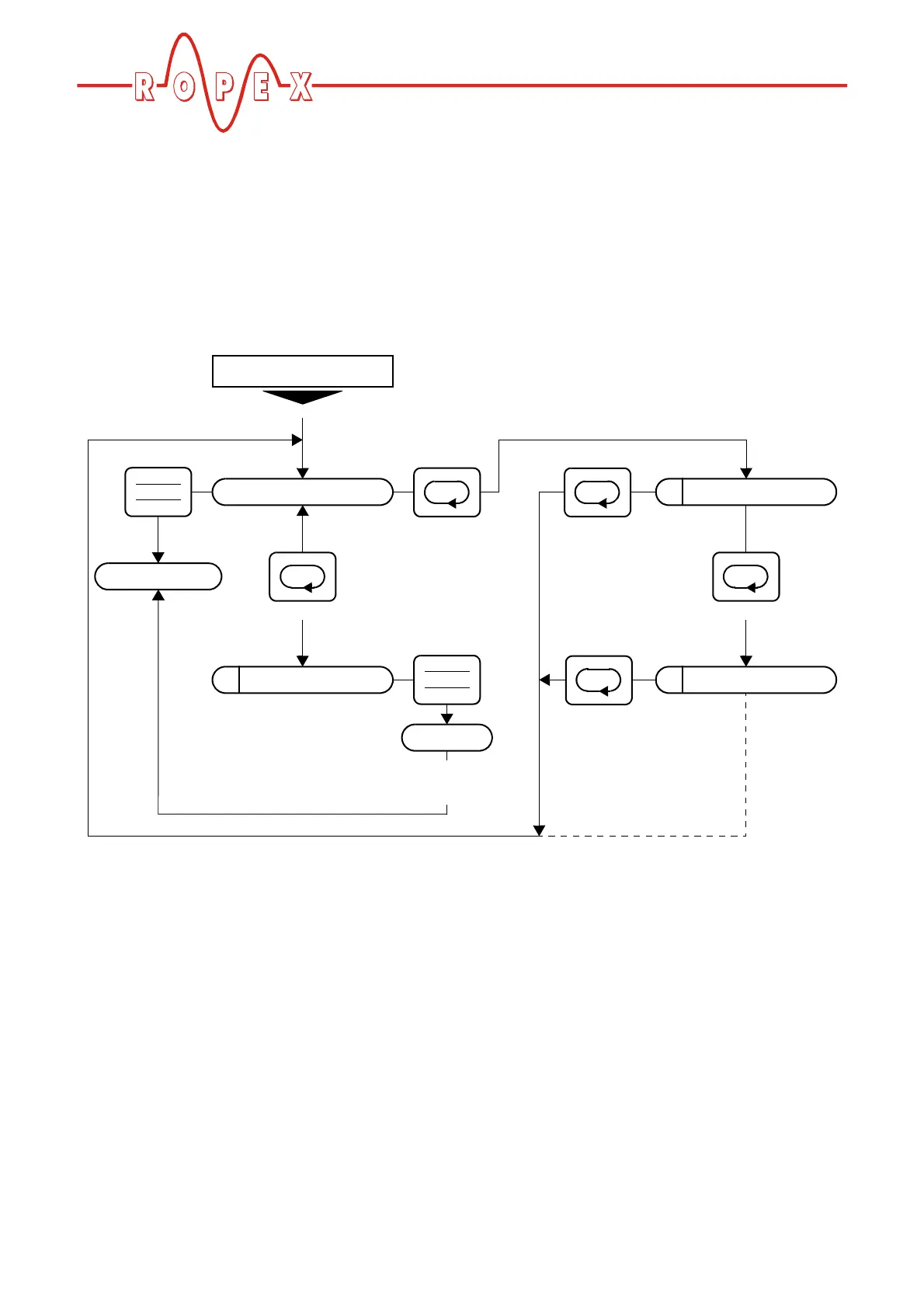
10.3.2 Navigation in menus with a fault
If an alarm is signaled, the controller switches to the
Alarm menu. Some faults can be acknowledged by
pressing the "RESET" key ( Kap. 10.25 „System
monitoring/alarm output“ auf Seite 59). In this case, the
controller switches back to the home position.
If the fault can be rectified by executing the AUTOCAL
function, you can select the "AUTOCAL" menu step
directly by briefly pressing the "MENU" key (<2s). You
can then activate the "AUTOCAL" function by pressing
the "ENTER" key ( section 10.9 "Automatic zero cali-
bration (AUTOCAL)" on page 45).
If you press the "MENU" key for longer than 2s in the
Alarm menu, you are taken directly to the configuration
level (starting at step 201 [20]). You can return from the
Configuration menu to the Alarm menu either by pres-
sing the "MENU" key for longer than 2s or by not pres-
sing any keys for 30s.
202
Factory settings
201
Language
Alarm
<1s
>2s
<1s
Fault
automatically
after 30s
>2s
or
automatically
after 30s
>2s
or
Autocal
Autocal?
ENTER
HAND
RESET
ENTER
HAND
RESET
Home position
End of
Autocal
107


 To Next Page