Controller functions
Page 50 RES-445
10.15 Measuring impulse duration
(as of software revision 026)
The length of the measuring impulses generated by the
controller can be set with this parameter by means of
step 220 [32]. It may be necessary to set a measuring
impulse that is longer than the default 1.7ms for certain
applications ( ROPEX Application Report).
10.16 Automatic phase angle
compensation (AUTOCOMP)
(as of software revision 100)
It may be necessary to compensate the phase angle
displacement between the U
R
and I
R
measuring
signals in certain heatsealing applications ( ROPEX
Application Report). The "AUTOCOMP" function is pro-
vided for this purpose. It can be parameterized with
step 221 as followed:
1. „OFF" (Factory setting)
The „AUTOCOMP“ function is deactivated.
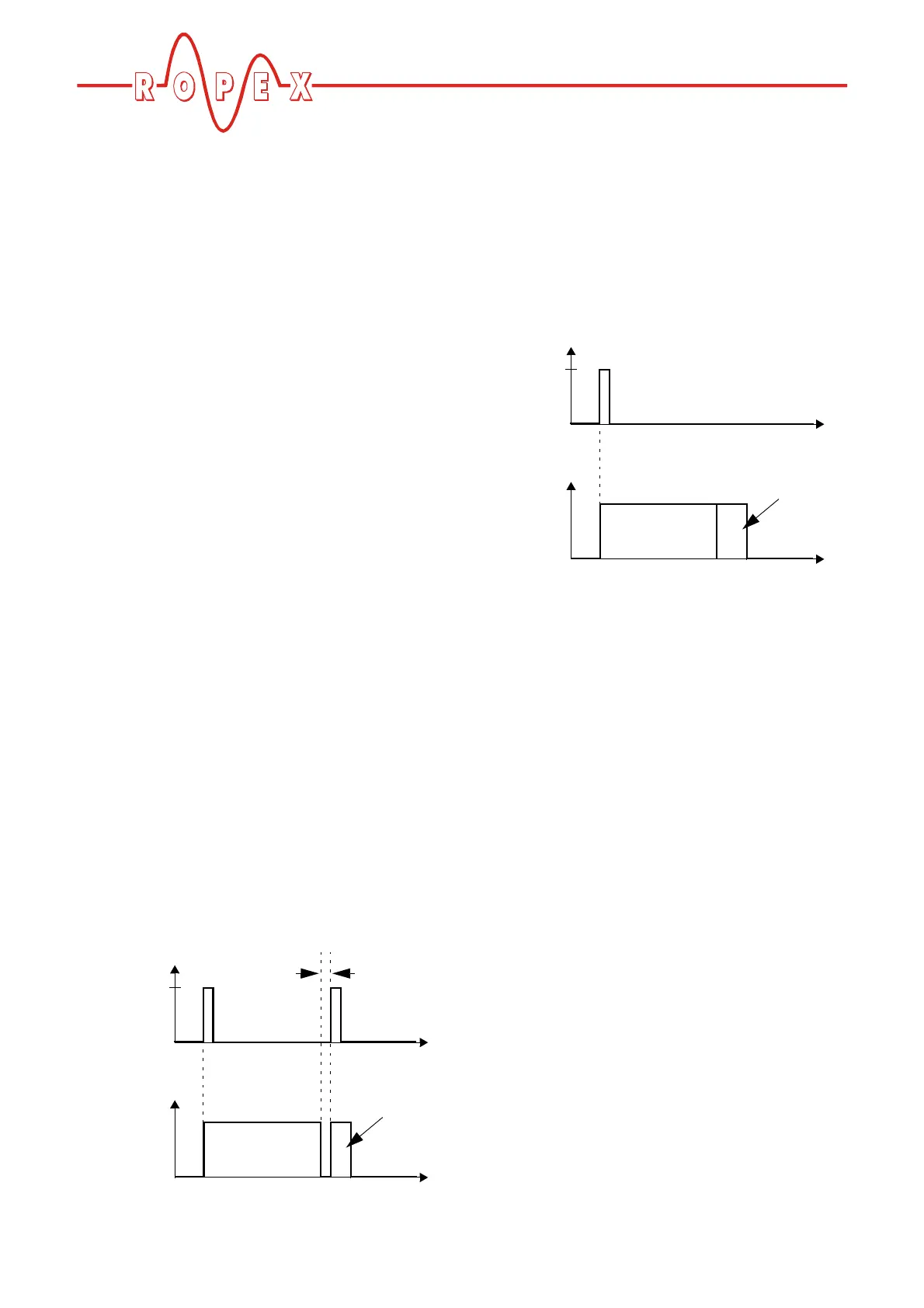
2. „ON“
The „AUTOCOMP“ function is activated by pressing
the "ENTER" key after the "AUTOCAL" function has
been successfully executed ( section 10.9 "Auto-
matic zero calibration (AUTOCAL)" on page 45).
The interval after the end of the "AUTOCAL" func-
tion must be less than 2.0s ("Start AUTOCOMP?
Start with ENTER" appears on the display during
this time). The subsequent "AUTOCOMP" function
is executed in approximately 2.0s ("- AUTOCOMP -
Please wait…" appears on the display during this
time).
If the interval following the successful execution of
the "AUTOCAL" function is longer than 2.0s, the dis-
play returns to the home position and the "AUTO-
COMP" function is not executed.
The actual value output (terminals 24+4) is set to
0…3°C (i.e. approx. 0 VDC) when the "AUTO-
COMP" function is executed.
3. „AUTO“
(as of software revision 105)
With this setting the „AUTOCOMP“ function is acti-
vated automatically after the "AUTOCAL" function
has been successfully executed.
The actual value output (terminals 24+4) is set to
0…3°C (i.e. approx. 0 VDC) when the "AUTO-
COMP" function is executed.
10.17 Locking the "HAND" key
(as of software revision 100)
The "HAND" key function can be configured with
step 213 in the Configuration meun when the display is
in home position.
This prevents the heatsealing bands from beeing
heated if the "HAND" key is pressed inadvertenly.
The following settings are possible:
1. Lock „OFF“ (Factory setting)
Pressing the "HAND" key while the display is in the
home position starts amanual heating process. The
heatsealing band is heated as long as the "HAND"
key remains pressed.
2. Lock „ON“
The "HAND" key is locked when the display is in the
home position, in other words it has no function.
Function
„ENTER“ key
pressed
„AC“
t
t
0
0
AUTOCAL
<2.0s
AUTOCOMP
„AP“
Function
„ENTER“ key
pressed
„AC“
t
t
0
0
AUTOCAL
AUTOCOMP


 To Next Page