KEYBOARD FUNCTIONS
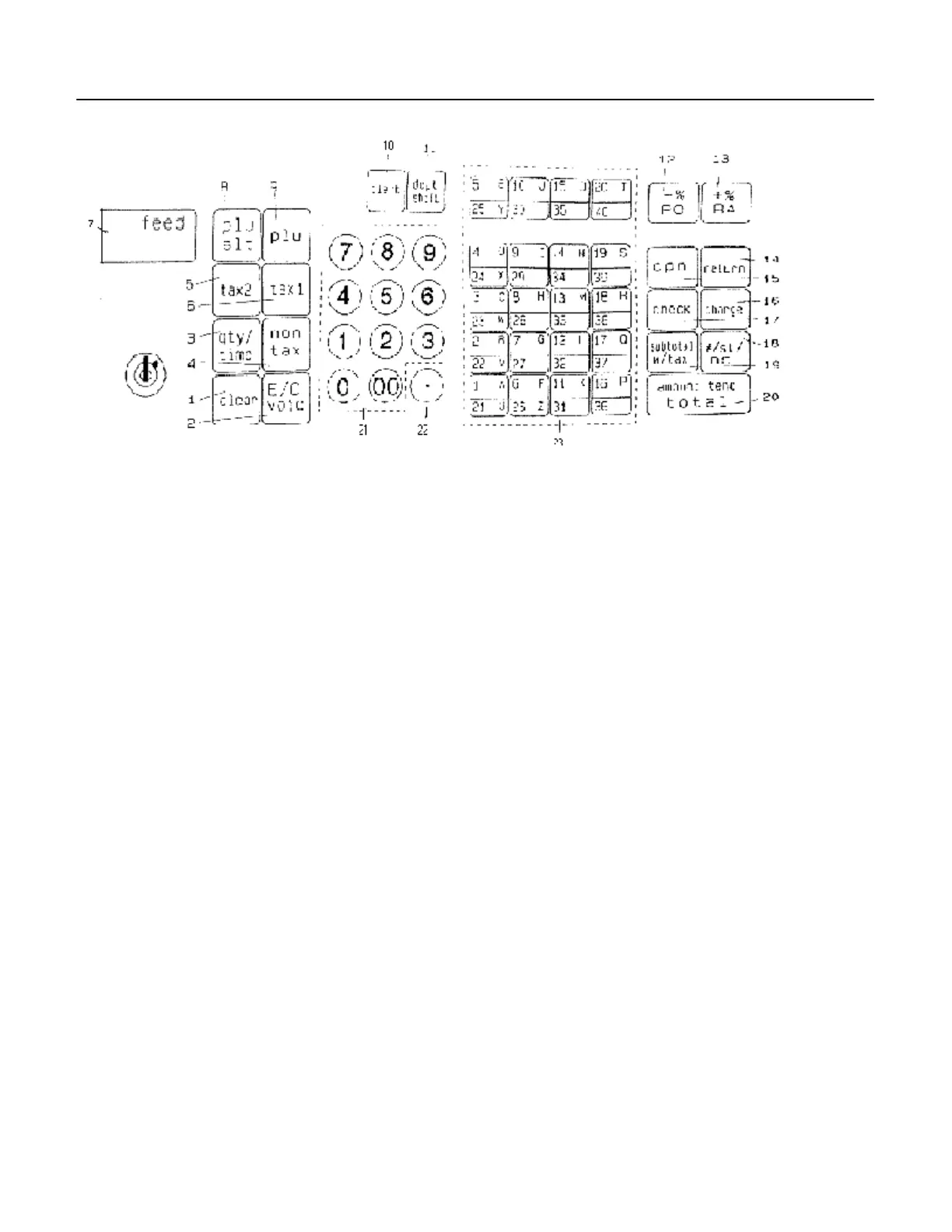
FIGURE 1: Control Lock and Keyboard Functions
KEYBOARD FUNCTIONS
The following key functions are primarily for cash register entries in REG mode. Several keys also have other
functions in the PRG, X and Z modes which are explained further in the manual.
(1) Clear Key [CLEAR] clears the display to correct an entry before it is processed. Also stops error alarm when
incorrect entries are made.
(2) Void/Error Correction [VOID/EC] - double function - Void is used for correcting a particular entry after it is
processed and printed. EC is used for deleting the last sales entry.
(3) Quantity and Time Key [QTY/TIME] - double function - is used to multip ly a number of items entered at one
price and to display the current time.
(4) Non Tax Key [NON TAX] is used when no tax is to be registered for a department that is programmed for
tax.
(5) Tax 2 Key [TAX 2] adds a tax amount to the sales figure according to the tax rate programmed for this key.
Tax 2 key is normally used to program a second tax rate required by a particular area or state. It can also be
used to override the pre-programmed tax on a department key.
(6) Tax 1 Key [TAX 1] adds a tax amount to the sales figure according to the tax rate programmed for this key.
Tax 1 Key is normally used to program a single tax rate required by a particular area or state. It can also be
used to override the pre-programmed tax on a department key.
5



 To Next Page