CompTrol Interface V4.0.x | Issue 21-05-2021 | 1000932 21
Product description
S1-1 S1-2 S1-3 S1-4 Program Designation
ON ON ON OFF
7 Temperature setpoint denition without signal boundary
value monitoring
OFF OFF OFF ON 8 Direct frequency request
ON OFF OFF ON 9 Direct frequency request with cascading
OFF ON OFF ON 10 Direct frequency request with the CompTrol Master
Table 7: Program selection via DIP switches
When starting up, the number of the selected program will appear on the 7-segment display for
approximately 1 second, see “17.5 Starting up the CompTrol Interface expansion module” on
page 100.
4.6 DIP switch S2
DIP switches S2-1 to S2-6 congure program-specic functions. DIP switches S2-7 and S2-8
congure the behavior of the 7-segment display. You can nd the precise DIP switch congura-
tions in the section dealing with each program.
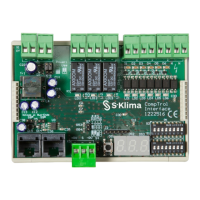
4.7 7-segment display
The CompTrol Interface features a three-digit 7-segment display. DIP switches S2-7 and S2-8
determine which values are shown in the display:
S2-7 S2-8 In programs 0 and 2 to 7 In programs 8 to 10
OFF OFF Temperature setpoint (°C) Frequency setpoint (Hz)
ON OFF Temperature actual value (°C)
Frequency actual value (Hz)
(can only be displayed if the CompTrol Interface
is set as the master via S2-1. No other unit may
be set as the master in the X/Y remote control
bus!)
OFF ON Fan speed (F1, F2, F3)
ON ON Displays error codes of air conditioning units or of the CompTrol Interface
Table 8: 7-segment display


 To Next Page